
Participating Frequently
June 7, 2019
Answered

Change Language? Lightroom From Portuguese to English

  • June 7, 2019
  • 2 replies
  • 2163 views

Hey,
I've been trying to change Lightroom's language for at least a first few days, which is in fact a long time for such a trivial task, and I'm sure Adobe is very well aware of that problem, which is one of the reasons why I'm surely not going to pay for more than a year of CC.
Anyways, rant asside, I want to change my language from Portuguese to English. I've removed creative cloud as a whole, deleted all entries on the Registry, deleted all references in Program Files, ProgramData, AppData, Temp, etc, and installed creative cloud in english. In fact, I already had it set to english even before I installed Lightroom before all this. I used to be able to simply change Creative Cloud's language and reinstalling Lightroom and that would work, but it no longer does.
Any help?

{Thread renamed by moderator}
This topic has been closed for replies.
Correct answer JohanElzenga

FranckTheMiner  wrote

Hey,
I've been trying to change Lightroom's language for at least a first few days, which is in fact a long time for such a trivial task, and I'm sure Adobe is very well aware of that problem, which is one of the reasons why I'm surely not going to pay for more than a year of CC.
Anyways, rant asside, I want to change my language from Portuguese to English. I've removed creative cloud as a whole, deleted all entries on the Registry, deleted all references in Program Files, ProgramData, AppData, Temp, etc, and installed creative cloud in english. In fact, I already had it set to english even before I installed Lightroom before all this. I used to be able to simply change Creative Cloud's language and reinstalling Lightroom and that would work, but it no longer does.
Any help?

{Thread renamed by moderator}

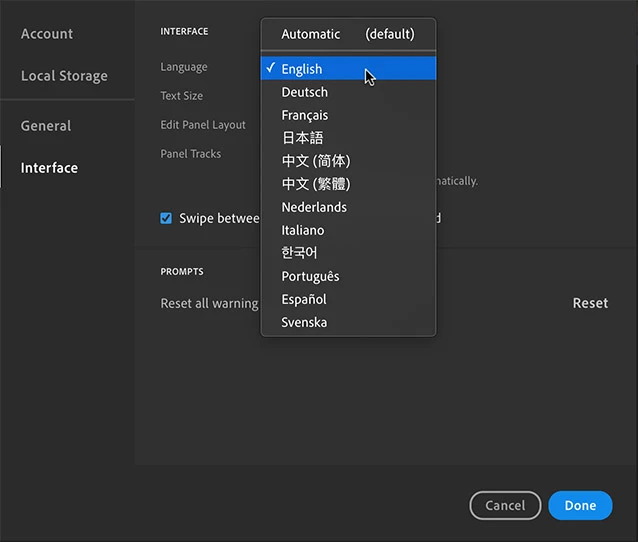
Lightroom is multilingual by default, you don't have to change the language through the CC app. You can select the language in the preferences (you will need to restart it). Did you try that?

2 replies

JohanElzenga
Community Expert
JohanElzengaCommunity ExpertCorrect answer
Community Expert
June 8, 2019

FranckTheMiner  wrote

Hey,
I've been trying to change Lightroom's language for at least a first few days, which is in fact a long time for such a trivial task, and I'm sure Adobe is very well aware of that problem, which is one of the reasons why I'm surely not going to pay for more than a year of CC.
Anyways, rant asside, I want to change my language from Portuguese to English. I've removed creative cloud as a whole, deleted all entries on the Registry, deleted all references in Program Files, ProgramData, AppData, Temp, etc, and installed creative cloud in english. In fact, I already had it set to english even before I installed Lightroom before all this. I used to be able to simply change Creative Cloud's language and reinstalling Lightroom and that would work, but it no longer does.
Any help?

{Thread renamed by moderator}

Lightroom is multilingual by default, you don't have to change the language through the CC app. You can select the language in the preferences (you will need to restart it). Did you try that?

-- Johan W. Elzenga
Participating Frequently
June 8, 2019

Hey,

I just tried that option on my Macbook, and I can confirm it works. However, I had started this thread on my Windows PC, so I won't yet mark your answer as correct until I test it there

JohanElzenga
Community Expert
Community Expert
June 9, 2019

It will work that way on Windows too.

-- Johan W. Elzenga
Sahil.Chawla
Adobe Employee
Adobe Employee
June 7, 2019

Hi there,

As you're looking to change the language of Lightroom, could you please try the steps mentioned here and let us know if you're able to change the language?

Change the language setting of your Creative Cloud apps

Regards,
Sahil

Participating Frequently
June 8, 2019

Hi,

I believe you may not have fully read my post, as I said that I tried just that on line 7. Still, could be helpful for those who haven't tried that yet.

Sincerely,
Francisco