


- Home
- Lightroom ecosystem (Cloud-based)
- Discussions
- delete images from Lightroom cloud storage
- delete images from Lightroom cloud storage
delete images from Lightroom cloud storage

Copy link to clipboard
Copied
Hello. I primarily use Lightroom Classic. I occasionally use my ipad to upload images when on the road, and let them sync to my Classic. I then transfer the original file via classic. So I end up with images stored in Lightroom CC cloud. But I don't know what images are stored up in the cloud at this point. But I have all my images backed up locally. If I go to lightroom.adobe.com and click "delete lightroom library" will that just clear all the images I have stored in the cloud? Unfortunately there is no way to filter what images are stored in the cloud that I can fine to simplify the process.
{Thread title edited by moderator}


 7
Replies
7
7
Replies
7




Copy link to clipboard
Copied
Hi there,
Using the option to Delete Lightroom Library would only delete the images uploaded to the Lightroom cloud storage. You can also select all the images on Lightroom.adobe.com and through All Photos in the Lightroom desktop app (cloud based) and delete them from there.
If you wish to purge the Lightroom cloud storage, once you delete all the images, please ensure that you remove the images from the deleted folder as well.
Note: Please ensure that you have a backup of all your images locally before deleting all the images from the Lightroom cloud storage. If you need, you can download all the images from the Lightroom cloud storage to your computer using the Lightroom downloader tool that you can access here: https://helpx.adobe.com/in/lightroom-cc/kb/download-lightroom-photos.html
Regards,
Nikunj
Copy link to clipboard
Copied
Deleting the images from cloud storage is precisely what I want to do. Is there a way to filter them online so I only see the ones uploaded to the cloud and delete that way?
I don't want to actually delete the images. I import on ipad, then through sync transfer them to my desktop hard drive. Im left with a ton of images stored in the cloud, which also store a copy on my hard drive, essentially doubling the space needed for storage. So all the images in the cloud are stored on my external hard drive at this point.
If I click that button I will need to resync everything from classic correct?
Thanks!


Copy link to clipboard
Copied
"Deleting the images from cloud storage is precisely what I want to do. Is there a way to filter them online so I only see the ones uploaded to the cloud and delete that way?"
Not really. If you want to install it, Cloudy Lightroom can filter for "Synced and Backed Up" which equates to originals in the cloud, so you could select these and delete them, which frees cloud space and removes the images from synced collections. However, you would only do this once you are certain that the files have arrived in Classic Lightroom and therefore safely on your hard drive.
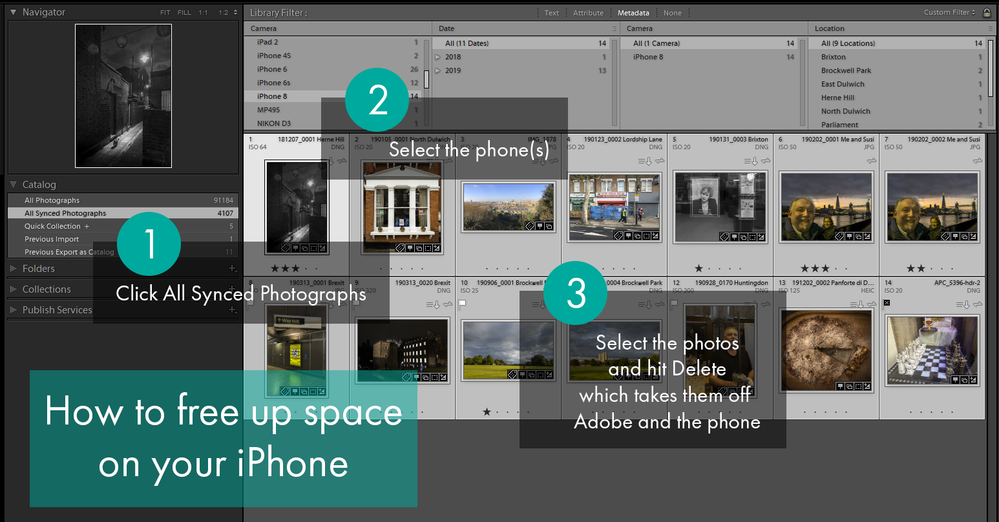
My preference is to delete the photos from All Synced Photos in Classic Lightroom. This graphic may help. I made it yesterday for someone whose phone/20gb is filling up with pics shot on the phone, but you could filter for dates / cameras etc. When you delete from ASP, the cloud space is freed. Also those images are removed from synced collections in Classic Lightroom.
Copy link to clipboard
Copied
But I don't want to remove them from synced collections....all I want to do is remove them from the cloud (the full version, leaving the smart preview). So I shouldn't delete them from ASP right?
the whole point is if I use my iPad to import then transfer the original to my desktop, I have them in synced collections but no longer need the full version stored on the cloud.
Copy link to clipboard
Copied
You've no choice. To remove originals from the cloud, you have to remove them from Adobe's servers, which wouldn't happen if they were still in a synced collection.
You can always add them back to the synced collections afterwards, which would mean smart previews are uploaded. So in practice, I just select photos in the synced collection, go to ASP, CtrlSHiftB to empty the Quick Collection, hit B to add the selected photos to the QC, delete, go to QC, select them all and add them back to the synced collection.
Copy link to clipboard
Copied
Could I not just stop sync in classic, delete everything in Lightroom cc and then restart sync? Collections are how I organize my photos, so I really dont want to clear them.
Copy link to clipboard
Copied
You might try unsyncing the collection and then syncing it again. I don't think it works, but it might.


Find more inspiration, events, and resources on the new Adobe Community
Explore Now
 AdChoices