
stefanh45494374
Participant
October 27, 2019
Question

Different saturation between the development modul and fullscreen preview in Lightroom CC

  • October 27, 2019
  • 2 replies
  • 260 views

Hi there

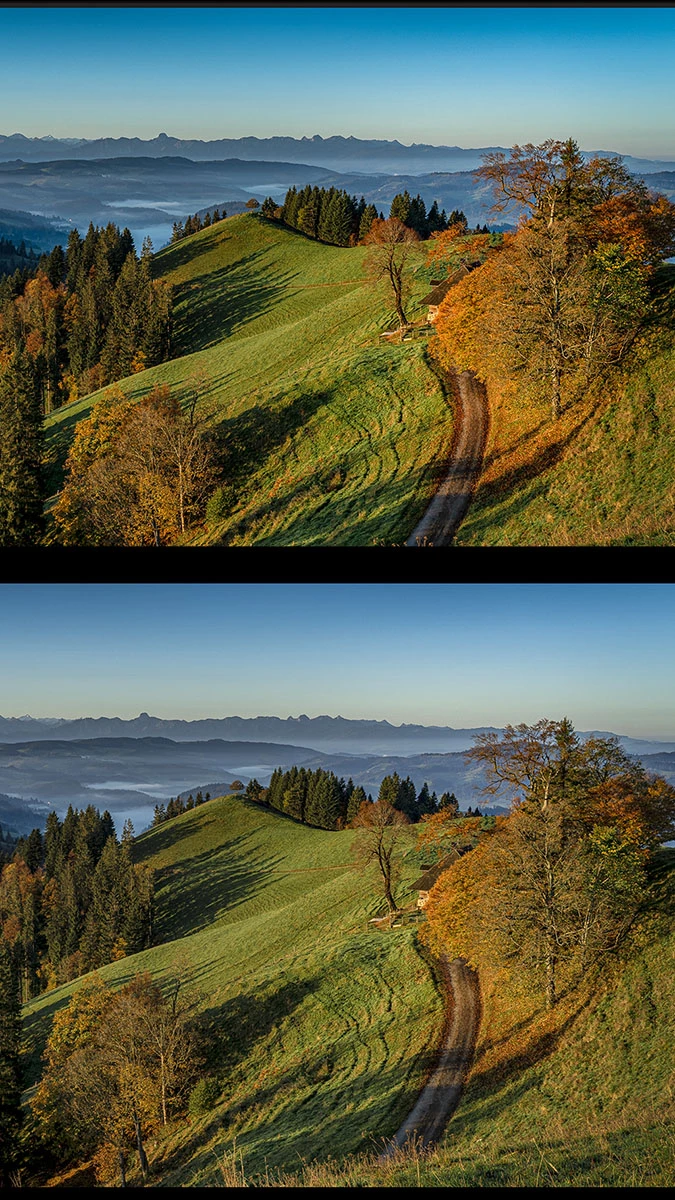
Since I'm using my new BenQ SW 271 monitor the saturation in the development modul (1st image) is higher than it is in the fullscreen preview (shortcut f - 2nd image). The saturation in the fullscreen preview is more or less equal with those in Photoshop and Windows Explorer.

Following my research in other forums the development modul works with ProPhotoRGB. Is this true and can this issue be fixed in the settings of  Lightroom?

thx Stefan
 

This topic has been closed for replies.

2 replies

Community Expert
October 27, 2019

This difference has not much to do with the color space used in Develop. What you are seeing is a difference in scaling algorithm used to display in the Develop module and in the preview. This will only show up in highly detailed images with strong color. The fall color in the tree to the right is a prime example of this. It is something to be careful with and is caused by the inherently lower resolution of your display than the actual image and the Develop module in order to stay fast using a subsampled version of your raw file so that it doesn't have to render the full resolution and then downscale every time. When going to full scale, it uses a higher resolution version of the raw to scale and you will get more blurring of the color. This is more like the actual export will look. This issue also crops up in night photos of the milky way and other highly detailed (or noisy) types of images.

JohanElzenga
Community Expert
Community Expert
October 27, 2019

Yes, this is true and there are no settings to 'fix' this. If your monitor can be set to AdobeRGB, then what you could try is setting the monitor to that and then select AdobeRGB as monitor profile (or create a new monitor profile). That means your develop preview will be 'translated' and shown in AdobeRGB on your monitor by the color management system, so it should display the same as the library preview, which is already AdobeRGB.

-- Johan W. Elzenga