
Fotosetbyjames
Known Participant
October 23, 2017
Answered

Downloading of Shared Albums?

  • October 23, 2017
  • 7 replies
  • 42424 views

I am pretty sure in the prior version of Lightroom Mobile someone whom I sent a shared link to could download from the web based link I sent to them. I tried this today and there was no download option anywhere that I could find. Was this a change with the new Lightroom CC? Am I missing something or is there a way I can enable downloading of shared albums? If not this forces me to export and use another cloud based app like dropbox etc.. doesn't make sense.

Workflow example:

Photos imported on mobile device to Lightroom CC

Edits in Lightroom CC

Share album and send link to client

Client downloading photos from shared link

Any help is appreciated, this seemed to work prior to the change.

James
This topic has been closed for replies.
Correct answer 99jon

There sure is, below the "X" to close the window. Has the little download Icon. Can we expect this in the near future or do I need to enable something on my end?


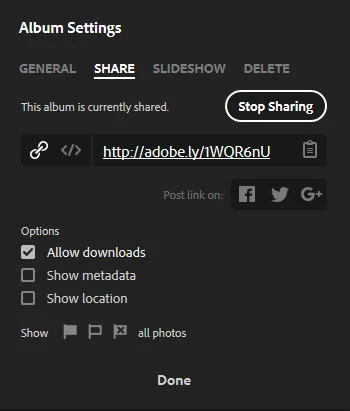
When you choose a public album and click on the settings button it should bring up a dialog with various tabs e.g. General, Share, Slideshow etc.

It is possible to enable downloads under the Share tab in the Lr Web app – see image below.

7 replies

selondon
Community Expert
Community Expert
June 19, 2018

As of today and the latest release has this now been resolved?

joshkckf
Participant
May 12, 2018

In your research on this topic, did you learn if/how a recipient of a shared album could download the whole album at once?

Some albums I've shared have been quite large and downloading one photo at a time is a bit cumbersome.

Jim Wilde
Community Expert
Community Expert
May 12, 2018

If you've enabled the "Allow Downloads" option, the people you send the link to should see a "Download" button top right in the grid view, next to the Slideshow button. Clicking that download button will cause all the images in that album to be downloaded into a single zipped folder.

Participant
April 2, 2018

That doesn’t solve the problem of my friends not being able to download the images I’m sending them in the album. It defeats the purpose of using this if I have to download the images myself and send them via another cloud service. I guess I’ll have to contact adobe support.

Jim Wilde
Community Expert
Community Expert
April 2, 2018

Yes it does. If YOU login to your lightroom.adobe.com website you have access to all your albums and photos, and for each album that you enable sharing on, you can set the various options that your viewers will have, i.e. you can set the shared album to allow downloads.

Participant
April 2, 2018

Thank you so much. That did the trick.

Participant
April 1, 2018

Hi Jim,

I tried logging in and it's still not showing. This is very strange.

Jim Wilde
Community Expert
Community Expert
April 2, 2018

Try opening a new browser window and go to lightroom.adobe.com (do not try to use the share link that you created for that specific album), log in to the same Adobe account that you use for LRCC and you should get to your "home" page where you have access to "All Photos" and all the albums that you have synced (shared or not).

Participating Frequently
June 19, 2018

"Try opening a new browser window and go to lightroom.adobe.com (do not try to use the share link that you created for that specific album), log in to the same Adobe account that you use for LRCC and you should get to your "home" page where you have access to "All Photos" and all the albums that you have synced (shared or not)."

Thanks for your answer, I'm very thankful you are here to listen and help. But wow... what a dumb user experience.

Participant
April 1, 2018

I still can't find the setting button. Please help. I've attached screenshots, and you can see there's no gear button.

Jim Wilde
Community Expert
Community Expert
April 1, 2018

The top screenshot is from the LRCC desktop app, which only has the ability to share an album (by right-clicking on the album name).

The settings options are only available from the web app, but you need to be logged in to your Adobe account in order to have access to those options. It looks from your second screenshot that you're not actually logged in, which is why you can't see the gear icon. Login, then look again.

Participant
November 3, 2017

Hi there, How is it possible for a person to download original quality image from a shared folder on LR CC? I cant find any settings or buttons for download. Thanks for your help.

Sahil.Chawla
Adobe Employee
Adobe Employee
October 23, 2017

Hi James,

As you're not able to download the images, could you please share a screenshot of the issue with us so that we can provide you a possible solution?

Regards,

Sahil

Fotosetbyjames
Known Participant
October 23, 2017

The option for someone to download is simply not there.

Here is a link to an example album and the web view page that displays. I'm 99% sure there used to be a download option.

Click below link to view my shared Lightroom album:

https://adobe.ly/2h3jnHK

gregoryw17089413
Participating Frequently
November 4, 2017

You can log-in to your Lr web app at the following link:

https://lightroom.adobe.com/

Click on the settings button to the right of any collection/album where public sharing is enabled or click the Share icon to start public sharing.

Click the Globe icon in the left margin to see existing shared creations. In this view, the Gallery button (top left) enables you to create a web page to share multiple collections/albums, rather like creating a personal home page.


I had the same question about "where is the settings button" but now see it in the web version thanks to 99Jon's comment.  But is there any way to access the settings from the Lr CC desktop app?

Also, it looks like the download functionality isn't a full size image?  An original JPEG that is 10MB is downloading as a 2MB JPEG.

Thanks.