tanvir04104
Participant
June 27, 2020
Question

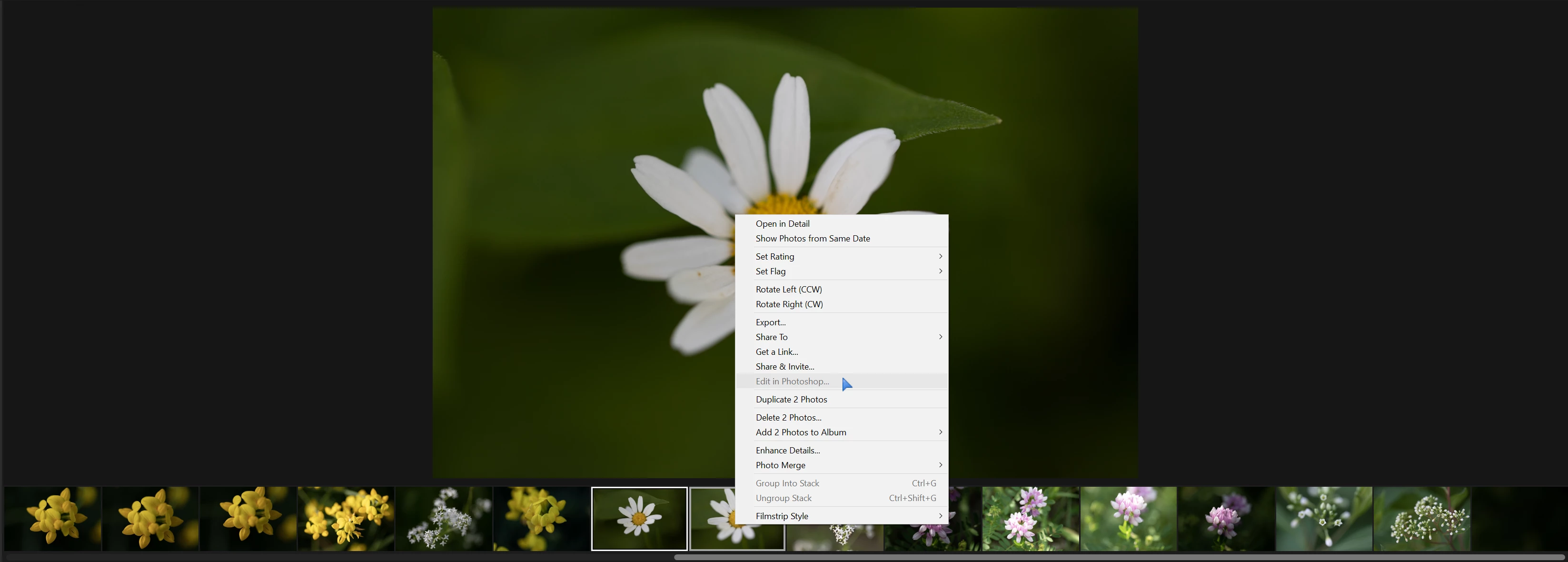
Edit in photoshop is greyout in light room

  • June 27, 2020
  • 5 replies
  • 425 views

edit in photoshop is greyed out in lightroom. lightroom version 3.3, photoshop version 21.2, camera raw version 12.3, windows 10 build 19041.329.

How do I fix this?
 

This topic has been closed for replies.

5 replies

Participant
July 1, 2021

has there been an answer to this? Mine is doing the same


Rob_Cullen
Community Expert
Community Expert
July 2, 2021

an answer to this?

See the answer from @99jon 

"It’s because you have two files selected in the filmstrip. Choose only one and then go back to Lightroom to choose the other."

Lightroom does not offer [Open as Layers]. It does not allow [Open in Ps] for multiple selected photos. 

If you want multiple photos as layers you need to open each photo, one at a time, as suggested by @99jon , then combine them in Photoshop.

Or- As suggested use the "Find" function, or 'Open' Lightroom Photos from the Start screen of Photoshop where you can select multiple photos and {Import Selected}, but they will open as separate documents in Ps (Not as layers in one document).


Regards. My System: Windows-11, Lightroom-Classic 15.3, Photoshop 27.5, ACR 18.3, Lightroom 9.3, Lr-iOS 10.4.0, Bridge 16.0.3 .
99jon
Legend
July 4, 2020

I don’t know that anything has been removed. Its only ever been possible to open multiple files as layers from LrC  not from Lr.

tanvir04104
Participant
July 4, 2020

Thanks for your help, Jon. I can open first image then paste other images as layers before blending them. I can't accept the fact that adobe removed that option. It was convenient before.

99jon
Legend
June 28, 2020

It’s possible to open Lightroom cloud photos directly from Photoshop which is often what I do using the “Find” function Ctrl+F (Windows) or Cmd+F (Mac) or click the search icon - see image below.


Select the Lr Photos tab and choose all photos or a named album. Click a thumbnail to open the image. Repeat Ctrl+F and choose a second, third  photo etc.

99jon
Legend
June 27, 2020

It’s because you have two files selected in the filmstrip. Choose only one and then go back to Lightroom to choose the other.

tanvir04104
Participant
June 27, 2020

which step do you follow to import second image in photoshop? Edit in photoshop option was available before even for 3+ images selected. Why is it removed?
