
Participant
October 22, 2017
Answered

Error OrganizerModuleFactory.lua on launch Lightroom

  • October 22, 2017
  • 4 replies
  • 7965 views

Hello,


I can't open my Lightroom - I reinstalled all Windows because of some additional problems and still the same problem:
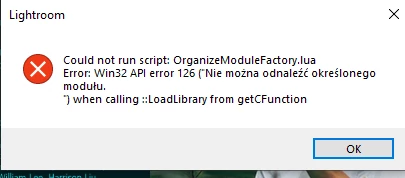
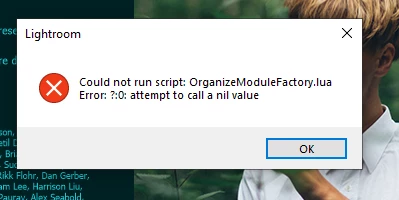
 

Could you help me please?


Kind Regards

Aga


{Thread title edited by moderator}

This topic has been closed for replies.
Correct answer Mohit Goyal

Hi there,


We're sorry for the Organizer Module Factory.lua error. Refer to the below suggestions, and it should help you to resolve the problem for you. 


Let us know if that helps.


Thanks,

Mohit


4 replies

Mohit Goyal
Community Manager
Mohit GoyalCommunity ManagerCorrect answer
Community Manager
May 6, 2021

Hi there,


We're sorry for the Organizer Module Factory.lua error. Refer to the below suggestions, and it should help you to resolve the problem for you. 


Let us know if that helps.


Thanks,

Mohit


nikunj.m
Community Manager
Community Manager
October 17, 2019

Hi Aga,


We apologize for the error you are getting while trying to launch Lightroom.


Would you mind sharing the version of Windows you are currently using and if you installed all available Windows updates are re-installing Windows?


You can also check if there is a VPN setup on the computer that may be causing this. If you have a VPN setup, disconnect it for a while and check if you are able to launch the application.


Regards,

Nikunj

Participant
October 25, 2019

Hello, thank you for answer. My problem has been already solved, I asked Adobe Support for help. Now my Lightroom works correctly. Thank you. 

Participant
October 28, 2017

I already installed the Ligthroom CC 4 times, but every time this message appears, the application worked on the Iphone and Android Tablet, but on the Notebook Windowns no!

Participating Frequently
October 28, 2017

This is for the new Lightroom CC, correct?  I have had a hell of a time with my copy and I even opened a support ticket with Adobe.  I was told by the support that Lightroom CC was the old product and that I needed to uninstall it and use Lightroom Classic.  I do not believe that is the case and that this individual was mistaken.  I understand that with the newest CC updates, what we used to know as Lightroom CC is now Lightroom Classic and Lightroom CC is the new cloud-based product.

I am getting the same error you are getting when I try to start Lightroom CC on my Windows 10 PC.  It is very frustrating.  Maybe someone from Adobe will chime in.

Participant
October 28, 2017

I have a MAC and did the update bc I thought I had to and went to go click on it to open it and it tells me it can’t open the app I tried to uninstall it and then reinstall and still the same I paid for this program and kind of sucks bc I have photos to edit I am going to call Monday and see if I get anywhere

Sent from my iPhone

Participant
October 22, 2017

When I open the new Lightroom CC for the first time, I am getting this message. I have tried to uninstall and reinstall but still get the same message.

nick.c
Participant
October 22, 2017

I had this exact same error on startup after my first installation. I have LR CC installed alongside LR Classic CC & Photoshop CC.
After I uninstalled, rebooted & reinstalled, the problem did not reappear and the program startup proceeded normally.

I never did work out what the cause was, but it may have been related to other Adobe components running in the background during installation.

Participant
October 22, 2017

Thanks! I did that and also had to disconnect from my VPN and then it started to work.