
Export to camera roll reduces file size
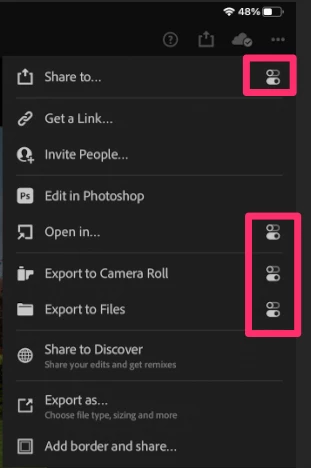
I shoot large DNG raw files on a Leica Q2, import them to Lightroom on my iPad via an SD card reader USB-C adapter, edit them, then export them as the highest quality JPGs possible, at 100%. The images are smaller in size when exported to camera roll or shared to a shared album, and are larger when "exported as" and then saved to files. I would like to have the images at maximum size be able to be saved directly to camera roll, not just files. I conducted several tests using the identical source DNG image from Lightroom. When I choose "export as" and select 100%, sRBG, and save to files, the image is 20mb. When I choose "export as" and select 100%, sRBG, and save to shared album, the image is 7mb. When I choose "export as" and select 100%, sRBG, and "save image" (presumably meaning saving to camera roll), the image is 7mb. When I choose "export to camera roll" the image is 7mb. When I choose "share to" and select "add to shared album" the image is 7mb. When I choose "export to" and select "add to shared album" the image is 7mb.
My goal is to export from Lightroom to camera roll at maximum file size and resoluton and then store
my final output from a shoot in an album that I can then share with friends and family, either by sharing the album or via texting the images themselves directly.
Currently, to accomplish this goal, I have to "export as" to files, then save from files to camera roll. That is the only way to avoid reducing the file size from 20gb to 7gb, per the above example.
any ideas if Adobe is aware of this issue and planning to fix it?


 AdChoices