Participant
August 14, 2023
Answered

Exporting from lightroom

  • August 14, 2023
  • 1 reply
  • 295 views

I need some help exporting files from lightroom.

Im in Australia and have had lightroom for about a week the version I have is called lightroom not the classic everyone seems to have I cant find that option here .

I can only seem to export my files as jpeg they start out as CR3 , in the settings for exporting there is no other option that I can find.

Any help would be appreciated. 

Joe

This topic has been closed for replies.
Correct answer Rob_Cullen

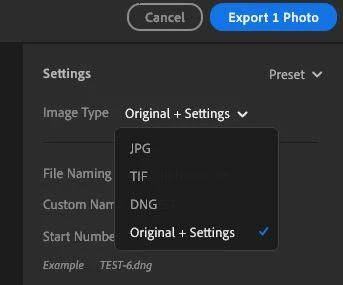
Click on the [Share] icon and select [Custom Settings]

Then you will get options-

1) [JPG]  with defined options

2) [TIF] with defined options

3) [DNG]  (The raw file with embedded edits- suitable for other Adobe apps)

4) [Original + Settings]  (The original CR3- unedited-  with a companion sidecar XMP file containing edits.)


1 reply

Rob_Cullen
Community Expert
Rob_CullenCommunity ExpertCorrect answer
Community Expert
August 15, 2023

Click on the [Share] icon and select [Custom Settings]

Then you will get options-

1) [JPG]  with defined options

2) [TIF] with defined options

3) [DNG]  (The raw file with embedded edits- suitable for other Adobe apps)

4) [Original + Settings]  (The original CR3- unedited-  with a companion sidecar XMP file containing edits.)


Regards. My System: Windows-11, Lightroom-Classic 15.1.1, Photoshop 27.3.1, ACR 18.1.1, Lightroom 9.0, Lr-iOS 10.4.0, Bridge 16.0.2 .
Participant
August 16, 2023

Thank you for that.