Exit
  • Global community
    • Language:
      • Deutsch
      • English
      • Español
      • Français
      • Português
  • 日本語コミュニティ
  • 한국 커뮤니티
0

Eyedropper tool missing in color grading pallet

New Here ,
Mar 08, 2022 Mar 08, 2022

Hello - 

Is anyone else missing the eyedropper tool (presumably accessible by the color swatch adjacent to each of the color picker circles) in the color grading pallet? 


The color swatches (which I've seen elsewhere) are missing in my version & the eyedroopper is no where to be found.


Thx-

Michael

TOPICS
macOS , Windows
994
Translate
Report
Community guidelines
Be kind and respectful, give credit to the original source of content, and search for duplicates before posting. Learn more
community guidelines
Community Expert ,
Mar 08, 2022 Mar 08, 2022

If it is Adobe Photoshop Lightroom you are working with-

In the Color Mixer panel- The 'Eye Dropper' is a small circular icon with an iron cross centre-
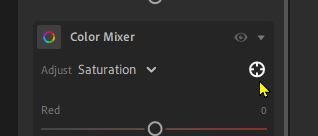
2022-03-09 16_06_22-Lightroom.jpg

Activate this by a [Click] and I see this on the image-

2022-03-09 16_06_43-Lightroom.jpg

And the circular cursor on the image can alter the selected mode (H, S, L.)

2022-03-09 16_07_00-Lightroom.jpg

There is no Tool for Color Grading! You move the 'dots' on the color wheels for global color tints. (Duotone, Tritone, etc)


Regards. My System: Windows-11, Lightroom-Classic 15.1, Photoshop 27.2, ACR 18.1.1, Lightroom 9.1, Lr-iOS 10.4.0, Bridge 16.0.1 .

Translate
Report
Community guidelines
Be kind and respectful, give credit to the original source of content, and search for duplicates before posting. Learn more
community guidelines
New Here ,
Mar 09, 2022 Mar 09, 2022

Thx for the quick response. Yes, it is Photoshop Lighroom v 5.2 I'm working with. 


I'm familiar w/ the eye dropper in the color mixer panel. But to clarify, are you saying that there is no such tool for the shadows/highlight/midtones in the color mixer panel?


Thx again-

Michael

Translate
Report
Community guidelines
Be kind and respectful, give credit to the original source of content, and search for duplicates before posting. Learn more
community guidelines
Community Expert ,
Mar 09, 2022 Mar 09, 2022

Yes, that is what I am saying. No (eye-dropper) Tool for targeting an area on the image in Color GRADING panel. (Only the Color MIXER has the Target adjustment Tool).

The Color Grading function is 'Global'- shadows/highlights/midtones are automatically determined by Lightroom.

You only have control of the Color (in each color wheel), and 'Lightness' / 'Luminance' (in the slider under each color wheel).

A Youtube tutorial by PhLearn here-

https://www.youtube.com/watch?v=3MIdVnNFC_s


Regards. My System: Windows-11, Lightroom-Classic 15.1, Photoshop 27.2, ACR 18.1.1, Lightroom 9.1, Lr-iOS 10.4.0, Bridge 16.0.1 .
Today we show you how to color grade a collection of images in seconds using the Color Grading Tool in Lightroom Classic! Download the Sample Images: https://phlearn.com/color-grading-tool-lightroom Join PHLEARN PRO (Save 10%): https://phlearn.com/youtube Join this channel to get access to perks:
Translate
Report
Community guidelines
Be kind and respectful, give credit to the original source of content, and search for duplicates before posting. Learn more
community guidelines
New Here ,
Mar 11, 2022 Mar 11, 2022
LATEST

Thx Rob. Appreciate the detailed response. Links you provided are very helpful.

-Michael

Translate
Report
Community guidelines
Be kind and respectful, give credit to the original source of content, and search for duplicates before posting. Learn more
community guidelines
