
June 22, 2022
Question

Fehler - Adobe Lightroom muss aufgrund eines Fehlers geschlossen werden

  • June 22, 2022
  • 1 reply
  • 510 views

Moin zusammen, 


seit ein paar Wochen habe ich das Problem, dass beim Öffnen von Lightroom CC immer folgender Fehler erscheint: 
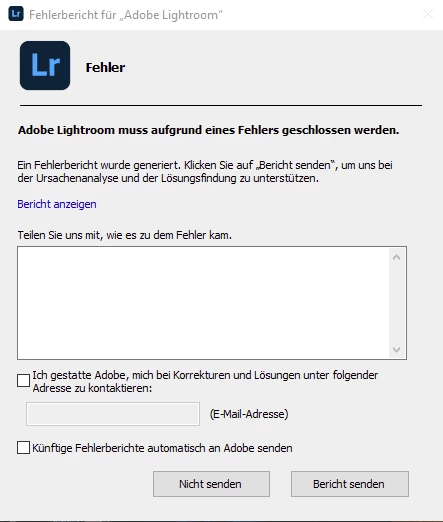
 

Ich habe bereits Lightroom ein paar mal deinstalliert und wieder installiert.

Dasselbe mit der Creative Cloud. Die Speicherpfade habe ich zudem auf eine andere, komplette neue SSD gelegt. Sogar Windows auf meinem PC habe ich komplett neu aufgesetzt - Nichts hilft. 


Andere Adobe Anwendungen wie Photoshop, After Effects und Premiere Pro funktionieren ohne Probleme. Auch mit Lightroom Classic habe ich keinerlei Probleme.

Da ich aber lieber mit Lightroom CC arbeite, ist das Ganze etwas nervig. 


Abhilfe schafft nur, die Installation der Version 5.0 - Ab Version 5.1 tritt dann immer der Fehler auf. 


Hat irgendjemand vielleicht eine Idee? 


Danke!

This topic has been closed for replies.

1 reply

Rikk Flohr_Photography
Community Manager
June 22, 2022

We’ve reviewed the email address you use with this forum and find no crash reports in our system.


Are you filling out and submitting the Crash Dialog?

Do you use a different email address when filling out the crash report?


Rikk Flohr: Adobe Photography Org
June 22, 2022

I filled out and have sent the crash dialog about 3 times a couple of weeks/months ago. 


A couple of hours ago I've also submitted one but forgot filling it out. 


Should I resend a filled out crash report? 

Rikk Flohr_Photography
Community Manager
June 22, 2022

My recommendation is when you experience the crash, fill out the information and use the email you use in this forum and submit it. I will watch for it on this end. 

Rikk Flohr: Adobe Photography Org