
joeh12686107
Participant
September 3, 2018
Answered

HDR in Lightroom CC

  • September 3, 2018
  • 3 replies
  • 925 views

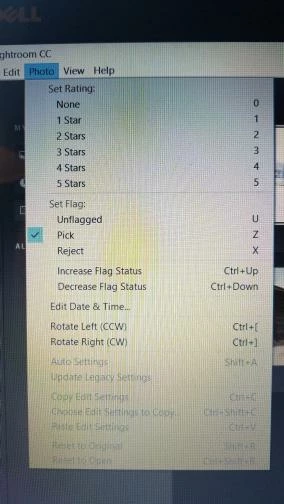
I downloaded a trial version of Lightroom CC. Watched the video on how to merge my three files. When i go to the program I select my three files than go to Photo and the file merge is nowhere to be found in the Photo drop down window.

This is what I see. Help
    This topic has been closed for replies.
    Correct answer JP Hess

    There is no "Merge to HDR" feature in Lightroom CC (the cloud-based version) at this time. It might be a feature in a version some time in the future, but not now. You need Lightroom Classic CC to have that capability at this time.

    3 replies

    selondon
    Community Expert
    Community Expert
    February 13, 2019

    Now available in the recent Lightroom CC 2.2 release:

    New and enhanced features | 2019 releases of Lightroom CC

    JP Hess
    JP HessCorrect answer
    Inspiring
    September 3, 2018

    There is no "Merge to HDR" feature in Lightroom CC (the cloud-based version) at this time. It might be a feature in a version some time in the future, but not now. You need Lightroom Classic CC to have that capability at this time.

    joeh12686107
    Participant
    September 3, 2018

    Thanks ,I suspected that was the case but I thought before I deleted the software I would ask the experts. Thank for you response. Wasn't to crazy about paying 10 dollars a month for the rest of my life anyway. I'll see if they have a trial of classic available.

    99jon
    Legend
    September 3, 2018

    You can download here and use free for 7 days.

    Lightroom CC vs. Lightroom Classic CC | Adobe

    99jon
    Legend
    September 3, 2018

    It is normally stored with the original images with the extension –hdr

    Try  text search of all photos by typing -hrd