
adaml60096233
Known Participant
November 9, 2023
Question

HDR photos display properly in Lightroom on Mac but appear too dim once exported

  • November 9, 2023
  • 9 replies
  • 15603 views

I'm editing on both an M1 MacBook Air and an M1 iMac. Both display HDR properly in the Lightroom app, but once exported, the lighting is not as intense--highlights are dimmed.


I've tried exporting in AVIF and JPEG XL, with all available color spaces, with no result. I've tried viewing the images in Preview, Safari, Chrome, and Photos, but they all look identical, i.e. a little too dim.


HDR Output is selected while exporting. A notice displays while exporting that "HDR is not visible in this preview," and the preview looks VERY dim, even dimmer than the final exported photos.


I've attached a screenshot here. Obviously the colors don't look like they do in real view, but you can see there's a difference. Left is the Lightroom app, right is the exported photo. 
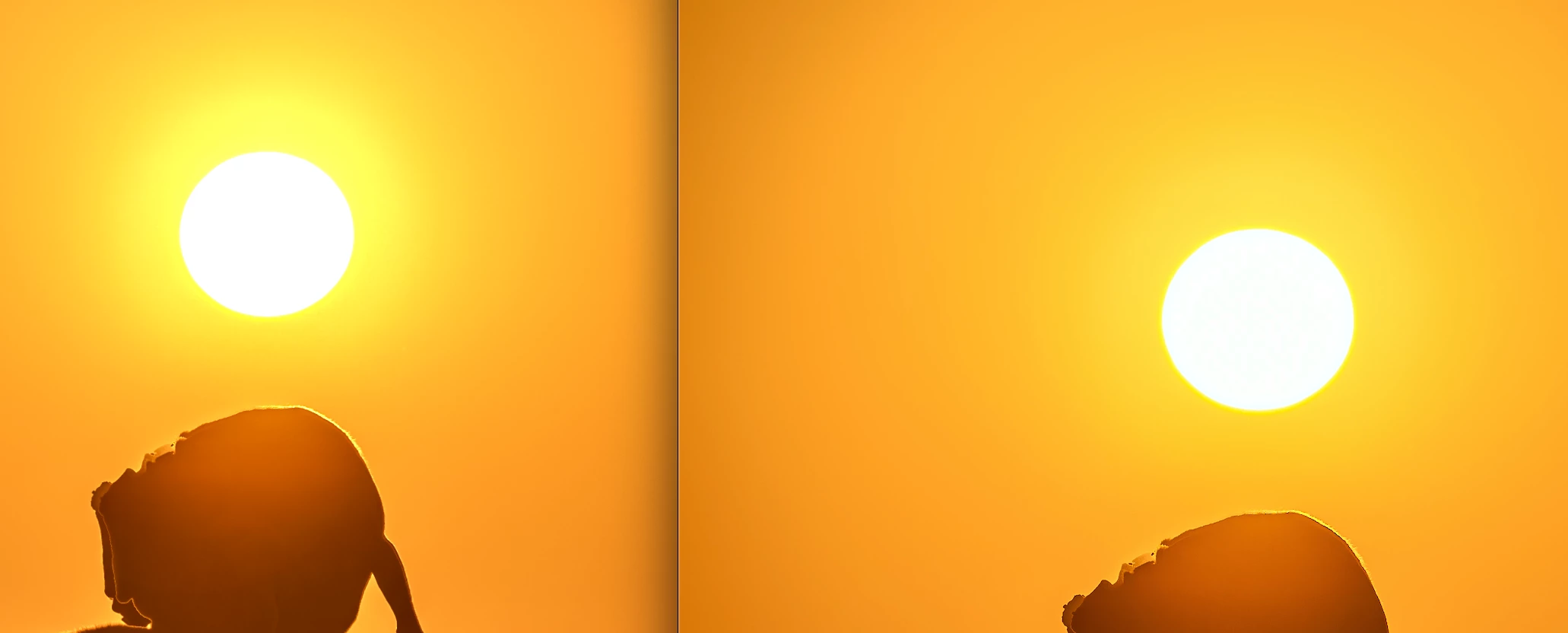
 

Everything I've read online leads me to believe that MacOS Sonoma should be able to display HDR properly. Does anyone know why they are not exporting properly?

9 replies

Participant
October 15, 2024

Dear all,


Also I am exploring a photography workflow that includes preparing and viewing XDR content. And considering purchasing the Apple XDR Pro display.


Using my MacBook Pro M1MAX (which has an XDR display), my observations are similar to that of the posters above: with Lightroom in edit mode, I can create and preview HDR content (simply gorgeous, the way bright areas come off the screen). In Lightroom full screen view, XDR turns off. For simple viewing, only the Google Chrome browser shows XDR content - Apple Preview and other programs or browsers do not.


But…. Today, I tested the same content on an Apple XDR Pro Display (connected to a Mac Pro), and…. I could see the XDR content directly in Preview!!! Furthermore: when I activate another window (say, Pages), the screen leaves XDR mode, and once I click the Preview window again, it turns XDR back on. This is different from the MacBook XDR, where XDR display (in Lightroom or Google) stays active even if I activate another window. So, I observe different behaviours between the MBP and the XDR Pro display... 


I am excited that the XDR Pro was able to show XDR directly from Preview!! But it makes me wonder… is it really the XDR display that is different from the MacBook Pro behaviour? Or perhaps it’s something related to the Mac Pro hard- or software? In the latter case, if I’d buy the XDR Pro and connect it to my MacBook Pro, I’d still have no XDR 🫤


I hope I soon have the opportunity to connect my own MBP to an XDR Pro display and see for sure whether it shows XDR content right off Preview.... 


Best, Rudi 


Community Expert
October 15, 2024

It's purely the software. Apple added some extra support to preview and to photos to display hdr content in Sequioa but it is still very partial. Preview for example still does not do tiff with HdR right. The difference between displays you see also is a software issue. Also Apple still does not support hdr images in their own browser. Lightroom doesn't display the hDr in every view context also. You have to enable the HDR in zoom view in library in preferences to get it outside of develop. Also you won't get it consistently on dual displays. Purely a software issue. 


There is no such thing as XDR content. That is just a Apple marketing term for the specific technology they use in their displays for HDR displays.

so situation is slowly getting a bit better but still a long way to go. The display technology is amazing but software hasn't kept up..

Participant
October 17, 2024

Thank you Jao vdL, very useful info! Will install Sequioa when I have the opportunity and then hope that also on my MBP, I can see HDR from Preview. Best, Rudi  

Participant
June 26, 2024

I'm using Lightroom on a MacBook Pro M1 to edit raw photos from a Sony α6400 camera. I wanted to create HDR images that could go into a Photos album for viewing on the laptop or on an iPhone.


I found a solution which might also answer the original question.  This probably depends on recent updates to Lightroom, Photos (MacOS) and Photos (iOS).


After editing in Lightroom (HDR mode) I export photos as JPEG XL (.JXL) files using the P3 HDR color space. Next, I import the image files into Photos on the MacBook. (Other apps on the MacBook don't show the .JXL images properly, but Photos does.) I could add these files to a Photos album, but after synchronizing with the iPhone it turns out they are not viewable on the iPhone. However, I can export them from Photos as HEIC files, and then import the HEIC versions back to Photos on the MacBook. These images (having been converted to HEIC by Photos) can be added to an album and they do show up as HDR with nice highlights on the MacBook and iPhone.

Participant
July 2, 2024

Thank you, that's what I was looking for to display photos from my other cameras in the apple photos albums in HDR. Although it's completly ridicioulous that we have to use such a workflow and it isn't working right out of the box. 

Participant
July 3, 2024

Well, turned out I had some settings to choose to make it work... So if you want to import working HDR images to your iPhone from any camera, this might be the workflow to follow - for me, it didn't work with P3 and jxl. 


  1. Develop your image as HDR image in Adobe Lightroom.
  2.  

  3. Export your image as AVIF in the colorspace HDR-Rec. 2020
  •  

  1. Import the image on your Mac into Apple Photos by drag&drop
  2. The image will show up as HDR in Photos on your Mac - and sometimes even on your iPhone, but not always.
  3. If it doesn’t show up as HDR on your iPhone, or if the HDR is lost when zooming into the picture (strange effect) you need a trick:
  4. Export the image from Photos on your Mac:
  5.  

  6. Expand the export setting and choose HEIC, Colorprofile Original and Size Original size:
  1.  

  2. Import the new HEIC File on your Mac into Photos again
  3. This new HEIC image will consistently be on the iPhone (as least for me) - iOS 17.5, macOS Sonoma 12.5.


All in all, this whole process seems really buggy to me. 

Participant
June 7, 2024


Got the same issue. Looks like I found a workaround which requires Photoshop. From Lightroom, choose to edit the picture in Photoshop (the modifications still visible) and from there export it as JPG. Photoshop probably flattens the whole thing from there I guess, which is exactly what we would want in this situation!

Participating Frequently
June 11, 2024

To send it to Photoshop is not the same result. You have to export it as AVIF (HDR-Rec. 2020). On Mac in the finder it looks not very well, but that doesn't matter. After that you can open it in Photoshop and save it as you want. And now you have the same result as in Lightroom (with HDR).

Participating Frequently
June 11, 2024

And don't forget to click the HDR-Button (Camera RAW), when you import it to Photoshop.

Participant
April 24, 2024

If lightroom files are exported as AVIF, they correctly show in HDR in photos on Mac but no other app that I can tell.

RadamBrown
Known Participant
April 25, 2024

I just tried exporting as an AVIF on my MacBook M3 Max and they don't look good at all...super washed out in the preview in Finder anyway...darn...was hoping this was the solution for me (and many others with the same problem). Thanks though!

Community Expert
April 25, 2024

Avif does not work in preview or in Finder. It only works in Photos or in Chrome. There are no HDR capable formats that work universally. 

Participant
March 11, 2024

Hi, Guys, Had the same problem everyone else had with HDRs. I decided to export files as PNGs rather than JPEGs. It worked for me.

Participant
March 11, 2024

Scratch that! That just changed the colors altogether! Adobe fix this!

Participant
March 11, 2024

Unfortunately, there's not much Adobe can do at this point. Windows, Mac/iOS and Android need to catch up and add support to to their default image viewers to decode the JPEG+gain maps format so that we can actually visualise HDR images withought having to rely on Chrome/Edge.

Participant
January 30, 2024

I have exactly the same issue: any image that I edit where I have been using the HDR button on the top right corner of the application, will result slightly different in the export. 

Community Expert
January 30, 2024

That's expected and the reason is that Mac Os and windows both do not support HDR formats correctly. Preview on the Mac will not correctly display them. The only option really is Chrome. The Photos app in the last mac os version does correctly display jpeg XL and AVIF, but preview still does not. Safari does not display it wel anywhere. 

Until this problem is fixed by Apple, Microsoft, and google (android doesn't do it right either), you should stay away from editing in HDR mode except if you have complete control over the display of your images. 

Participating Frequently
February 2, 2024

We should go to Apple's forum and Me Too every posts about HDR displaying issues.

Community Expert
November 12, 2023

No Apple apps support HDR images correctly. Preview will attempt something but it will be wrong. All the other apps you mention will not display HDR images at all or incorrectly. This is just Apple being way behind the times. The only apps that will work correctly are Photoshop after you enable the "Precise color management for HDR display" in the Technology preview settings (and also the option to open HDR images in HDR mode in camera raw) and Chrome. Chrome should display the image identical to Lightroom. It does on my machine so not sure why it doesn't on your machine.


>Everything I've read online leads me to believe that MacOS Sonoma should be able to display HDR properly. Does anyone know why they are not exporting properly?


They're wrong. HDR images are not correctly implemented in Mac OS. It is also not correctly implemented on Windows by the way for the other poster's info. There you also need Chrome or Photoshop. Support for this is extremely spotty still. 

 
adaml60096233
Known Participant
November 12, 2023

Interesting that Chrome shows it correctly on your machine. Is that just vanilla Chrome, or preview/beta or something?


On mine, it still has the dullness problem. Screenshot enclosed: left is Photoshop, center is Chrome, and right is Lightroom.


Community Expert
November 12, 2023

Plain vanilla Chrome. It should work correctly on Macs for sure and I can't notice a difference on my XDR display: https://gregbenzphotography.com/hdr/


Participating Frequently
November 12, 2023

I got similar problem, but slightly different: the exposure and color drifted.

Editing synced Smart Previews on my iPad Pro, which has an XDR display. It looks perfect on Lightroom for iPad.

However after I export it, either via Lightroom Classic on my Mac where original files were, or via Lr on iPad, the exported files is far from correct when viewed using the iPad's Photos app vs. Lr iPad preview.


Participant
November 11, 2023

Hello adaml60096233,


I am using Windows 10 and I have exactly the same issue. So, that rules out the issue with MacOS.


My display supports HDR and my photos appear really good in the lightroom but after exporting, they look dim with muted highlights. But when I export the SDR images, the exported images look exactly identical. So, the issue is with only the HDR exporting. Like you, I tried exporting in different formats and the result is the same. I was really excited that Lightroom brought the HDR update but it's frustating that the exported images look dull. I've been researching for a fix since the update dropped but my effortts have been in vain.


P.S: I am also getting the "HDR is not visible in this preview" while exporting and the preview looks really dull.

Participant
February 6, 2025

Quite Literally the same identical Issue as you. I hope you found a fix?


I have tried literally everything. No matter what export I use i cannot get the same export as what im seeing in Lightroom

I have tested every single export option both PNG and JPEG both 8 bit and 16 bit both HDR export on and off

Nothing I do will fix this issue. I edit a picture in HDR in Lightroom and everything looks great until I go to Export

Community Expert
February 7, 2025

How are you viewing your images? HDR support has improved in preview recently but is still not complete. Safari does not support any HDR images. Chrome does support them but I don't think it supports HDR in png images. Photoshop only correctly displays these images if you enable support in the technology preview settings.  Photos supports avif but not much else. Preview supports avif and tone mapped jpeg in the very latest versions but not in older Mac OS versions. So it is very much a gamble whether your image will be displayed correctly. HDR image support is still very much in its infancy.