Participating Frequently
December 29, 2023
Question

HEIC format files open corrupted in Lightroom Mobile on iMac with macOS Sonoma.

  • December 29, 2023
  • 1 reply
  • 1645 views

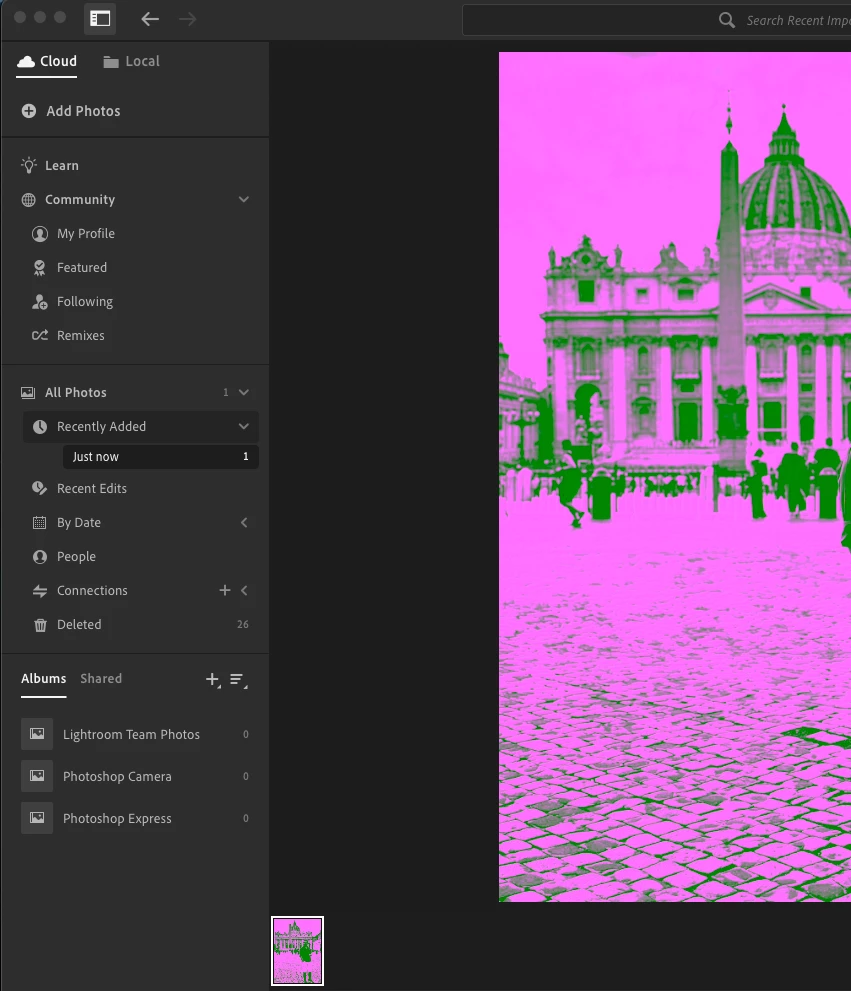
I use Lightroom mobile on my Mac computer with macOS Sonoma. When you open HEIC format photos taken by Apple in Lightroom Mobile, the image is distorted.

This topic has been closed for replies.

1 reply

Sameer K
Community Manager
Community Manager
December 29, 2023

Hey, @azafrak. Welcome to the Lightroom Community. I'll need more specific info to help you figure this out.


What exact versions of Lightroom, Lightroom Mobile, macOS & iOS devices are you working on? Was this image shot using Apple's camera app or Lightroom's in-app camera? Does this happen with all the images you've imported after this one?


Would you be okay with sharing a few sample images? Upload it as an attachment here, or use a cloud file sharing option to share a link with me or via direct message in my profiles.


You can go to Lightroom > Preferences > Performance > Set up 'Use Graphics processor' to OFF from Custom or Auto to determine if the issue is with Lightroom Desktop.


Let us know how it goes. Thanks!
Sameer K

azafrakAuthor
Participating Frequently
January 11, 2024

Hello,

You asked for information from me, I presented this information to you, but you did not respond 🙂
Is there any progress regarding the issue? @Sameer K 

azafrakAuthor
Participating Frequently
January 11, 2024

Did you send sample images as @Sameer K requested?


By the way, it's not "Lightroom Mobile" that you are using on your iMac, the app you are using there is Lightroom Desktop (Lightroom Mobile, as it's name implies, only runs on devices which are using a mobile operating system, i.e. iOS, iPadOS, Android).


And how did you get the HEIC files into Lightroom Desktop? Did you import directly from the phone into Lightroom Desktop, or did you import them into Lightroom Mobile on your phone and sync them via the Adobe Cloud to Lightroom Desktop? If you used the latter method, did the images show that same issue in the Lightroom Mobile app on the phone?


I did not send a sample of the photo, because this problem also occurs with any HEIC extension photo. I am sharing the screenshot below. You can see what photos with HEIC extension look like. Isn't this a clear enough example?


The reason I say Lightroom Mobile is that Lightroom Mobile and Lightroom Desktop versions are cloud-enabled. But yes, the correct pronunciation would be Lightroom Desktop (Cloud Enabled).

But I think it is clear which version I am using in the screenshot I shared and in my next message?


Coming to your question, I transferred the photo from iPhone to macOS via airdrop. I also downloaded it from Google photos, but nothing changed. The problem still persists.