
Participant
June 11, 2022
Answered

How do I print images (or create PDF) with selected metadata??

  • June 11, 2022
  • 3 replies
  • 1002 views

I have invested a lot of time adding metadata to my images in Lightroom (cloud-based), adding titles, location, city, state.  My images are primarily of birds, and location/description information is vital.


How can I produce output of the images and include specific metadata fields in the output?  Either print, or PDF file, or ultimately a photo book?  Silly me, I spent all this time keying in the information thinking it would be useful, before even realizing Lightroom doesn't even have a print function!


Please be kind, and as specific as possible in your responses.  I'm not an expert but I have done a lot of searching for this and can't seem to find anything helpful.  I have tried exporting images from lightroom and importing them into photoshop (elements) but it doesn't seem to pick up the relevant metadata.
This topic has been closed for replies.
Correct answer Jao vdL

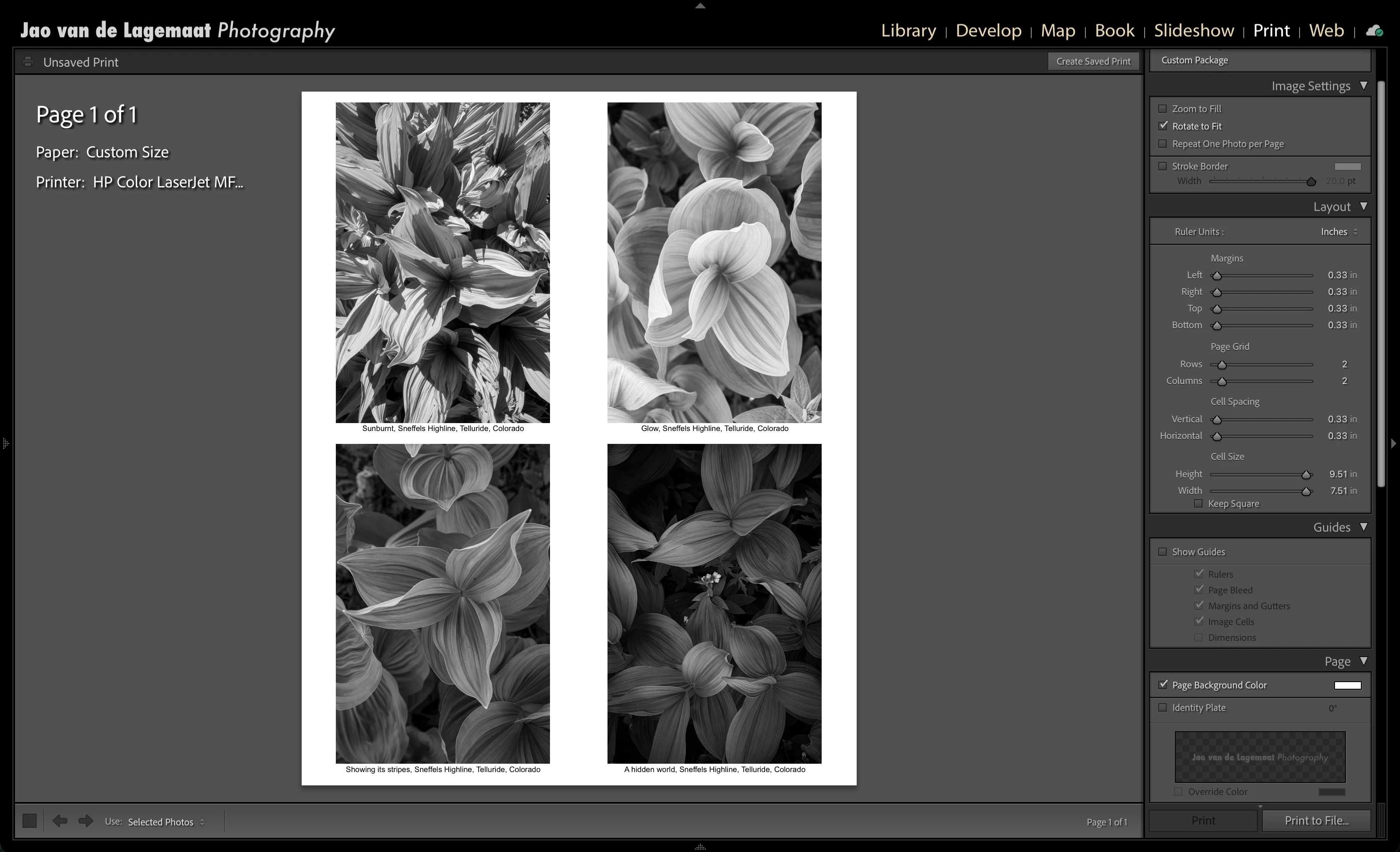
Classic iss the correct solution for this. The print panel allows you to add a text field using arbitrary metadata that ends up in an exported pdf or print. 

If you want to remain with Lightroom Cloud, exporting files from it will retain the metadata that can be picked up by other programs. Not sure why your elements is not picking it up but normal Photoshop always does. Creating contact sheets in Photoshop with this is a bit of a pain but in Classic it is trivial. Image captions are automatic from Title, Sublocation, City, State


3 replies

Jao vdLCommunity ExpertCorrect answer
Community Expert
June 12, 2022

Classic iss the correct solution for this. The print panel allows you to add a text field using arbitrary metadata that ends up in an exported pdf or print. 

If you want to remain with Lightroom Cloud, exporting files from it will retain the metadata that can be picked up by other programs. Not sure why your elements is not picking it up but normal Photoshop always does. Creating contact sheets in Photoshop with this is a bit of a pain but in Classic it is trivial. Image captions are automatic from Title, Sublocation, City, State


Participant
June 12, 2022

Thank you Jao!!  Exactly what I was looking to do.  I downloaded LR classic and was able to do something like what you have shown.  Many thanks!

Victoria Bampton LR Queen
Community Expert
Community Expert
June 12, 2022

@John H. H. wrote:

I have tried exporting images from lightroom and importing them into photoshop (elements) but it doesn't seem to pick up the relevant metadata.


Try that same process, but with Lightroom Classic instead of Photoshop Elements. A trial will do you fine, because the ability to import and to print continues to work even after the trial expires.

Victoria - The Lightroom Queen
Participant
June 12, 2022

Thanks Queen Victoria!  That worked!

Rob_Cullen
Community Expert
Community Expert
June 12, 2022

I tested an Export from Lr-Desktop (DNG file) to Windows-Desktop (JPG file), and all the metadata came with the exported file and is visible in Adobe Bridge.

So you should be able to work with exported files, viewed in Bridge, or opened in Ps-Elements.


Regards. My System: Windows-11, Lightroom-Classic 15.1.1, Photoshop 27.3.1, ACR 18.1.1, Lightroom 9.0, Lr-iOS 10.4.0, Bridge 16.0.2 .
Participant
June 12, 2022

Thanks Rob!  I downloaded Bridge and can see the metadata I want coming over with the image into Bridge.  Some of the metadata, but not all (as far as I can tell), comes into into PS Elements.  

Any suggestions on how I might be able to print (or produce PDF) images with selected meta data?  Specifically: Title, Location (from Lightroom; called "sublocation" in Bridge), City, and State?   

I currently have Lightroom 5.3 (cloud/windows), PS Elements 2021, and Bridge 12.0.2, on Windows 10.  Neither Bridge nor Elements seems to let me select certain metadata to print with an image.  Would full photoshop allow this?