
ptknight_S4S
Participating Frequently
July 31, 2020
Answered

How. do. I remove photos from web storage but not from my hard drive

  • July 31, 2020
  • 2 replies
  • 828 views

I am getting message all my cloud storage (20GB) is used. but cannot see how to. delete all images in cloud.  I do. not want to delete from my hard drive, but free up cloud storage for use with Premier Rush.

This topic has been closed for replies.
Correct answer Rob_Cullen

First, I suggest you check that all photos have downloaded to your Lr-Classic catalog and the files reside on your hard-drive- click on the [Cloud] icon to check sync status, then if syncing is complete-

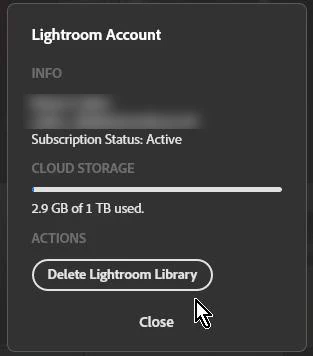
Go to lightroom.adobe.com, and click on your ID icon in the top-right corner and choose "Account Info". You'll see an option labelled "Delete Lightroom Library" which will delete everything from the cloud.


2 replies

Rob_Cullen
Community Expert
Rob_CullenCommunity ExpertCorrect answer
Community Expert
July 31, 2020

First, I suggest you check that all photos have downloaded to your Lr-Classic catalog and the files reside on your hard-drive- click on the [Cloud] icon to check sync status, then if syncing is complete-

Go to lightroom.adobe.com, and click on your ID icon in the top-right corner and choose "Account Info". You'll see an option labelled "Delete Lightroom Library" which will delete everything from the cloud.


Regards. My System: Windows-11, Lightroom-Classic 15.1.1, Photoshop 27.3.1, ACR 18.1.1, Lightroom 9.0, Lr-iOS 10.4.0, Bridge 16.0.2 .
ptknight_S4S
Participating Frequently
July 31, 2020

To clarify, I want to delete everything in the cloud storage and nothing from my hard drive where I prefer to work in LR Classic CC. This cloud storage seems impossible to delete. No delete option appears unless I go photo by photo with some 28k photos, an impossibly long and tedious task. 

Rob_Cullen
Community Expert
Community Expert
July 31, 2020
 Deleted!  Could not re-edit my post.
Regards. My System: Windows-11, Lightroom-Classic 15.1.1, Photoshop 27.3.1, ACR 18.1.1, Lightroom 9.0, Lr-iOS 10.4.0, Bridge 16.0.2 .
ptknight_S4S
Participating Frequently
July 31, 2020
Many thanks, WobertC! I have now successfully deleted everything from cloud
storage. All my 58k photos are accessible in Lightroom Classic CC on my
external 2 TB flash drive, another external HD backup and in Backblaze
cloud storage. I assume I have 20 GB of Adobe cloud storage available for
Adobe Premiere Rush projects.

BTW, I don't understand why, if Rush is now part of the CC subscription I
get only three exports. Can you help on this too?

Best regards,

Peter
----
Peter T. Knight, Ph.D.
Photographs: www.petertknight.com https://500px.com/ptknight