
Participant
June 25, 2020
Answered

How to bulk sync edits to multiple photos similar to lightroom classic

  • June 25, 2020
  • 2 replies
  • 1468 views

I just moved all my photos from lightroom classic lightroom cc.


Everything seems to be good expect one of the features that I use the most on the lightroom cc namely ability to edit one photo and then to apply the edits (include crop) to multiple photos by sync/apply feature. 


As far as I can tell I can only do this one photo at a time in LR cc by copy pasting one at a time which is insane if you work with 100s of photos. Am I missing something or is this crucial feature missing in CC?


This topic has been closed for replies.
Correct answer Curt Wrigley

Yes you can:


Thank you .  I never noticed that.

2 replies

Jim Wilde
Community Expert
Community Expert
June 25, 2020

The feature isn't actually missing, it's just poorly documented. After copying the edit settings you wish to sync to multiple other images, select the target images and instead of doing Cmd/Ctrl+V, you can do Shift+Cmd/Ctrl+V to paste the settings to all selected images.

Curt Wrigley
Inspiring
June 25, 2020

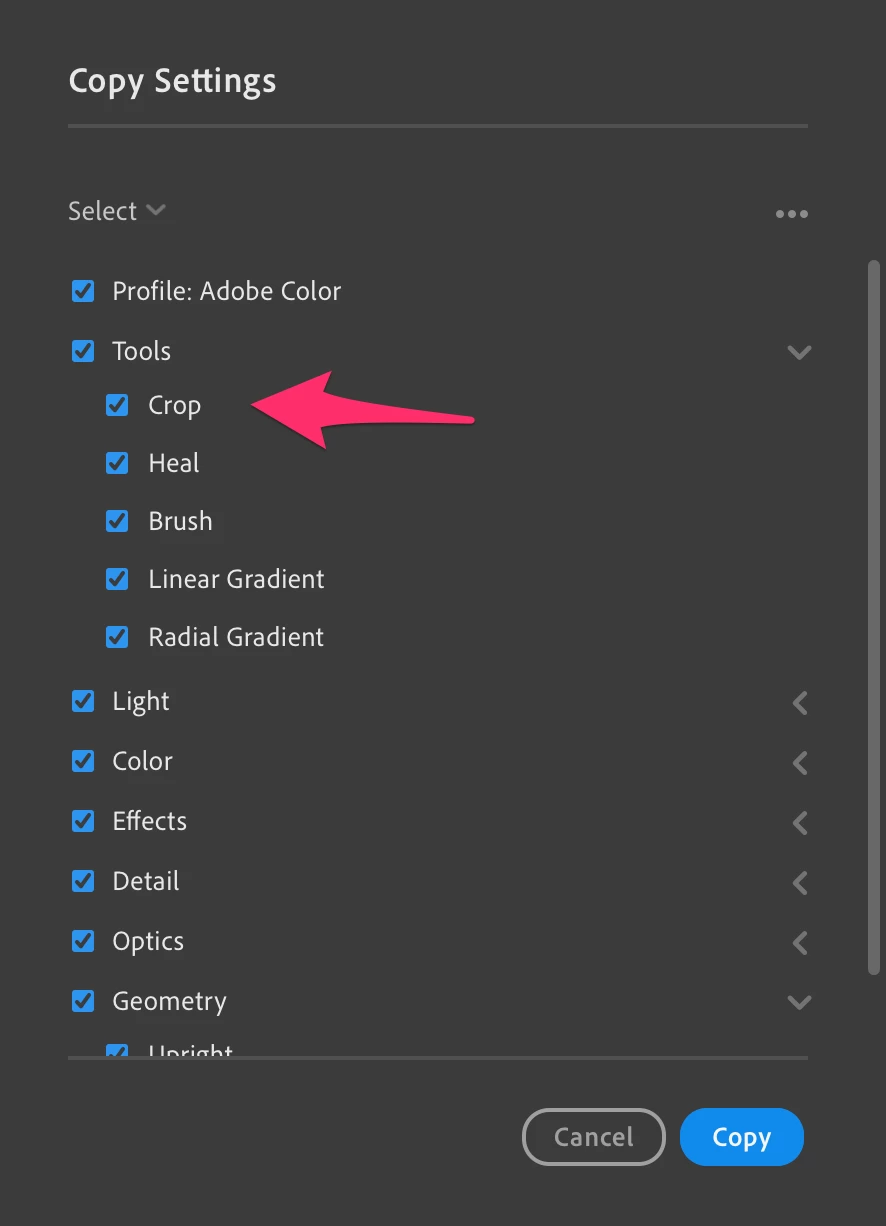
I dont believe that you can paste or sync the crop settings as to OP asked.


Saving a crop in a presset does not seem to work either.

Jim Wilde
Community Expert
Community Expert
June 25, 2020

Yes you can:


JohanElzenga
Community Expert
Community Expert
June 25, 2020

This feature is missing in Lightroom desktop.

-- Johan W. Elzenga