
Participant
May 7, 2023
Answered

How to delete Lightroom local storage on iphone?
  • May 7, 2023
  • 1 reply
  • 948 views

Hi guys, 


My iphone's local storage on the verge of exploding, and I realized that the lightroom local storage is occupying a lot of GBs. 
I browsed on the web on methods to reduce storage (like clearing the cache) but it doesn't help with the local storage of lightroom on the phone. I saw a post saying there is a method to 'disable store locally' so these photos get moved to the cache and I can clear them. Does anyone knows where is that button? 

thankss
This topic has been closed for replies.
Correct answer Sameer K

Hey @Leung29769851o1bu. Welcome to the Lightroom Community. I'll help you figure this out.

What version of Lightroom & iOS you're working on?


I've checked your account & you've already utilized the 20GB cloud storage in your plan. Lightroom won't sync new images to the cloud & which could be why Lightroom continues to store the original images locally. Log on to Lightroom Web (https://lightroom.adobe.com) to check all the images & data that are already synced to the cloud.


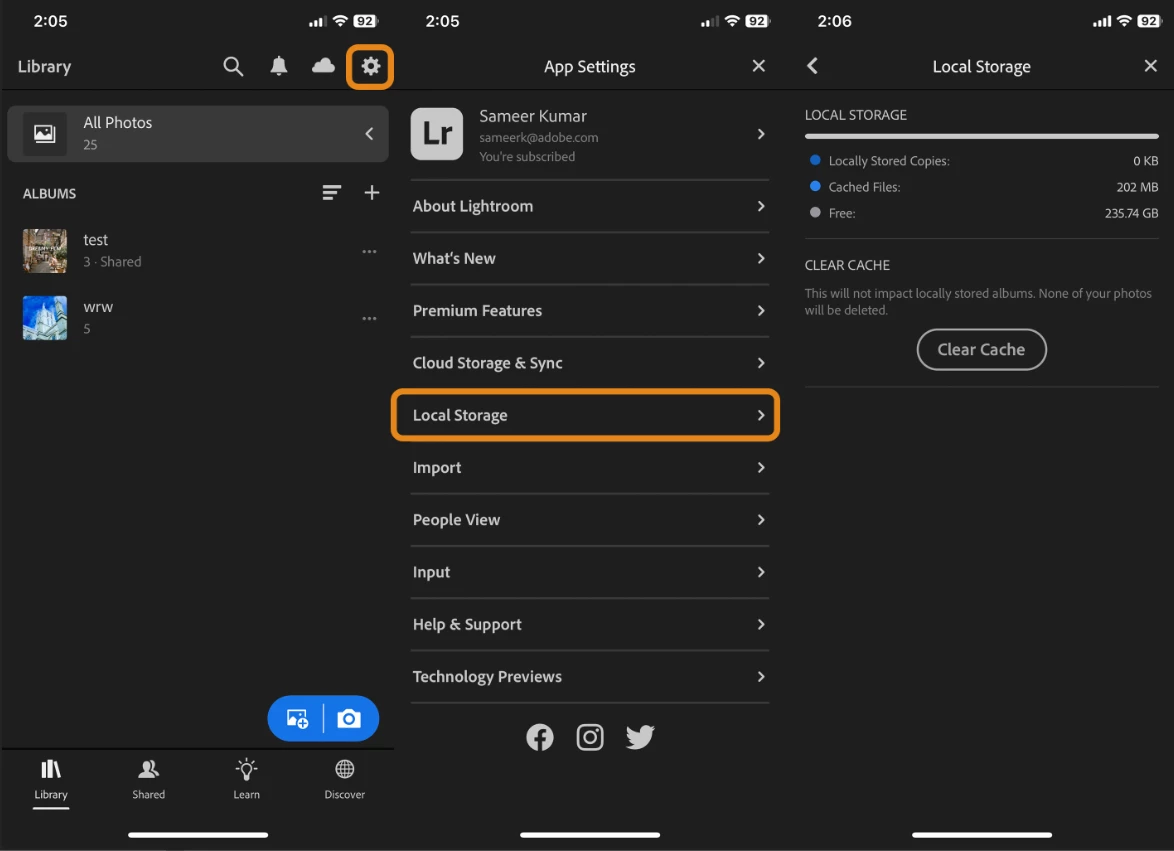
Once the images start syncing to the cloud, Lightroom shows gradually clears space from the local storage. You can check the local storage from & clear caches as shared below.


Please do not uninstall Lightroom while the images are still pending sync to the cloud to avoid unexpected data loss.

Let me know how it goes. Thanks!
Sameer K

1 reply

Sameer K
Community Manager
Sameer KCommunity ManagerCorrect answer
Community Manager
May 10, 2023

Hey @Leung29769851o1bu. Welcome to the Lightroom Community. I'll help you figure this out.

What version of Lightroom & iOS you're working on?


I've checked your account & you've already utilized the 20GB cloud storage in your plan. Lightroom won't sync new images to the cloud & which could be why Lightroom continues to store the original images locally. Log on to Lightroom Web (https://lightroom.adobe.com) to check all the images & data that are already synced to the cloud.


Once the images start syncing to the cloud, Lightroom shows gradually clears space from the local storage. You can check the local storage from & clear caches as shared below.


Please do not uninstall Lightroom while the images are still pending sync to the cloud to avoid unexpected data loss.

Let me know how it goes. Thanks!
Sameer K