

winterludes
Inspiring
December 12, 2021
Question

How to disable blue pop up guides in new brushes update to LR Mobile

  • December 12, 2021
  • 3 replies
  • 948 views

The newest LR Mobile app update made changes to the brushes/masking with some new features and a new interface.   

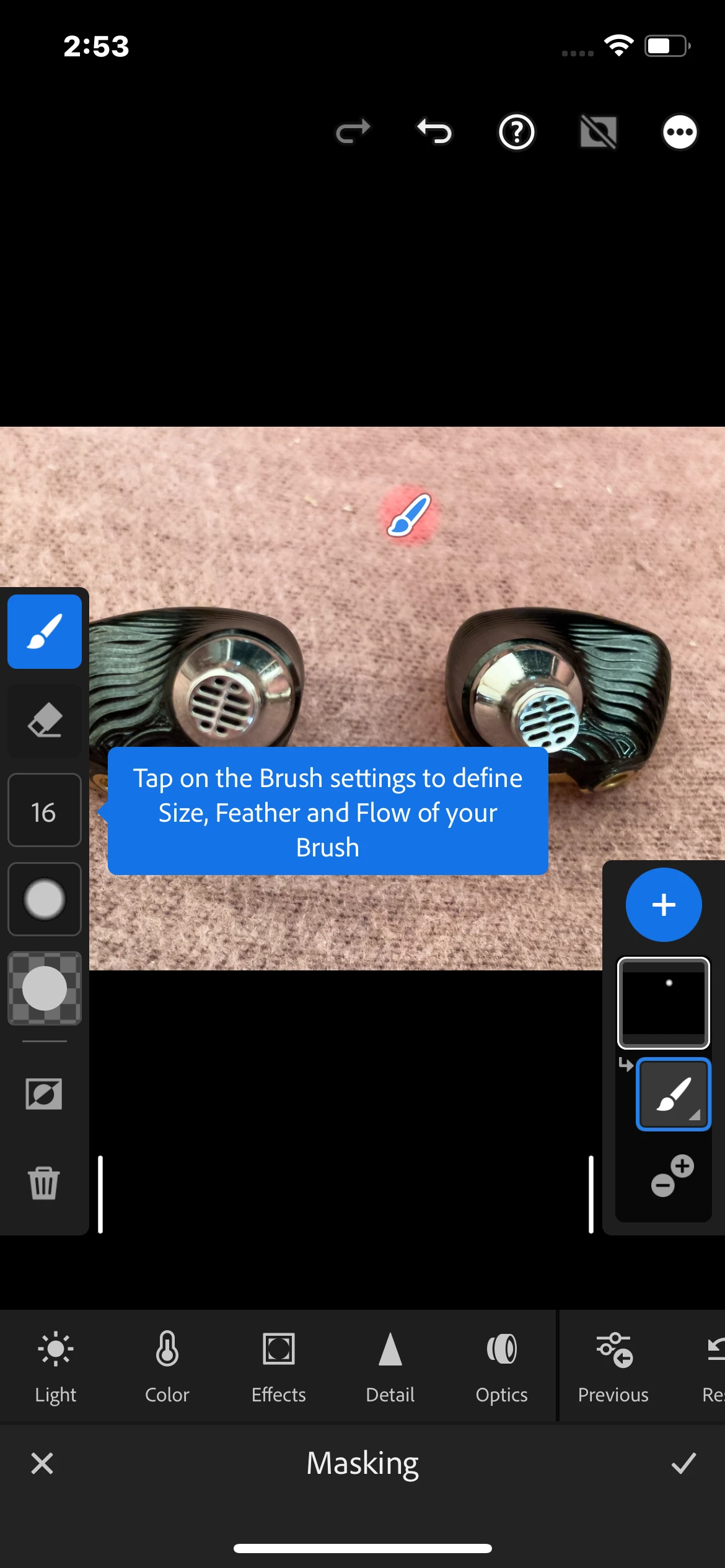
 But it also added tool tips that pop up every single time I add a brush stroke to a mask. I have to click on it to make it go away. And they say the same very basic info every time that would be very easy to look up online.  It makes using masking/brushes such a PITA because I have to keep tapping the tool tip dialogue box that pops up to get rid of it between each brush stroke. It's honestly maddening. 

There must be a way to turn this off. 

it's so annoying I have to wonder if Adobe uses their own software. 

here is a screenshot of what pops up every time I add a brush stroke.  
This topic has been closed for replies.

3 replies

Inspiring
January 11, 2022

Hi again @winterludes 

A teammates of mine who has more knowledge in this area pointed out to me: "the menu in masking has a toggle to turnoff “Tool overlays” which will hide the egregious brush icon"


Hope this helps!

winterludes
Inspiring
January 11, 2022

@Charlie.D Tha's veriy nice, thank you so much!  


Can you please pass on a reccommdation to your team?  There are lots of new useful tools in masking, like "select sky" or "select subject" which could potentially take a lot of time out of masking, but they are rendered useless in most situations because you cannot then add or subtract from that mask using a brush.  I'm either missing something, or this is a serious mistake making LR Mobile way less powerful.  It would save a lot of time to be able to "select subject" and then remove the extra bits that get sleccted that I don't want selected.  


This is possible in photoshop of course.  Thank You!


Whitney

Inspiring
December 14, 2021

Hi @winterludes 

I thought those blue help messages were meant to show only once, on first use.  Are you seeing them over and over for the same tools?  


Hi @TaeAnnPhoto please see this help doc for device requirements and feature usage info: https://helpx.adobe.com/in/lightroom-cc/using/masking-mobile-ios.html 

winterludes
Inspiring
December 14, 2021

Hi @Charlie.D 

Yes I'm seeing the blue pop up window over and over despite quiting the app, opening it back up, they pop up every single time I add a brush stroke, so everytime i am trying to brush something in I have to tap the blue pop up between every stroke to make it go away, it's beyond frustrating.  


while you're here, the update also added a big paintbrush logo right on top of the area that you are brushing that does not disappear even when you try to make edits to that area by changing the exposure, etc.  If the area you are modifying is small, like someone's eye for example, the brush logo covers thier entire eye and I can't see the changes I'm trying to make to the eye.  i have to make a change, then click the X to get out of masking, then look at it, then open masking back up again and make a guess at a change, then close masking so I can see the eye, then re open it and guess at a change, etc.  This is just unbelievably terrible design, and something. that was conciosuly added to the app.  


LR is not for 4 year olds, we do not need a little brush logo.  I need to be able to see what I'm editing!  Please pass this glaring oversight on to Adobe.  Both of these problems make brushing so much worse with the update.  


Thank you for the reply!

Inspiring
December 14, 2021

Thanks for the feedback about the masking paintbrush icon.  If you hold down on the brush, there is the option to hide the brush (and it's edit) but that doesn't help if you want to keep painting the mask (ie Add to) at the same time.


Regarding the first thing you mentioned, I can't get the message to repeat after first use.  Just to be clear, are you able to reproduce this with the 7.1 app update that is available today?  (Search for the Lightroom app listing if you don't see the update offered automatically)

Participating Frequently
December 13, 2021

Please tell me how you are even creating a brush stroke with this new update. I cannot even create a brush stroke to edit and Adobe support has been ZERO help.