
Participant
December 24, 2020
Answered

How to Import photos into new LR install?

  • December 24, 2020
  • 1 reply
  • 502 views

My computer C: drive died to I reinstalled Windows 10 and LR. Now I need to import my photos. I can't find any of my saved Catalogs. All of the photos have been edited in LR and they all have XMP files. They are organized by date and every day I shot has its own folder. I would like to keep this organization. 

This is how it looks in my Folder:
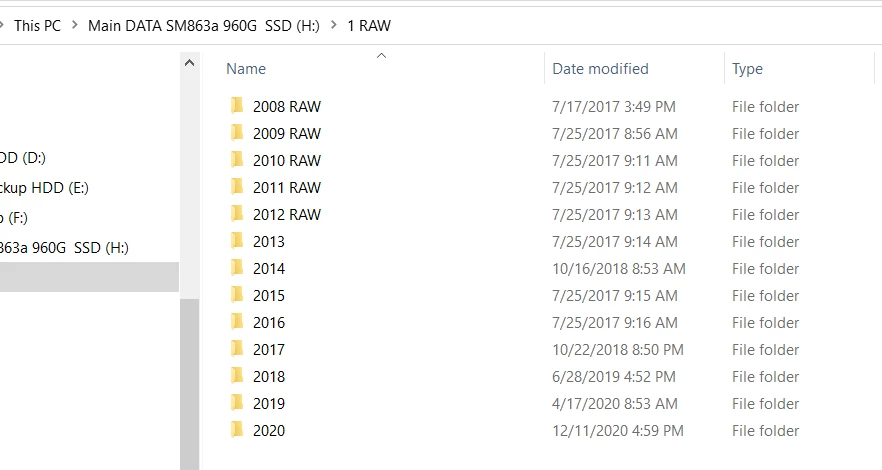
What is the easiest way to import the photos and keep the chronological organization?
Thanks!

This topic has been closed for replies.
Correct answer Rob_Cullen

You have posted in the Lightroom-(MOBILE) forum, but-

IF I understand you are using Lightroom-CLASSIC or a Perpetual Version (eg. 6.14), then-

Import using the 'ADD' option above the main Import window. All your folders and files will remain exactly where they are.

Having a Backup Catalog would have been a better answer.

https://youtu.be/--nEKNEH_1I?list=PLmXfFxjdp3CHCRpDULlvcaqWfK_zLPWF2


1 reply

Rob_Cullen
Community Expert
Rob_CullenCommunity ExpertCorrect answer
Community Expert
December 27, 2020

You have posted in the Lightroom-(MOBILE) forum, but-

IF I understand you are using Lightroom-CLASSIC or a Perpetual Version (eg. 6.14), then-

Import using the 'ADD' option above the main Import window. All your folders and files will remain exactly where they are.

Having a Backup Catalog would have been a better answer.

https://youtu.be/--nEKNEH_1I?list=PLmXfFxjdp3CHCRpDULlvcaqWfK_zLPWF2


Regards. My System: Windows-11, Lightroom-Classic 15.1.1, Photoshop 27.3.1, ACR 18.1.1, Lightroom 9.0, Lr-iOS 10.4.0, Bridge 16.0.2 .
duglstAuthor
Participant
December 27, 2020

Thanks, WobertC.

For the last several years the icon for my LR app was LR so when I got my computer working again, after it crashed, I downloaded LR. Later I realized that my old LR was LR Classic. My LR Classic got regular updates but the icon on my computer continued to be LR. When I downloaded LRc, the icon became LRc. 

I had kept lots of Backup on drives other than the C: OS drive that crashed but I couldn't find them because it has been years since I set that up and I have several drive.... Eventually I searched my other drives and found several recent Backups. Now everything is working great.