
Participating Frequently
August 29, 2024
Answered

Import image files from iPad File manager app into iPad Lightroom mobil

  • August 29, 2024
  • 1 reply
  • 1191 views

I want to import image files from the iPad File Manager app into Lightroom Mobil on the iPad. 

I know I can do that with other image processing software of the iPad but would like to use Lightroom.
This topic has been closed for replies.
Correct answer JohanElzenga

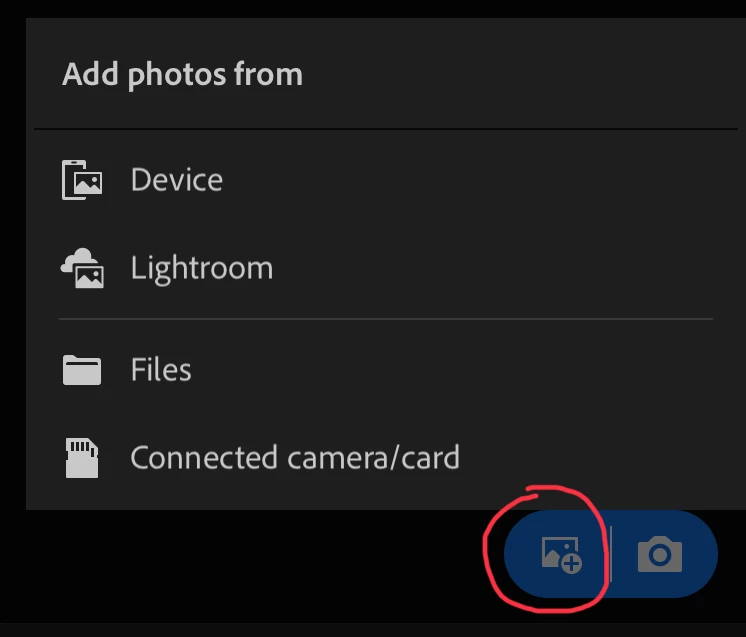
Launch Lightroom for iPad, tap on this icon, and then on 'Files'.

1 reply

JohanElzenga
Community Expert
JohanElzengaCommunity ExpertCorrect answer
Community Expert
August 29, 2024

Launch Lightroom for iPad, tap on this icon, and then on 'Files'.

-- Johan W. Elzenga
waldhaus1Author
Participating Frequently
August 29, 2024

I don't see that icon. THe icon with the camera is present.

My version is 9.5.0 793255/164

Perhaps I need to delete and reinstall?

I had thought there was a way to import into Lightroom.

I am using an iPad pro with the M3 processor and plenty of memory. 

I had thought I used to have a way to add from the files app.

waldhaus1Author
Participating Frequently
September 8, 2024

Reinstalling was probably not necessary. You probably had the 'Lr camera photos' album selected. That is an album that shows all photos taken with the built-in camera app. You cannot manually add photos to this album, so the import button does not show if you select it.


I don't see the Lightroom camera album from witching Lightroom on my iPad. Perhaps selecting the Lightroom camera causes it to be selected. I don't recall ever using the Lightroom Camera on the iPad, but I could have done so and forgotten. 

I must have done something to cause the import icon to disappear.