
Participating Frequently
August 10, 2020
Answered

iPadOS 13 and SD imports

  • August 10, 2020
  • 3 replies
  • 4220 views

I used to be able to import directly my raw images from my SD card to Lightroom, which detected the SD card as a "camera device".  Now it does not, and if I try to import from the file system (navigating to the SD card) I cannot import more than 4-6 in a single go and without being able to see the preview.


I am connecting the card reader ( usb 3 ) to an USB-to-USB-C adapter, then connected to the iPad.  This worked flawlessly few months ago in iPadOS 13.


{Moved from Lightroom Cloud to Lightroom Mobile & Apple TV Forum by Moderator}
This topic has been closed for replies.
Correct answer Charlie.D

Hey Charly, thanks for getting back to us. 

I have an iPad Pro 10.5" from 2017, running on 13.6.1.

I shoot with a Canon EOS 6D in raw format (. CR2).

Just checked, the native photo app finds the card instantly. And again: it used to work just fine and was super comfortable. Unfortunately I cannot tell when exactly it stopped working (paused for like three months and can't tell if it came with the last update). 


Try this:

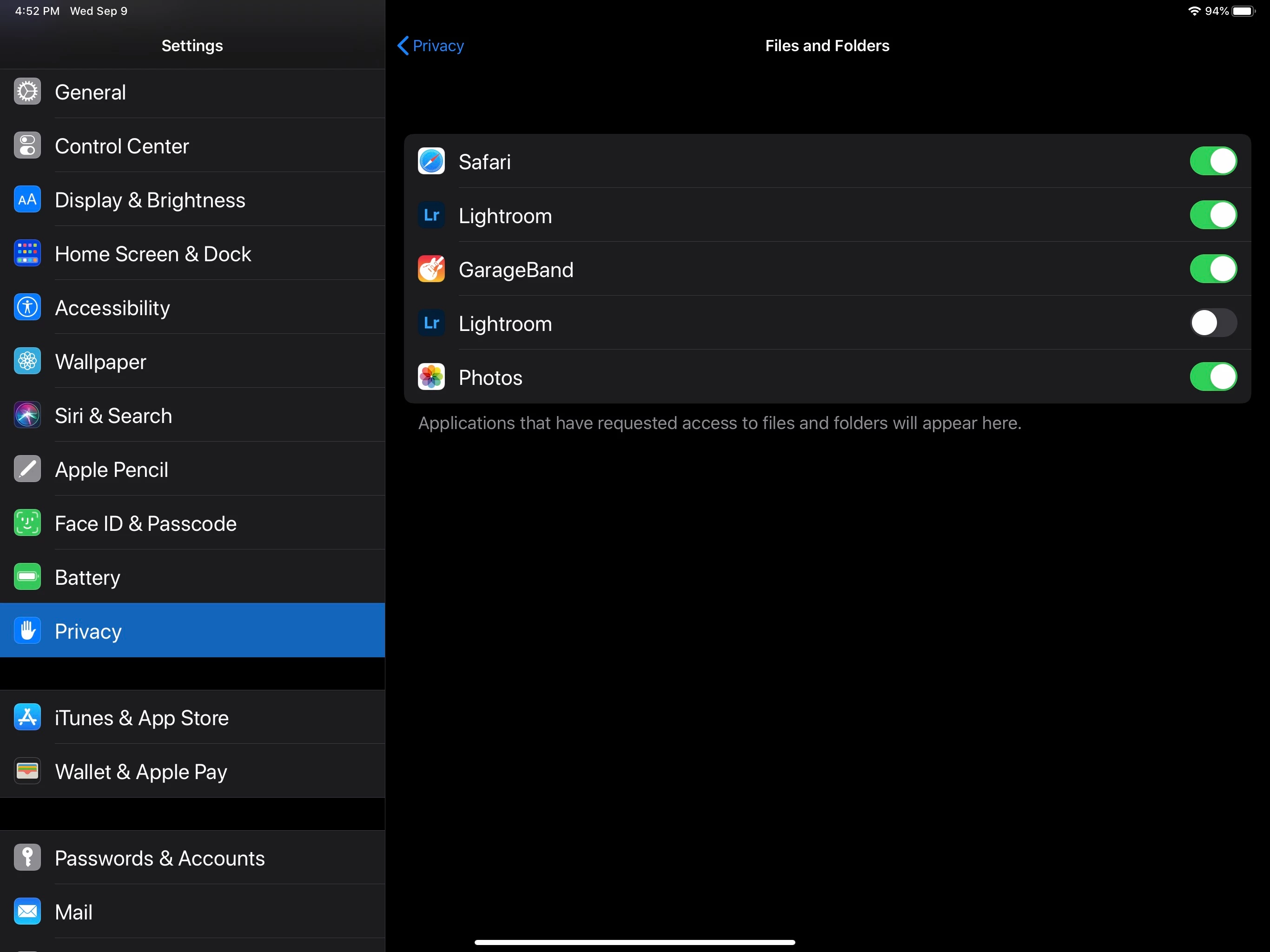
Go to iOS Settings > Privacy > Files and Folders.  Do you see two settings for Lightroom like in this screenshot below?


Turn them both OFF.  This should reduce this two settings to just one.  Now turn ON the remaining Lightroom setting.  Launch Lightroom again and then attach your SD card.  It should work again now.


Hope this helps!

3 replies

danielw58122329
Known Participant
October 19, 2020

Thanks but no thanks. The instructions given fixed this issue which I've just "lived with" for maybe 6 months now, at least longer than I managed to use the feature in the first place. This bug sucks big time.

Participating Frequently
August 30, 2020

Same here. Used to work just fine, now it doesn't anymore. First I thought the card reader was broken, but it works just fine with Light Room on my iPhone. 

Inspiring
September 9, 2020

Hi Pan and Holger

Sorry for the slow reply.  I am not able to reproduce any trouble with Direct Import on my iPad with iOS 13.6


Some questions:

Can you share specific details about which device model and iOS version you are running? 

Holger, what file types (camera make and model) are you trying?  I see Pan's files are from Fuji X-T2.

Is the iOS Photos.app able to access your photos from SD card? 

Cindy Rossiter
Participant
September 21, 2020

Hi Olivier, 

I moved your message to an existing thread, which I think may explain the problem you see.  Does the advice in previous messages above help?


I've got the same problem, I tried what you suggested also rebooted the iPad but it's still greyed out and not letting me import from sd card. This is a big issue for me as the whole reason for buying the iPad Pro is so I can work while travelling in between photo shoots 

Participating Frequently
August 10, 2020

I would like to add more information as I have been testing at home further.


The SD card is not seen as a "camera device" anymore, regardless of the way I use to plug it to the iPad.  I am using Apple's USB-C to USB-C/HDMI/USB dongle and connecting directly my Fuji X-T2 to the device through an USB cable.  Same result, the SD card is just seen as an "unnamed" USB device and I can only access it that way.  The images are imported from the filesystem, without any of the nice features this had in the past (Like the preview of the Raw images).