Participant
April 2, 2024
Answered

iPhone 14 Pro lost HDR display capability in Lightroom for iOS

  • April 2, 2024
  • 3 replies
  • 3586 views

Previously, my iPhone 14 Pro displayed HDR images really well (in Lightroom for iOS)


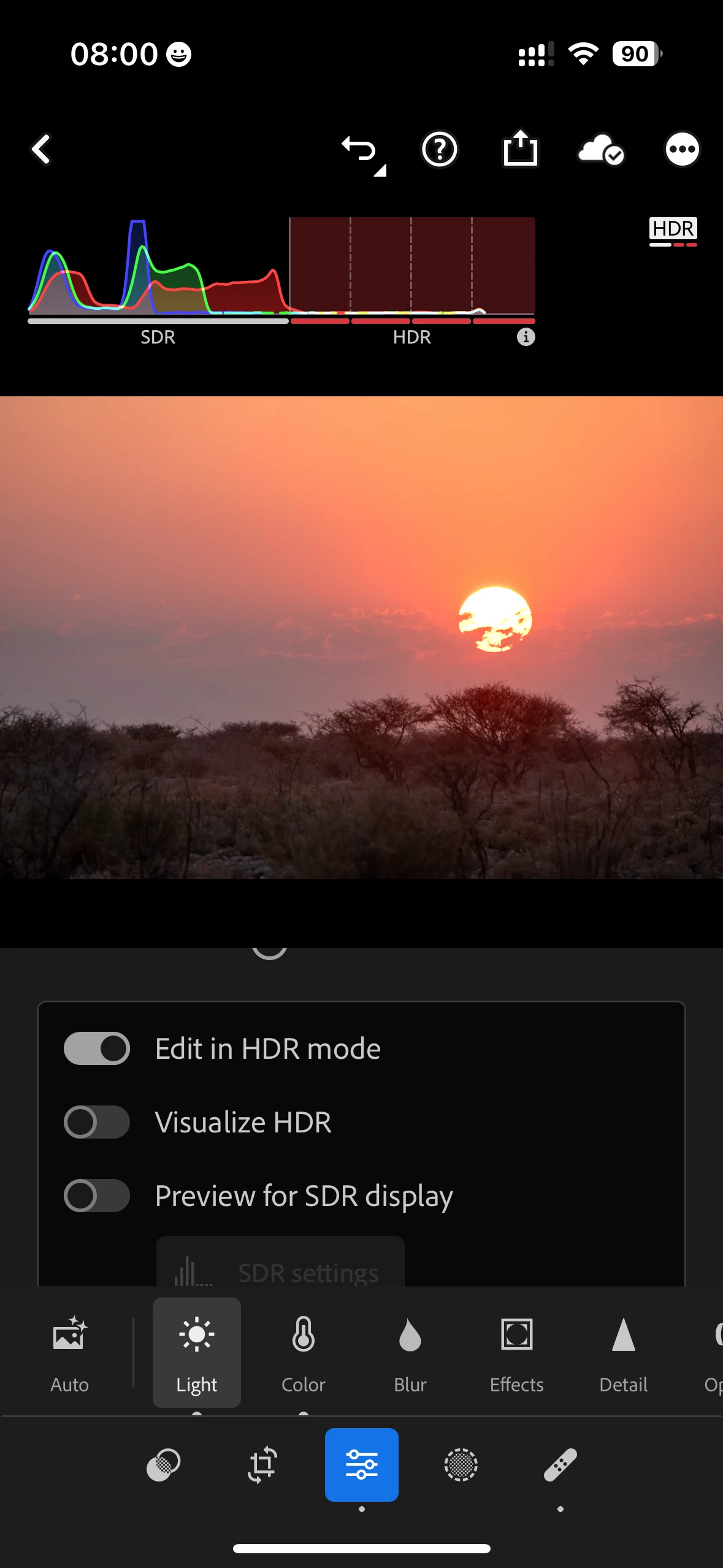
I recently discovered that this changed for the worse. Lightroom now reports that the iPhone 14 Pro is not capable of displaying HDR images, by turning the HDR part of the histogram red, indicating the display is not capable of HDR (see screenshot). The actual images is not showing in HDR anymore, so it is not just a faulthy histogram.


The same images display perfectly fine in HDR on my iPad Pro.


Any ideas?


Correct answer Conrad_C

Just curious, what is the brightness level of the iPhone display, and how does the HDR histogram change if you change the brightness? Normally, as you raise the brightness, the white bars get shorter under the HDR histogram (because there’s less headroom for previewing HDR highlights), but on my iPhone it still shows about half a white bar at full brightness.


If the HDR histogram does not change or show white bars even if you reduce brightness all the way, then that is definitely not normal and something is wrong somewhere.


Also, I just thought of something else, when I was trying to think of ways the iPhone display might be altered: In iOS Settings, do you have any visual Accessibility options enabled? I did an experiment on my iPhone: In the Accessibility settings, I enabled the Reduce White Point option, and bam…HDR range goes all red. Which makes sense, because that setting further limits display of highlights. I sometimes like to use Reduce White Point when even the minimum brightness is too bright at night, so I assigned it an Accessibility Shortcut, which I sometimes activate by mistake during the day…and when that happens, the display isn’t as bright as it should be. If this is not the answer, I hope that it at least points you in the right direction.

3 replies

Conrad_C
Community Expert
Conrad_CCommunity ExpertCorrect answer
Community Expert
April 7, 2024

Just curious, what is the brightness level of the iPhone display, and how does the HDR histogram change if you change the brightness? Normally, as you raise the brightness, the white bars get shorter under the HDR histogram (because there’s less headroom for previewing HDR highlights), but on my iPhone it still shows about half a white bar at full brightness.


If the HDR histogram does not change or show white bars even if you reduce brightness all the way, then that is definitely not normal and something is wrong somewhere.


Also, I just thought of something else, when I was trying to think of ways the iPhone display might be altered: In iOS Settings, do you have any visual Accessibility options enabled? I did an experiment on my iPhone: In the Accessibility settings, I enabled the Reduce White Point option, and bam…HDR range goes all red. Which makes sense, because that setting further limits display of highlights. I sometimes like to use Reduce White Point when even the minimum brightness is too bright at night, so I assigned it an Accessibility Shortcut, which I sometimes activate by mistake during the day…and when that happens, the display isn’t as bright as it should be. If this is not the answer, I hope that it at least points you in the right direction.

Participant
September 22, 2024

I've been having the exact same problem.


The first time, I deleted the app then redownloaded it and everything was fine for about a week.

The second time, nothing changed after redownloading the app so I had a look at my visual accessibility. The only mode I had on was Auto-Brightness and when I turned this off nothing changed. Also in the lightroom app import settings having the "HDR edit mode for new photos" on or off has made no difference (I assume the settings were on default when I had the app for the first time).


I'm really lost on what else could be causing this? I'm using the free version of the app and I also have an Iphone 14 Pro. It's really frustrating loosing everything each time I delete it so any help would be very much appreciated!!

Participant
September 22, 2024

I forgot to add that my screen brightness is on full and night shift is off

Community Expert
April 6, 2024

I would try deleting the app and reinstalling it and seeing if that resolves it.

Community Manager
April 3, 2024

I'm not able to reproduce an issue.  Some images have more data to work with than others.. Raw images from the iOS or Lightroom Mobile camera will have more headroom to work with than JPGs, etc.  Can you attached a sample image?  If your file type (or a compressed zip of your image) won't attach to the thread, let me know.

Participant
April 5, 2024


Hi Charlie


See the two attatched screenshots of the same image, which has signigicant data in the HDR range, especially the blue channel as can be seen in both histograms. This image was capturted by a Sony 7RM3 camera.


The first is from my iPhone 14 Pro. The red shading of all 4 HDR ranges indicates that Lightroom (incorrectly) recognizes the display of the iPhone as SDR capable only.


The 2nd is from my iPad Pro 12.9. As you can see, the HDR range is not shaded red,  indicating that Lightroom (correctly) recognize the iPad display as an HDR capable display.


Hope this helps.