Participating Frequently
October 4, 2024
Answered

Lightroom and Lightroom Classic crashing PC [Windows 11]

  • October 4, 2024
  • 3 replies
  • 3444 views

I have so many issues with Lightroom, Lightroom Classic, and Adobe Creative Cloud. I pay $65 dollars a month for what feels like unusable software.

Problems:
Crashing on startup
Crashing editing photos
Crashing trying to export photos (small batches between 1 and 5 photos even)

When Lightroom crashes, it crashes my entire system, similar to a hard reboot. Similar issues with rendering and exporting in Premier Pro.

PC specs as follows:

i9 12900k
ZOTAC 4080 SUPER
Trident G-SKILL DDR5 32GB RAM - 6,000MHZ
ASUS Z690 FORMULA
-------------------------------------

Samsung Evo 990 - 1TB M.2
Samsung Evo 880 1TB SSD
WD 3TB HDD
WD 6TB HDD
-------------------------------------

LR Version 7.5
Windows 11 Version 10.0.22631 Build 22631
-------------------------------------
Attempted fixes:
NVidia Studio Driver install (latest version 561.09)
Re-installing Windows
Disabling GPU Acceleration
Re-installing Adobe Creative cloud, Lightroom, and Lightroom Classic
Checking for Driver Updates
Running Adobe in Compatibility mode (Windows 😎

Any help would be appreciated. I am being delayed on deploying the photos from the last wedding I photographed. Very frustrated.

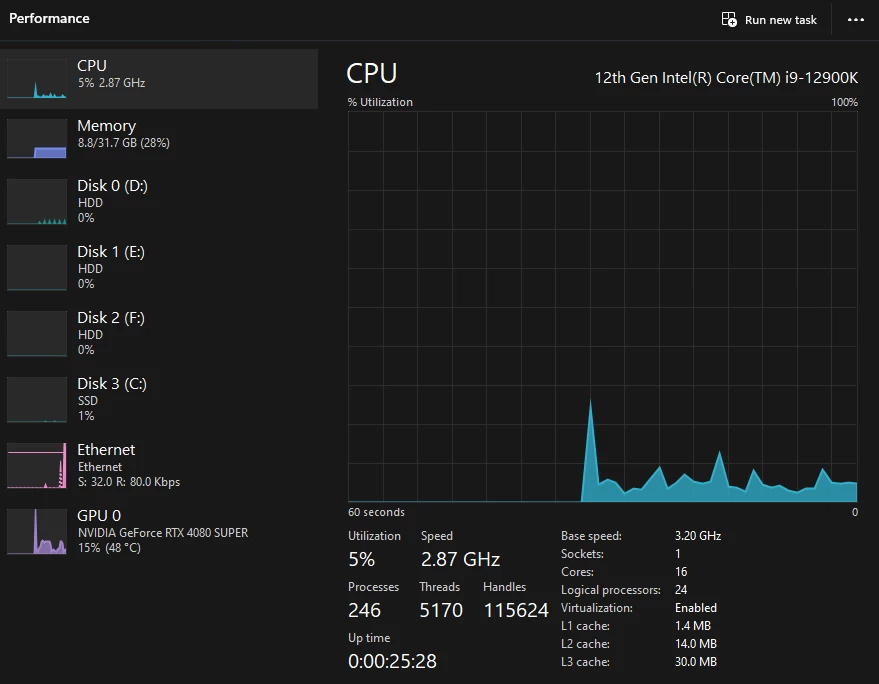
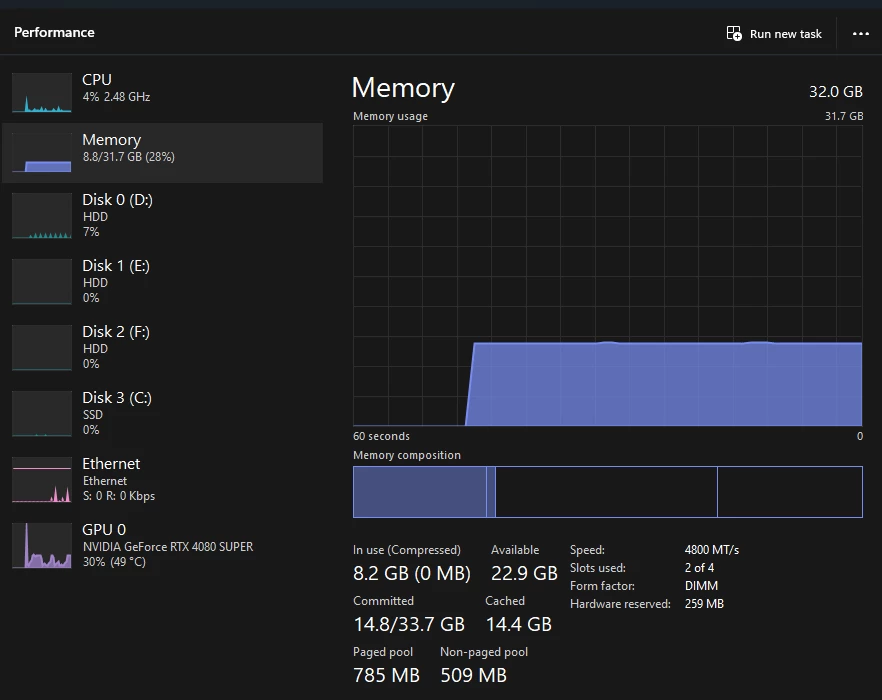
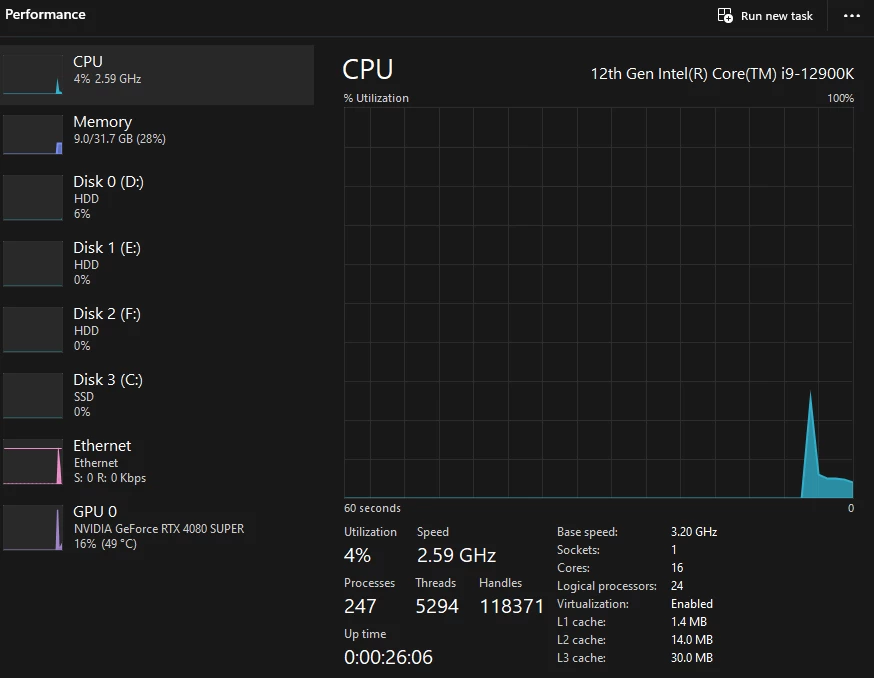
note: for these images, a program was being run in the background. This is not average idle resource consumption for my PC.

Correct answer amarti.ph

Ive Solved it, the new update V8.2 is crashing down the GPU and Processor... i Did a downgrade to version 8.1 and now is working normal....

@Sameer K to your update with the tech team, i will keep version 8.1 until next version comes up to check if the bugs are solved

3 replies

Participant
April 1, 2025

Ive been experiencing same issu after updating lightroom CC couple weeks ago. whenever im using masks or remove tool lightroom crashed the GUI and then it completely crashes and reopen, in some cases Ive lost all edits done on the current photo. been sending the crash reports.


Im runing it on a

Snapdragon Elite X Processor

Qualcom Adreno X1-85 GPU (V31.0.84.0)

32 GB Ram

1 TB SSD


i have reinstalled windows, lightroom, erased cache, GPU and Board Drivers but issue still the same....


amarti.phCorrect answer
Participant
April 1, 2025

Ive Solved it, the new update V8.2 is crashing down the GPU and Processor... i Did a downgrade to version 8.1 and now is working normal....

@Sameer K to your update with the tech team, i will keep version 8.1 until next version comes up to check if the bugs are solved

SharpShotFoto
Participant
May 2, 2025

I had same issue with Lightroom Classic 14.3. Had to down grade to 14.2 and issues have disappeared.

Participant
October 8, 2024

Hello,


I am experiencing a very similar issue to the OP.  I am running Lightroom Classic on Windows 11 and often times my pc crashes whenever I try to import or export photos in Lightroom.  I do not have crash logs as the pc crashes entirely so no crash prompt is displayed.  


The issue began several months ago and at one point I was able to temporarily resolve the issue by uninstalling Lightroom Classic and reinstalling an earlier version, 13.3. though LR has updated since then and the issue has returned. Today I tried to revert back to 13.3 again and now it crashes on every single import.


Please let me know what info I can share to assist in troubleshooting further.  Windows is up to date as are my GPU drivers.

SmillysAuthor
Participating Frequently
October 8, 2024

Minor update for you, but I ordered a new power supply unit. Maybe that will help with stability?

Owynsphotos
SmillysAuthor
Participating Frequently
October 11, 2024

@Sameer K 
Replaced power supply. Same issue persists. I also tried unplugging all my drives, same issue yet.

Owynsphotos
Sameer K
Community Manager
Community Manager
October 4, 2024

Hey, @Smillys. Welcome to the Lightroom Community. Thanks for sharing the details. I couldn't find crash reports submitted with the account you've signed in to the community with. If you see a crash dialogue, submit it with your Adobe ID. Check here for more steps: https://adobe.ly/3Wpjx0B


Is sync paused while you edit images? Are you editing images that have already been imported into Lightroom? Do you have OneDrive or any other cloud services enabled on this machine? 


Awaiting to hear from you. Thanks!

Sameer K

(Use '@mention' to tag me when you reply)

SmillysAuthor
Participating Frequently
October 4, 2024

@Sameer K 

I do not have a crash report to share.

Sync is disabled, I forgot to add that to my 'Attempted fix' section. The photos have been imported into a fresh cataloge on the 6TB HDD. This is an internal drive to my PC, not an external drive. OneDrive is disabled on this computer, all files are locally stored.

Just as a heads up, that Adobe Support link " https://adobe.ly/3Wpjx0B" is broken.


Owynsphotos
Sameer K
Community Manager
Community Manager
October 4, 2024

Thanks for sharing this. 

Please follow the steps here: https://helpx.adobe.com/photoshop/kb/submit-crash-reports.html
Also, monitor the Windows Event Viewer > Windows Logs > Application Logs to check for error reports. 


Let me know how it goes. Thanks!
Sameer K