indyrev
Participating Frequently
October 26, 2017
Answered

Lightroom CC Sync Stuck with memory leak

  • October 26, 2017
  • 5 replies
  • 3087 views

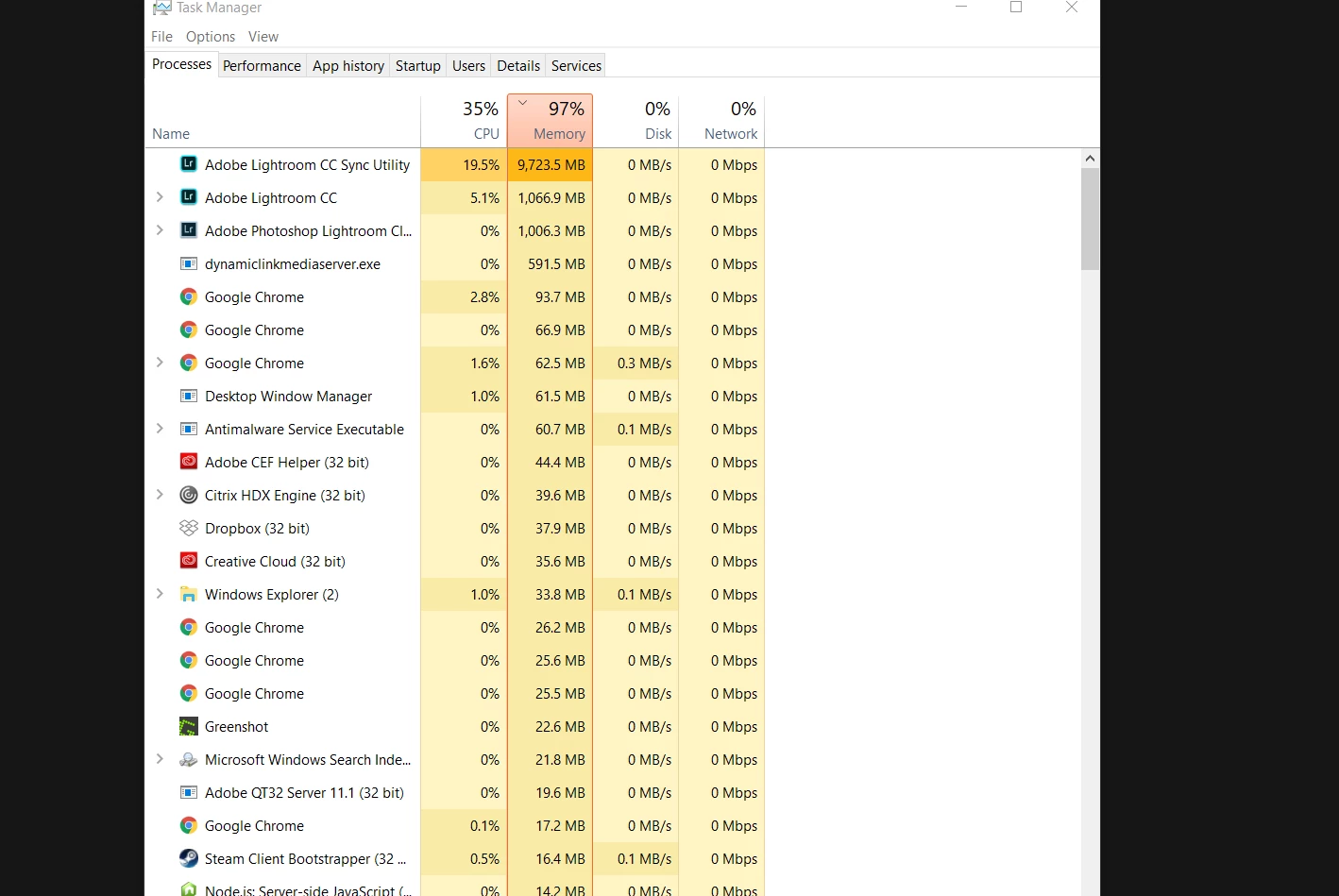
I attempted to migrate three catalogs to Lightroom CC but the sync seems stuck and the process is using up all of the memory in my computer.  It ramps up forever until Windows crashes.  I attached a screenshot of it using 10GB, it just grows by about 50MB per second non-stop.

Windows 10 64-bit version 1.0.

Thanks.

This topic has been closed for replies.
Correct answer chihone

Is your Lightroom photo catalog under any other Cloud services? Dropbox, onedrive, Google Backup & Sync...etc.

After talking to an Adobe Support tech I was informed that the migration can be problematic if your photo library is stored under another Cloud service as the read & write permissions of those folders can be constantly changing and it will mess up the migration.

This is exactly what gave me the same memory leak in my Lightroom CC Sync Utility. Mine kept hovering near maxed out memory even though I had 16 GBS, and the migration stopped short at 405 photos out of my 3400 total.

I wiped my Lightroom CC library clean to start the migration over (Go to Lighroom Classic Preferences, Lightroom CC, Delete all Data).

I then moved my photo library off of Dropbox and Google Backup & Sync.

Fixed a couple of broken link folders in Classic CC as a result of doing so.

Restarted the Migration process... and it's currently working as advertised, no more memory leak.

Hope this helps

5 replies

Participant
November 7, 2017

Delete your preview folder out of your Lightroom folder. I just did it and it work so far.

Participating Frequently
November 2, 2017

Have the same problem, Lightroom CC uploaded about 4000 photos no problem but for the past week or more it will not upload anything else for me. When I open it it says syncing the remaining number of photos but after a few mins the number is the same, then disappears completely and it just says "syncing photos" then adobe lightroom helper uses all 16GB of my ram and I have to quit the program. Love the fact that I'm paying 20 bucks a month for this crap. At first I thought their servers were overloaded, now I know thats not true. Support seems to be non-existent, really wish I didn't migrate

Bo Fahlberg Madsen
Participating Frequently
November 3, 2017

It seems that I have resoled the issue on my end. I just generated a new catalog and imported my old catalog into it. Lightroom is still downloading photos from CC, but it has used 8 GB of ram at the most, and not the crazy 45+ GB. I’ll let you guys know how it goes

indyrev
indyrevAuthor
Participating Frequently
November 5, 2017

Bo, this is what I ended up doing too.  It seemed to go the same distance as before (256GB uploaded or so) but now again it is stopped.  I feel like I may be encountering two issues: 1) this one with the memory leak, and 2) like this https://forums.adobe.com/thread/2400291​ where perhaps there's some corrupt file/folder which is holding up the upload.  I agree with you that if Adobe considers this adequate support for a paid product, they're fooling themselves.  I have half a mind to cancel my subscription and find a Lightroom replacement.

Having recreated my catalog into one merged catalog, enabling sync and then switching to Lightroom CC and migrating it, it seems to have solved the memory usage thing, it's just still not uploading everything.  I don't think this a very good way to fix the issue because I did lose a fair amount of collection and tagging information when I switched to a new catalog.

In terms of the issue holding up the upload itself, I wish there was an easy way to review the logs or something to see which files where causing it grief.

I actually do fall under the case which  Jayc57139230 explains where my Lightroom CC catalog folder is synced by Dropbox.  I have moved the catalog elsewhere, we'll see if that make it work any better, if so I may mark their answer as the correct answer. 

chihoneCorrect answer
Participant
November 2, 2017

Is your Lightroom photo catalog under any other Cloud services? Dropbox, onedrive, Google Backup & Sync...etc.

After talking to an Adobe Support tech I was informed that the migration can be problematic if your photo library is stored under another Cloud service as the read & write permissions of those folders can be constantly changing and it will mess up the migration.

This is exactly what gave me the same memory leak in my Lightroom CC Sync Utility. Mine kept hovering near maxed out memory even though I had 16 GBS, and the migration stopped short at 405 photos out of my 3400 total.

I wiped my Lightroom CC library clean to start the migration over (Go to Lighroom Classic Preferences, Lightroom CC, Delete all Data).

I then moved my photo library off of Dropbox and Google Backup & Sync.

Fixed a couple of broken link folders in Classic CC as a result of doing so.

Restarted the Migration process... and it's currently working as advertised, no more memory leak.

Hope this helps

Bo Fahlberg Madsen
Participating Frequently
November 2, 2017

I have my photos on an external drive which is conn to my iMac through a thunderbolt cable. My catalog is located on the same drive. I’ll chech the promtions to the drive.

Bo Fahlberg Madsen
Participating Frequently
October 30, 2017

I have the same issue on my iMac, and it kinda sucks that there really isn’t any good way to contact adobe suppor.

indyrev
indyrevAuthor
Participating Frequently
October 28, 2017

This forum is my only method of support on the Creative Cloud Photography plan.  I don't know who else to call.  I can hold alt and click the cloud icon which seems to show pending photos but it seems to me most of my photos are pending (18k+).  I tried re-installing the software.  I've tried killing the lightroomcchelper.exe process many times, it just does the same thing.  I've used Sysinternals ProcMon to monitor the process, and it seems to be fixated on one or two particular folders but I don't really know what to do with this information.  I'm afraid of just deleting any catalogs at this point because I don't want to lose my metadata.