
Participant
April 11, 2021
Beantwortet

Lightroom displaying washout out colors - Sony ARW

  • April 11, 2021
  • 1 Antwort
  • 670 Ansichten

Since I had purchased my Sony A6000 many years ago I have used Capture One to process my raw files. I decided recently that I wanted to try Lightroom and see if I liked it better or not. As I was trying out the software and going through images I hit a few that Lightroom processed so differently that I was not sure how I would handle it. Attached is a sample image from both applications. Capture One on left.... Lightroom on the right. As you can see the image from Lightroom has taken the purple lighting and completely washed out all detail on the tree. On some of the branches the images shows almost pure white. My question is there anything I can do to guide Lightroom into processing these images correctly?
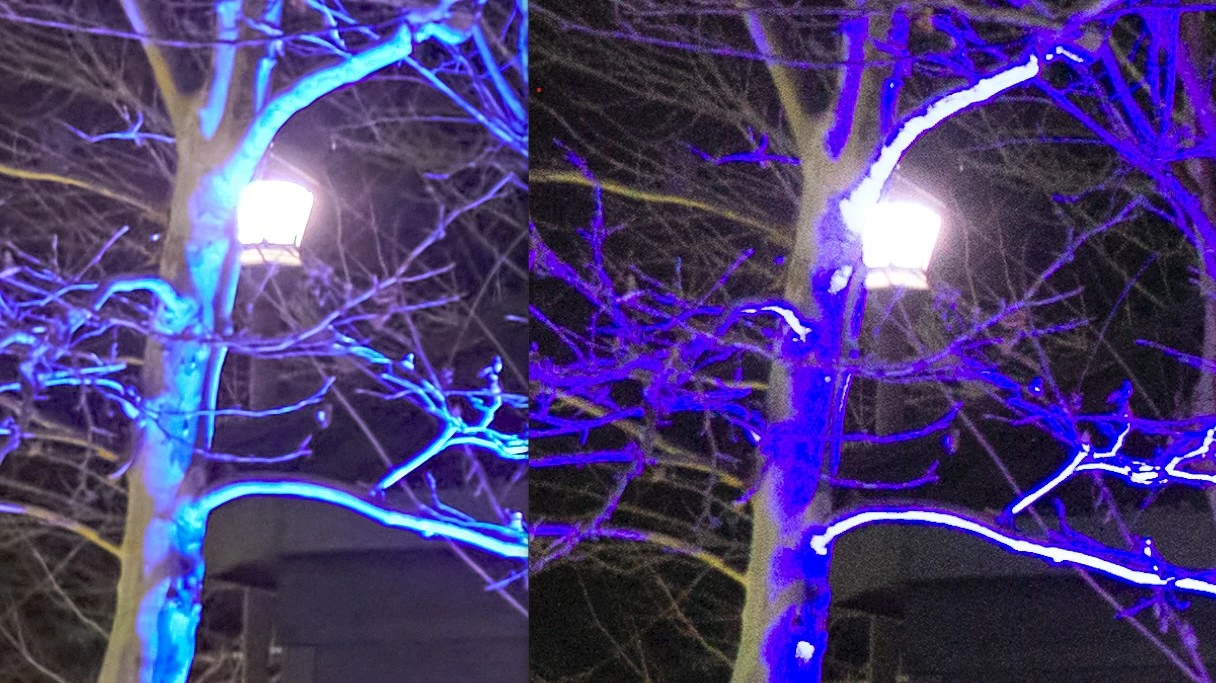


Dieses Thema wurde für Antworten geschlossen.
Beste Antwort von Jao vdL

Very strange. Never seen anything like that. The white areas showing red does mean that they are blown out which is of course expected for this subject. Have you tried using the camera standard profile for these files?

1 Antwort

Community Expert
April 11, 2021

Looks like you might have clipping warnings turned on. It is enabled by clicking the little triangles at the left and right ends of the histogram. You can also turn the clipping warnings on and off by hitting the J key. Very easy to happen by accident. Not sure why the blue areas under the tree are showing bright white. What kind of edits are you applying?

BradN1Autor
Participant
April 11, 2021

Currently, Its has only the default settings when you first import a image. I turned off and on the clipping warnings but it doesn't see related. Though the dark areas that are clipped are almost the exact same color as the tree. White areas show red.


Jao vdLCommunity ExpertAntwort
Community Expert
April 11, 2021

Very strange. Never seen anything like that. The white areas showing red does mean that they are blown out which is of course expected for this subject. Have you tried using the camera standard profile for these files?