
Participating Frequently
February 10, 2024
Question

Lightroom Histogram

  • February 10, 2024
  • 2 replies
  • 612 views

Hello,

I'm happy with the new Lightroom but I have an issue with the histogram. In my workflow I'm very depended looking at my histogram but it seems that within the new Lightroom there is slightly more more information in highlights comparing with same settings of image in Adobe Camera RAW and Photoshop.
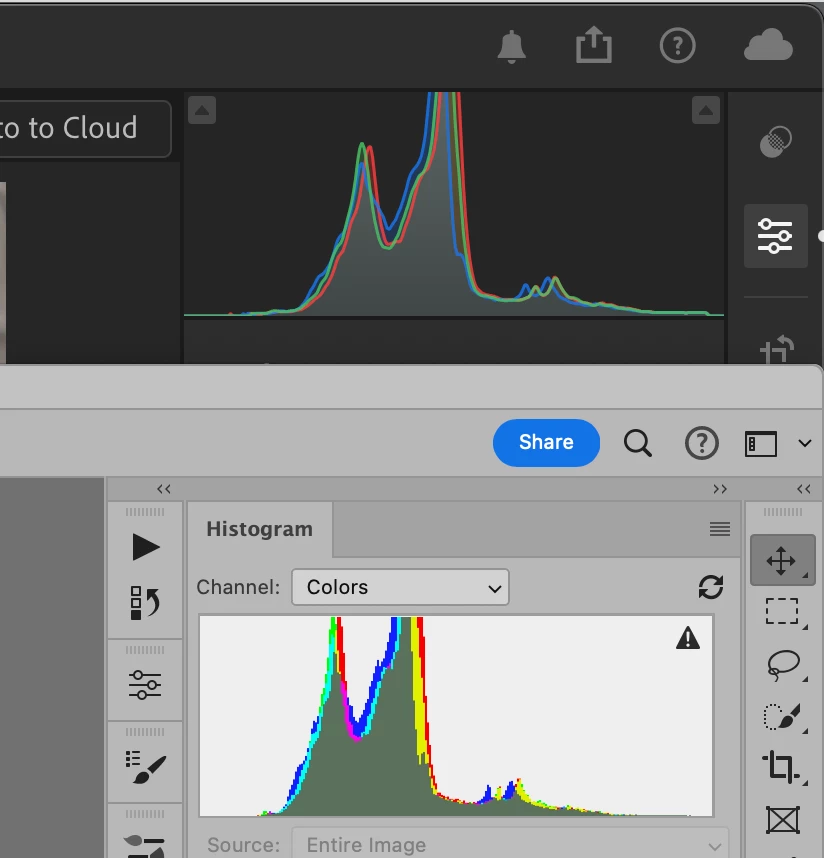
This topic has been closed for replies.

2 replies

JohanElzenga
Community Expert
Community Expert
February 10, 2024

Click on the triangle with the exclamation mark in it in the Photoshop histogram. This warning means the histogram is not up to date, so your comparison is not valid anyway.


-- Johan W. Elzenga
Community Expert
February 10, 2024

This happens because you are not looking at the histogram in the same color space. In Lightroom (both versions, none is the new version they are both just as new) the histogram is in a special colorspace that has prophotoRGB primaries and sRGB tone curve. No such thing exists in photoshop, camera raw or any other software. Even if you choose prophotoRGB in photoshop or camera raw, the histogram will look different because of the different tone curves. In classic, you can turn on soft proof and see the histogram in a color space that is available in other programs such as sRGB, display p3, adobeRGB, prophotoRGB etc. There is no soft proof in Lightroom cloudy unfortunately so you can't do that in the cloud based version.

Participating Frequently
February 10, 2024
Thanks for respons…..well it’s just a minor thing for me but it caught my eye. Don’t know why it will come
out in ProPhoto RGB it’s a huge space that I will never use unlike some people who do use it. There’s no
screen or printer that handle this space.
I had my reasons to step over to the new Lightroom instead of using Bridge and ACR as a workflow.
Thanks
JohanElzenga
Community Expert
Community Expert
February 10, 2024
quote
There’s no screen or printer that handle this space.
By @ronm46318456


Indeed there is not, but ProPhotoRGB is important for printing nevertheless. The reason is that the shape of RGB color spaces is very different from the shape of the CMYK color spaces that printers use. If you want to use all the colors that your printer can print, then you need to start from an RGB color space that covers all those CMYK colors, which means that this RGB space must be very large. ProPhotoRGB is one of the few RGB spaces that does include all the colors that a modern 12 or 14 inks inkjet printer can print.


-- Johan W. Elzenga