mosyukov
Participant
April 12, 2020
Question

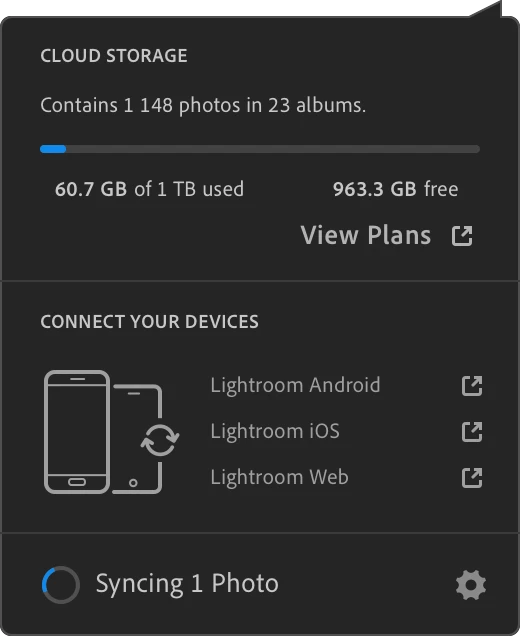
Lightroom is stuck syncing one photo forever

  • April 12, 2020
  • 4 replies
  • 831 views

Hello Internet.


This is the kind of issue that keeps coming up on the forum for years, yet seemingly no bug fix has ever been issued.

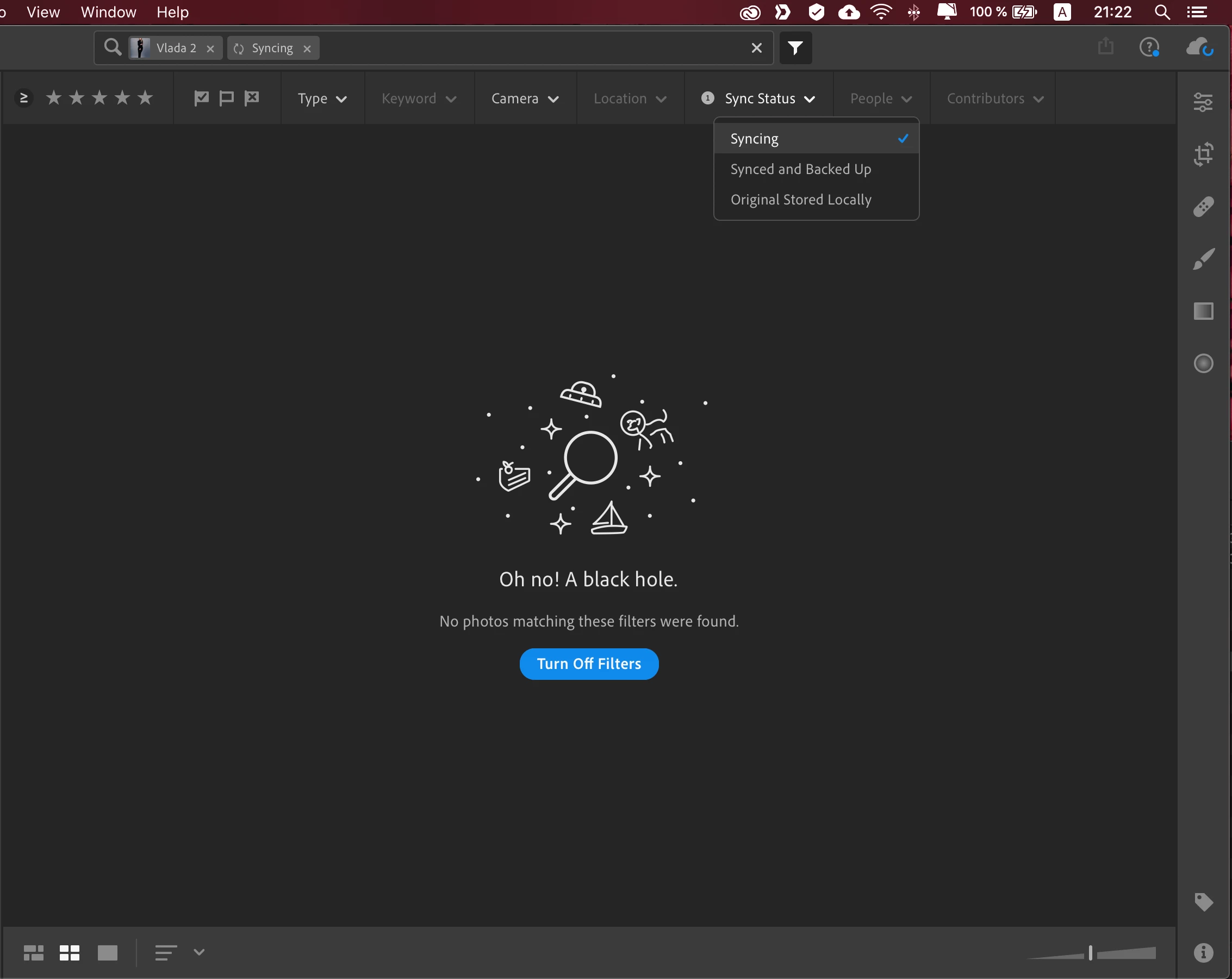
Allow me to show it visually. One mysterious photo keeps syncing forever and ever (amen?).

Please, help me. My inner perfectionist is now extremely, extremely annoyed by this. 

Thank you.


PS. Also, why can I not change my Support Community Screen Name? I've edited it in the account settings as suggested, with no effect on my Community Screen Name. 


Honestly, dear Adobe. Does it all absolutely need to be painful?


This topic has been closed for replies.

4 replies

Participant
April 17, 2020

I got this fixed last night. I uninstalled Lightroom via the Cloud app. Then deleted the library files (for library files were in the Pictures folder on Mac and in a hidden AppData/... folder on PC). Reinstalled Lightroom from the Cloud app, the photos started coming back into my library and at the end it showed as synced and backed up (no photos stuck syncing). The crucial step in my fix was to pause the syncing on all devices while resetting just one device at a time. My MacBook Pro and PC both had issues. Now fully resolved. Also, you may be able to see which photo is causing issues using lightroom.adobe.com. There was a item called something like "sync errors", I found the photo that was causing the sync issue there and deleted it permenantly before starting my reinstalling of lightroom as above.

Participant
April 27, 2020

Reinstalling worked for me this time, after deleting the library file and completely reloading from the cloud.  I hope I don't have to do this too often.  It would be good to know what conditions cause, and what can be done to avoid, what looks like a corruption to the library file.


gordaansiosa
Participant
April 15, 2020

Same problem here, stuck syncing 2 pictures, but under Sync Status - > Syncing is showing no results.

Participant
April 14, 2020

Yes, same problem for me.  I fixed it once some time ago by reinstalling.  A few weeks ago it started showing 2 photos syncing and in the last few days has gone up to 3 photos syncing.  Search for photos syncing shows nothing.  I can't put my finger on anything that might have triggered this.  It all still seems to work OK, but is very annoying.


Participant
April 15, 2020

I just tried reinstalling, no luck this time, as soon as it connected it was back to 3 photos syncing.

I am using LR from a desktop (iMac), and laptop (Macbook).  The sync issue is only on the iMac.  I tried forcing it to sync everything by adding a keyword to every photo via the Macbook.  It syncs the keywords OK and then goes back to 3 photos.  There must be something local to the iMac cauing the issue.


Participant
April 12, 2020

Same problem here. Using the webs interface, I checked the Sync Conflics and found the filename of the problem file. I deleted the file (permenantly) but it's still forever showing "Syncing 1 Photo".