
Participant
February 27, 2020
Question

Lightroom limited functionality.

  • February 27, 2020
  • 3 replies
  • 813 views

Всем привет. Ребята, прошу помощи. Пользователю нужен был Lightroom Classic. Заказчик купил Lightroom. Пользователь не совсем понимает как пользоваться этой версией Lightroom. Возможно кто то подскажет.
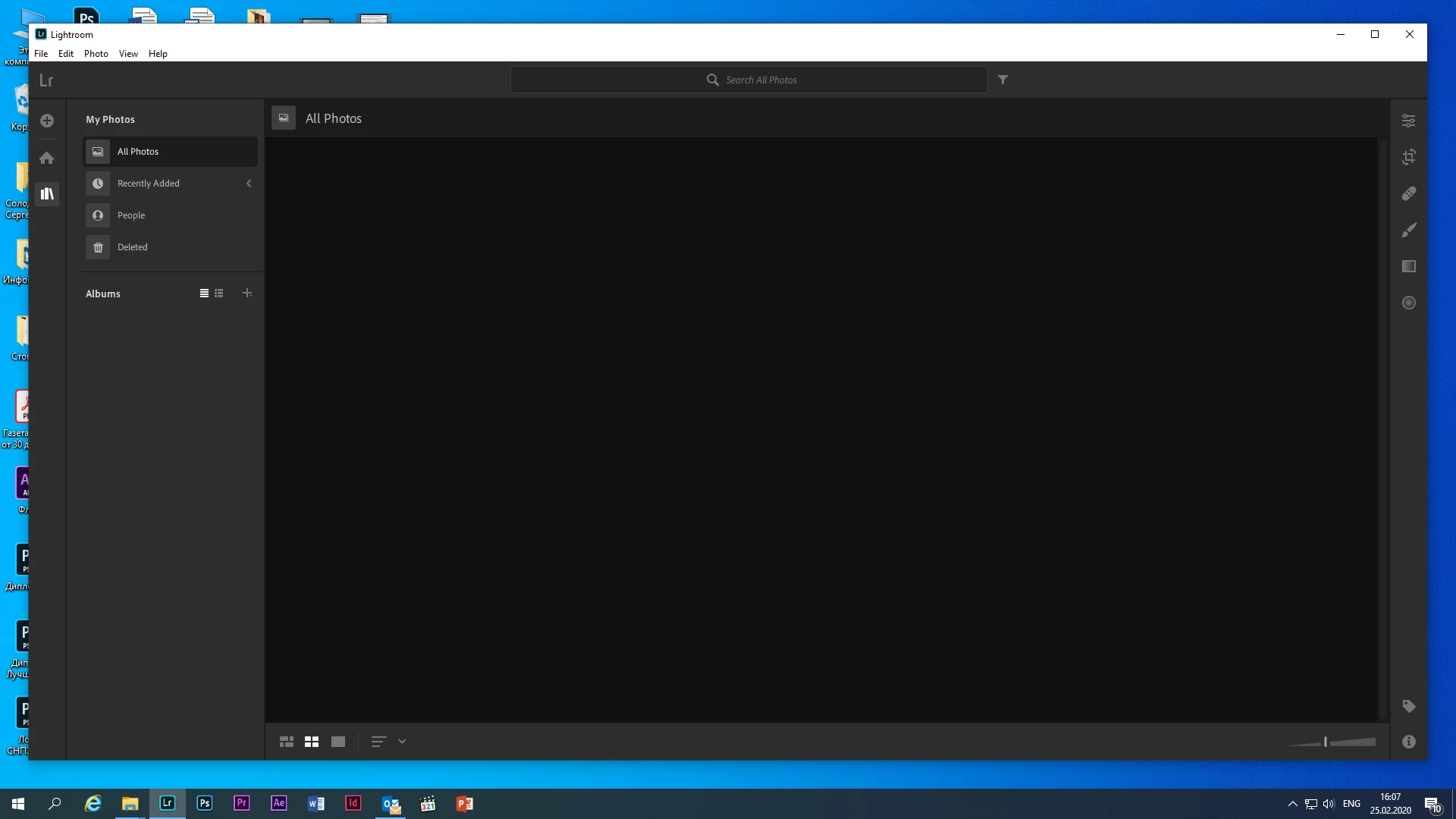
После запуска неактивна часть фенкционала (слева кнопки + и дом).

Hello. Guys, please help. The user needed Lightroom Classic. The customer bought Lightroom. The user does not quite understand how to use this version of Lightroom. Maybe someone will tell you.
After starting, the part of the functional is inactive (on the left is the + button and the house).
This topic has been closed for replies.

3 replies

TokarevpvAuthor
Participant
February 28, 2020

Unable to connect to network
There is an assumption. Access to the Internet is blocked by the security service. Where can I get technical information? You need to find out the addresses and ports on which the program works.


Rob_Cullen
Community Expert
Community Expert
February 28, 2020

Sorry, I cannot be of more technical help.

See the Adobe help on Connectivity issues at-

https://helpx.adobe.com/creative-cloud/kb/troubleshoot-download-install.html#network_connectivity_issues


Must be Signed-In with the Creative Cloud Desktop App and be on-line to the web.


Regards. My System: Windows-11, Lightroom-Classic 15.1.1, Photoshop 27.3.1, ACR 18.1.1, Lightroom 9.0, Lr-iOS 10.4.0, Bridge 16.0.2 .
Rob_Cullen
Community Expert
Community Expert
February 28, 2020

The catalog in Lightroom is empty (no photos) until some have been imported to the catalog. Lightroom will  store them in the Cloud.

Menu: File/Add Photos will import selected photos.

Regards. My System: Windows-11, Lightroom-Classic 15.1.1, Photoshop 27.3.1, ACR 18.1.1, Lightroom 9.0, Lr-iOS 10.4.0, Bridge 16.0.2 .
TokarevpvAuthor
Participant
February 28, 2020

This field is not active.


Akash Sharma
Legend
February 27, 2020

Hi there,


Sorry that Lightroom desktop is showing no images in the grid and is blank. Please sign out of Lightroom app and see if that helps?


  1. From the menu bar, choose Help > Sign Out.
  2. Lightroom will now restart. 
  3. Sign in with your Adobe ID again when prompted.  


Thanks,

Akash

TokarevpvAuthor
Participant
February 28, 2020

thanks but it didn’t help