

Lightroom - "No images that can be imported were found" importing from External SSD
In Lightroom (see version info below) I cannot import any images into my albums from a connected external SSD drive. The folder is a mix of JPG and MOV files taken with my Olympus OM-D E-M10 Mark IV. I was successful importing some images to my albums from the camera directly by selecting a subfolder of it as a connected device, set to STORAGE option and connected via USB cable. But EACH TIME the process takes forever, because the camera contains 1819 image and movie elements. I would think after the inital scan, the image information would be cached so it would not have to rescan each time. This is also very frustrating because there is no progress control/window to indicate progress. The application just turns white, reports it is not responding, but if left alone for 5-10 minutes, all the images just appear to be selected from.
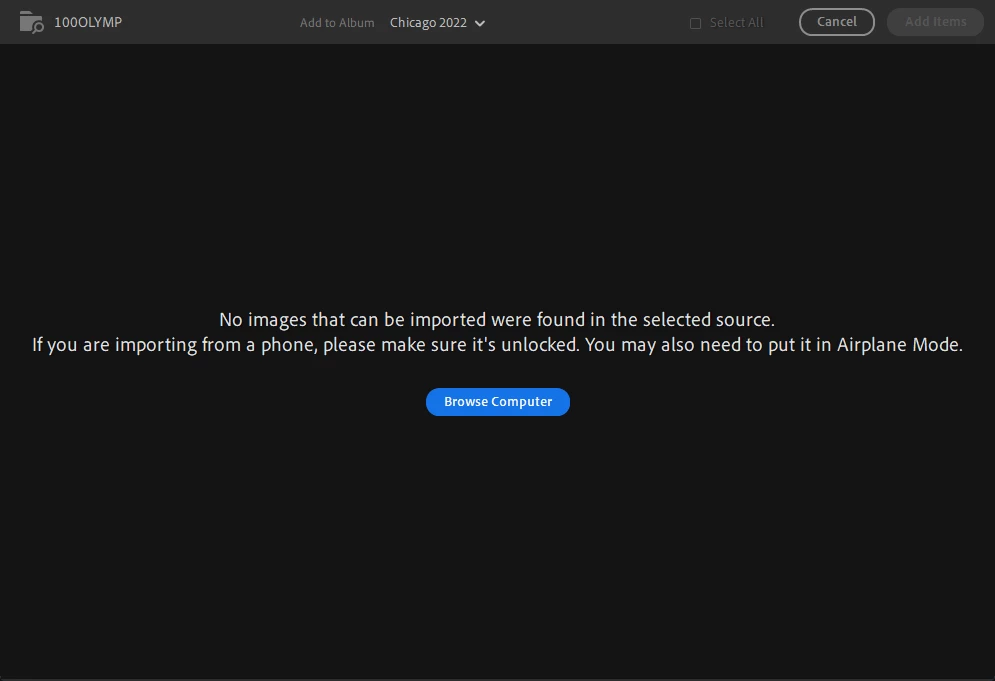
So I decided to copy all the files to one of my fast external SSD drives first, then try to add from that drive. Which is how I ended up with this issue of "No images that can be imported were found..." when selecting the folder holding the copied files on the SSD. I can see the images just fine in Windows Explorer and in OM Workspace 2.1. Version info is below the screen shot of the error.
PLEASE HELP! Thank you.
Running Windows 11 Pro
Edition Windows 11 Pro
Version 22H2
Installed on (CLASSIFIED)
OS build 22621.819
Experience Windows Feature Experience Pack 1000.22636.1000.0
DELL Alienware m15 R6
Device name (CLASSIFIED)
Processor 11th Gen Intel(R) Core(TM) i7-11800H @ 2.30GHz 2.30 GHz
Installed RAM 32.0 GB (31.7 GB usable)
Device ID (CLASSIFIED)
Product ID (CLASSIFIED)
System type 64-bit operating system, x64-based processor
Pen and touch No pen or touch input is available for this display
LIGHTROOM
Lightroom version: 6.0 x64 [ 20220928-0910-e5c3644 ] (Sep 28 2022)
NGL Version: 1.31.0.19
WF Version: 5.0 0e17e26
VF Version: 1.0.119.3
HIL Version: 40405
Operating system: Windows 11
OS Version: Windows 11 Pro (2009)
Application architecture: x64
System architecture: x64
Computer model: Alienware Alienware m15 R6 / 11th Gen Intel(R) Core(TM) i7-11800H @ 2.30GHz
Logical processor count: 16
Processor speed: 2.3 GHz
Built-in memory: 32510.7 MB
Real memory available to Lightroom: 32510.7 MB
Real memory used by Lightroom: 382.3 MB (1.1%)
Virtual memory used by Lightroom: 663.7 MB
Memory cache size: 8.3 MB
Internal Camera Raw version: 15.0 [ 1261 ]
Maximum thread count used by Camera Raw: 9
Camera Raw SIMD optimization: SSE2,AVX,AVX2
Camera Raw virtual memory: 0MB / 16255MB (0%)
Displays: 1) 2560x1440, 2) 2560x1440, 3) 2560x1440, 4) 1280x800
System DPI setting: 96 DPI
Desktop composition enabled: Yes
Input types: Multitouch: No, Integrated touch: No, Integrated pen: No, External touch: No, External pen: No, Keyboard: No
Graphics Processor Info: DirectX: NVIDIA GeForce RTX 3060 Laptop GPU (30.0.15.1272) - 6 GB
Graphics Processor Detail: loaded: Yes, supported: Yes, compute: Yes, init: I4_GPU3, hard: success, soft: success, al: Yes, dl: No
OS Media Capability: true
Application Folder: C:\Program Files\Adobe\Adobe Lightroom CC
Settings Folder: C:\Users\hopwo\AppData\Roaming\Adobe\Lightroom CC
Library Folder: C:\Users\hopwo\AppData\Local\Adobe\Lightroom CC\Data
 AdChoices