
Participant
July 8, 2021
Answered

lost "details" slider in the Detail panel of the Edit window

  • July 8, 2021
  • 1 reply
  • 346 views

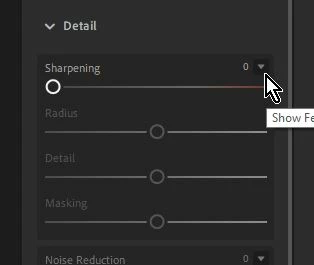
I was using Lightroom to edit some photos.  I think I clicked where/when I shouldn't have and suddenly lost the "details" slider in the Detail panel of the Edit window.  How do I get it back?  Right now in that panel I have "sharpening," "noise reduction," and "color noise reduction," but nothing else.
This topic has been closed for replies.
Correct answer Rob_Cullen

Click on the 'carrot' icon to expand the other Detail sliders and make them visible-

1 reply

Rob_Cullen
Community Expert
Rob_CullenCommunity ExpertCorrect answer
Community Expert
July 9, 2021

Click on the 'carrot' icon to expand the other Detail sliders and make them visible-

Regards. My System: Windows-11, Lightroom-Classic 15.1.1, Photoshop 27.3.1, ACR 18.1.1, Lightroom 9.0, Lr-iOS 10.4.0, Bridge 16.0.2 .
Participant
July 9, 2021
Got it! Thanks a bunch! I knew it had to be a simple 'click' somewhere -
I just couldn't figure out where.