
Exit
  • Global community
    • Language:
      • Deutsch
      • English
      • Español
      • Français
      • Português
  • 日本語コミュニティ
  • 한국 커뮤니티
0

lost "details" slider in the Detail panel of the Edit window

New Here ,
Jul 08, 2021 Jul 08, 2021

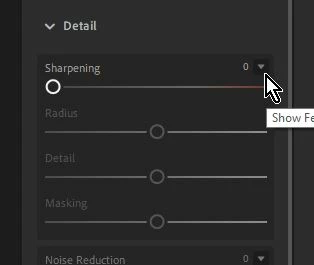
I was using Lightroom to edit some photos.  I think I clicked where/when I shouldn't have and suddenly lost the "details" slider in the Detail panel of the Edit window.  How do I get it back?  Right now in that panel I have "sharpening," "noise reduction," and "color noise reduction," but nothing else.
347
Translate
Report
Community guidelines
Be kind and respectful, give credit to the original source of content, and search for duplicates before posting. Learn more
community guidelines

correct answers 1 Correct answer

Community Expert , Jul 08, 2021 Jul 08, 2021

Click on the 'carrot' icon to expand the other Detail sliders and make them visible-

2021-07-09 16_27_10-Lightroom.jpg

Translate
Community Expert ,
Jul 08, 2021 Jul 08, 2021

Click on the 'carrot' icon to expand the other Detail sliders and make them visible-

2021-07-09 16_27_10-Lightroom.jpg

Regards. My System: Windows-11, Lightroom-Classic 15.0, Photoshop 27.0, ACR 18.0, Lightroom 9.0, Lr-iOS 10.4.0, Bridge 16.0 .
Translate
Report
Community guidelines
Be kind and respectful, give credit to the original source of content, and search for duplicates before posting. Learn more
community guidelines
New Here ,
Jul 09, 2021 Jul 09, 2021
LATEST
Got it! Thanks a bunch! I knew it had to be a simple 'click' somewhere -
I just couldn't figure out where.
Translate
Report
Community guidelines
Be kind and respectful, give credit to the original source of content, and search for duplicates before posting. Learn more
community guidelines