Exit
  • Global community
    • Language:
      • Deutsch
      • English
      • Español
      • Français
      • Português
  • 日本語コミュニティ
  • 한국 커뮤니티
0

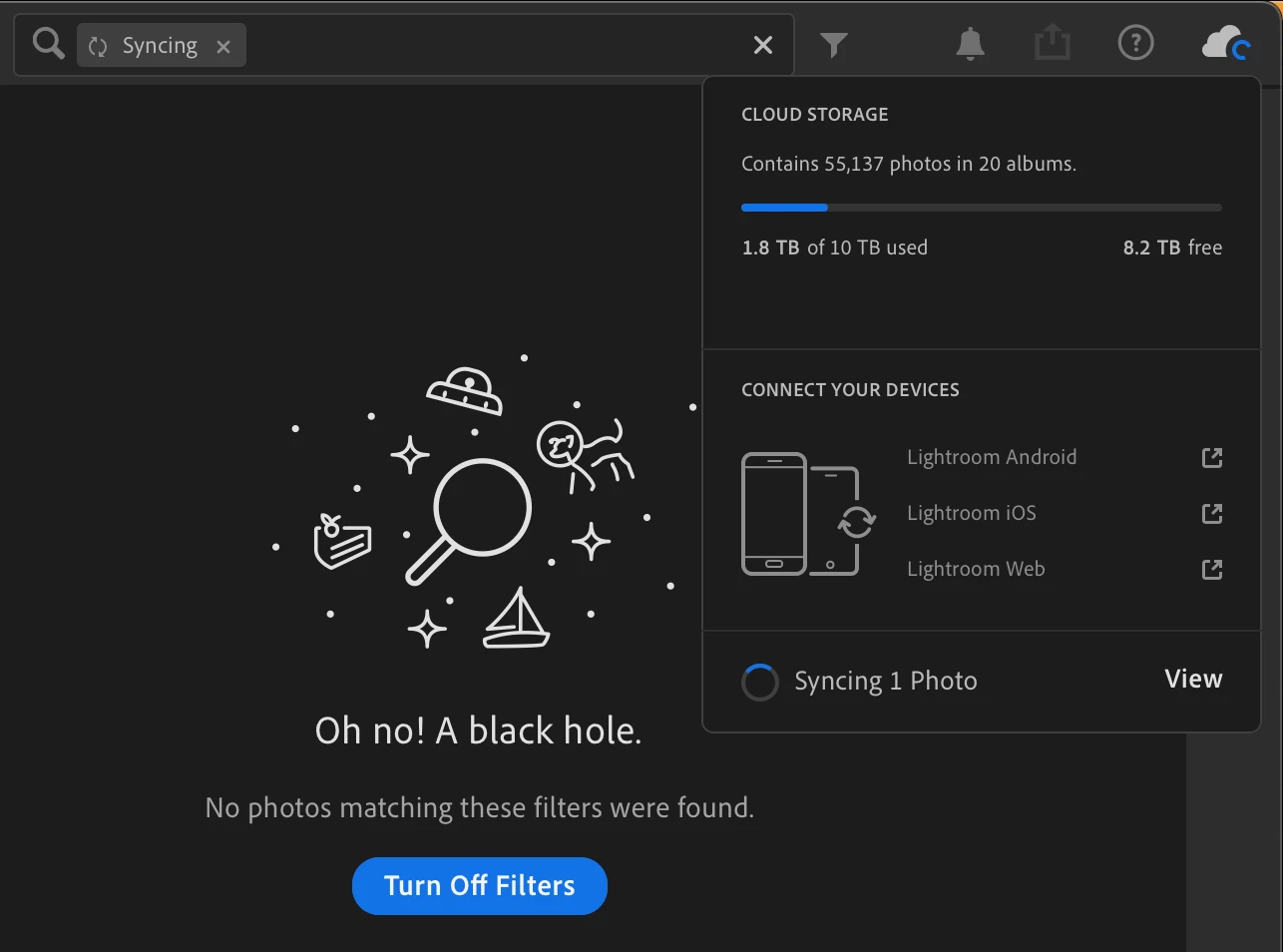
Lr Cloud get stuck in syncing 1 photo forever
New Here ,
Jan 08, 2022 Jan 08, 2022

Lightroom Syncing Stuck.png

Just like the screenshot, Lr shows 1 photo in syncing while there is nothing in syncing at all.

This issue has been bothering me for months. Rebooting macOS doesn't help.

TOPICS
macOS
546
Translate
Report
Community guidelines
Be kind and respectful, give credit to the original source of content, and search for duplicates before posting. Learn more
community guidelines
Adobe Employee ,
Jan 08, 2022 Jan 08, 2022

In a browser, log in with the same Adobe ID at https://lightroom.adobe.com and, in the upper right look for a system album named Sync Issues. Do you see any images there? If so, clicking on the image should give you instructions on how to clear that particular image. 


SyncIssuesWeb.png

Rikk Flohr: Adobe Photography Org
Translate
Report
Community guidelines
Be kind and respectful, give credit to the original source of content, and search for duplicates before posting. Learn more
community guidelines
New Here ,
Jan 08, 2022 Jan 08, 2022

Yes ! There are 18 photos. They are all photos that have not yet been synchronized on my phone.

KrosDai_0-1641696675649.png

I deleted them all and restarted Lr, the issue is still there.

KrosDai_1-1641696852945.png

KrosDai_2-1641696912893.png


Translate
Report
Community guidelines
Be kind and respectful, give credit to the original source of content, and search for duplicates before posting. Learn more
community guidelines
Adobe Employee ,
Jan 09, 2022 Jan 09, 2022

The best thing to have done would have been to allow those photos to complete syncing from your phone.  Unfortunately deleting them may have complicated the matter.


  • From which platform did you perform the delete?
  • Did you remove them from Deleted Items after deleting?
  • Did you allow all devices to complete the sync after the delete and the removal from Deleted items?


Rikk Flohr: Adobe Photography Org
Translate
Report
Community guidelines
Be kind and respectful, give credit to the original source of content, and search for duplicates before posting. Learn more
community guidelines
New Here ,
Jan 09, 2022 Jan 09, 2022

However, I'm pretty sure that my problem has nothing to do with this sync issue. The sync is fine on my another macOS Lr.

 
Translate
Report
Community guidelines
Be kind and respectful, give credit to the original source of content, and search for duplicates before posting. Learn more
community guidelines
Adobe Employee ,
Jan 10, 2022 Jan 10, 2022

Please, remove them from the trash via Lightroom Web and allow all devices an active internet connection and at least an hour of sync time with the App(s) open and in the foreground.  


Then list each device individually and provide its total synced items and pending sync items. 


Thank you.

Rikk Flohr: Adobe Photography Org
Translate
Report
Community guidelines
Be kind and respectful, give credit to the original source of content, and search for duplicates before posting. Learn more
community guidelines
New Here ,
Jan 10, 2022 Jan 10, 2022

Unfortunately, all those devices were either reset to factory mode or sold ...

Translate
Report
Community guidelines
Be kind and respectful, give credit to the original source of content, and search for duplicates before posting. Learn more
community guidelines
Adobe Employee ,
Jan 11, 2022 Jan 11, 2022

Then the files need to be removed from Deleted items and the remaining devices need to be allowed to sync. If you no longer have a device and its sync was partial - those partially synced items need to be completely removed. 

Rikk Flohr: Adobe Photography Org
Translate
Report
Community guidelines
Be kind and respectful, give credit to the original source of content, and search for duplicates before posting. Learn more
community guidelines
New Here ,
Jan 12, 2022 Jan 12, 2022

They have been completely deleted, but the matter is still there.

Translate
Report
Community guidelines
Be kind and respectful, give credit to the original source of content, and search for duplicates before posting. Learn more
community guidelines
Adobe Employee ,
Jan 14, 2022 Jan 14, 2022
LATEST

If at https://lightroom.adobe.com you have:

  • No Images listed in Sync Issues Folder
  • No items in deleted folders


and


If on all other currently syncing devices/computers you have:

  • A status of Synced and Backed up


Then you will need to go to the client showing 1 image syncing and provide us a diagnostic log for the engineers to review. 


For LrDesktop

  • Go to Preferences
  • Account Section
  • Hold down the [Opt/Alt] key to make [Diagnostic Log] button appear.


When you have the log ready, notify me on this thread and I will send instructions for delivering it to us.


Rikk Flohr: Adobe Photography Org
Translate
Report
Community guidelines
Be kind and respectful, give credit to the original source of content, and search for duplicates before posting. Learn more
community guidelines