
Question
Lr cloudy falsely claims NAS is out of disk space for original copies
Hi All,
I'm having an issue where LR (cloudy) always claims that the volume where I "store a copy of all originals" is full. Here is our setup:
- My wife is running LR cloudy on a Win10 machine and has "store a copy of all originals" disabled. She is in the process of importing and curating our archive of photos in small batches. She doesn't seem to have any issues and our photos are visible on our iOS devices.
- I am running LR cloudy v3.3 (20200611... build) on MacOS Catalina 10.15.5 with "store a copy of all originals" enabled and pointing to a volume on a NAS (Synology DS413) on our local network.
- I have tons of free space both on my local drive (> 400GB free) and the NAS ( > 4TB free)
- We are on the 120GB plan and LR shows we have about 60GB free there
The issue:
- When I launch LR on my machine, I always get an error dialog "Unable to Move Some Photos"
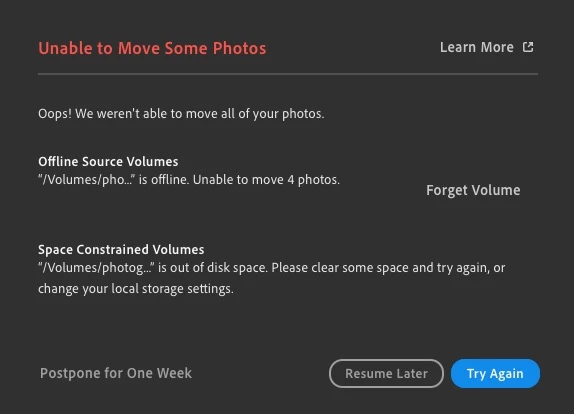
- Clicking "Try Again" retries those 4 photos and always fails. This is more of an annoyance than anything and I'd be fine if this were the only issue.
- If I click "Resume Later" (or really if I don't do anything or just keep clicking "Try Again"), eventually I get a red banner across the top:
 along with a red circle with an exclamation point on the cloud icon in the upper right of the screen.
- In addition, all recent photos uploaded by my wife also display the red circle with an exclamation point along with the error "Not synced, disk full Waiting to download, please clear some space..."
- Here's the strang(est) thing: if I wait and leave LR running, nothing happens; however, if I quit LR and relaunch it (sometimes multiple times), at some point, those newly imported photos have actually been synchronized and copied up to the NAS. This is ok for a temp workaround, but I don't think my psyche can handle doing that long term.
I've been getting that initial error about the 4 "unmovable" photos for quite some time, but the "volume is full" error is relatively new (we successfully used this workflow for more than 9000 images before this started happening). Here's a screengrab of my local settings:
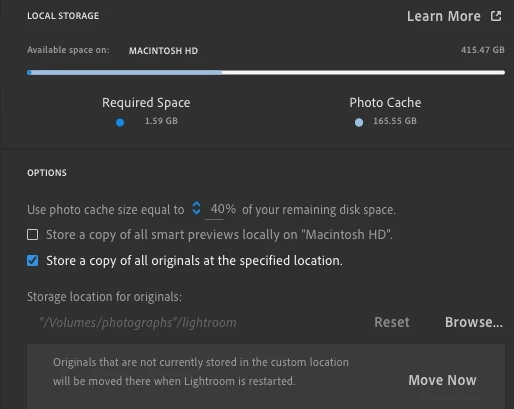
I'm wondering if it's all tied to those 4 "unmovable" photos, that somehow that error is confusing the rest of the sync process, but I don't know how to identify them (if I filter on "syncing", eventually that filter gets down to 0 photos).
Help! Any pointers would be appreciated.
 AdChoices