
jjc97158674
Known Participant
April 28, 2023
Answered

LR Mobile export to Camera Roll (Photos - IOS) Colors are washed..

  • April 28, 2023
  • 1 reply
  • 9488 views

This is becoming super frustrating and continues to drive me to the brink of madness. Attached is the photo i'm editing in LR Mobile on the left (which has the correct color and contrast, detail etc) and when i save it to my Iphone 13 Pro you can see the color is chalky, washed, and loss of contrast; on the right. This is one unacceptable and infuriating, to spend all this money on equipment and software just to get an inaccurate photo is mind boggling. I have also turned off my 'HRD' settings in my Photos app so this is the direct comparison. Any help is super appreciated!!!
Correct answer Jao vdL

The reason this is happening is that you are selecting a too narrow colorspace for the color of the sea in that image. You are probably chosing sRGB and that jade color is not possible in sRGB. So simply make sure you export to display P3 instead (the colorspace your iPhone's display is in).

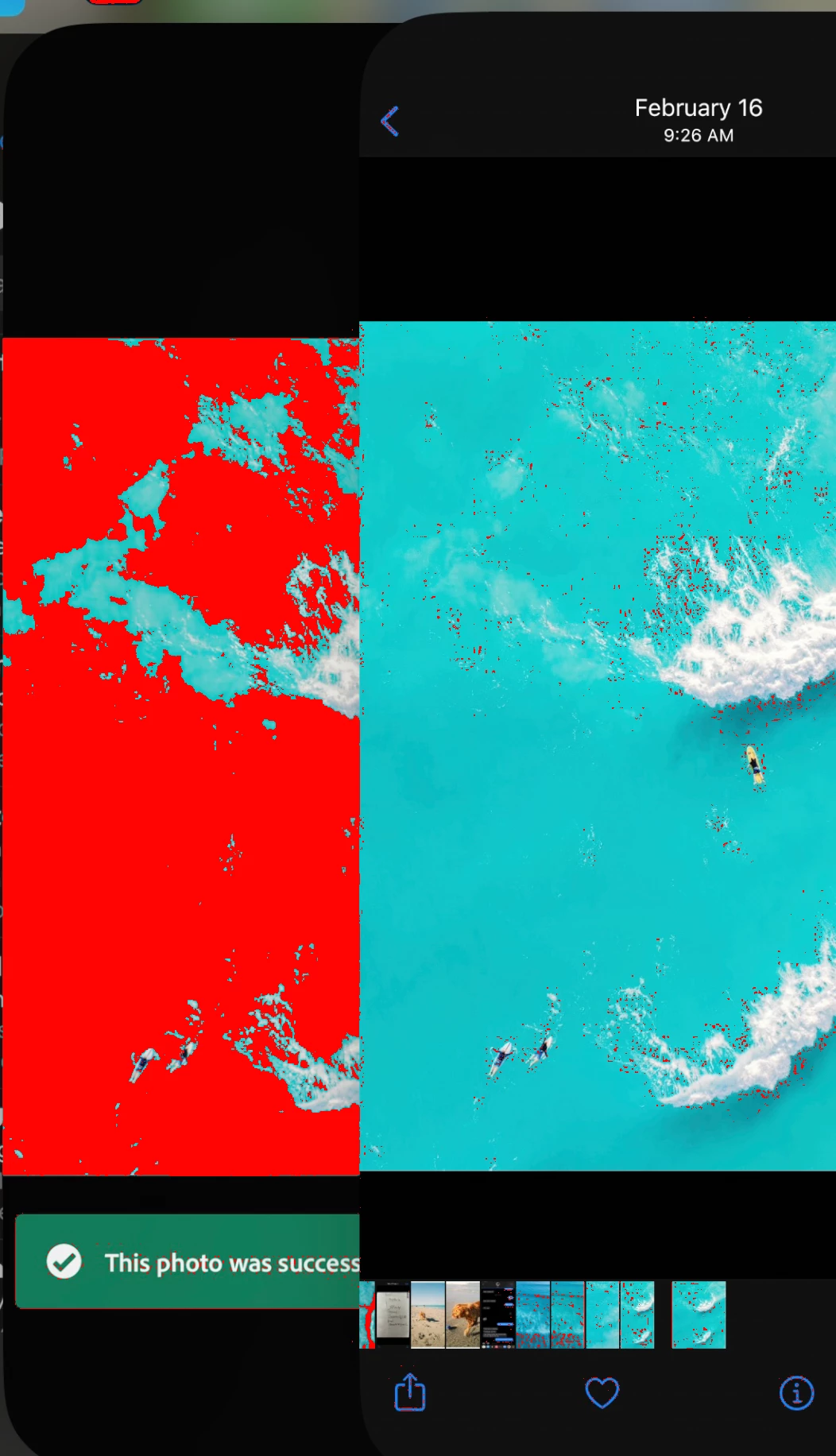
Here is the proof. Soft proofing your screenshot to sRGB in Classic. You can see the left (your Lightroom app) is way out of sRGB gamut (red areas). That color simply cannot be displayed in sRGB. Right is not clipped because the export already clipped it to sRGB and dulled the colors as a result. You can set the options on how to export using the tiny little buttons on the right hand side of of the share button, then choose "More options"->Color Space

1 reply

Jao vdLCommunity ExpertCorrect answer
Community Expert
April 28, 2023

The reason this is happening is that you are selecting a too narrow colorspace for the color of the sea in that image. You are probably chosing sRGB and that jade color is not possible in sRGB. So simply make sure you export to display P3 instead (the colorspace your iPhone's display is in).

Here is the proof. Soft proofing your screenshot to sRGB in Classic. You can see the left (your Lightroom app) is way out of sRGB gamut (red areas). That color simply cannot be displayed in sRGB. Right is not clipped because the export already clipped it to sRGB and dulled the colors as a result. You can set the options on how to export using the tiny little buttons on the right hand side of of the share button, then choose "More options"->Color Space

Rick.Williams
Known Participant
April 29, 2023

I really wish Adobe would offer more guidence, or ever default to P3. I bet a lot of users are affected by this and don't even realize it.

jjc97158674
Known Participant
May 1, 2023

I think you would be better off exporting in P3.


why do you say that Rick?