
Inspiring
October 18, 2024
Question

LrC Migration Success on Macbook/Partial Succes on iOS?

  • October 18, 2024
  • 2 replies
  • 266 views

Recently migrated from LrC to Lightroom. All seemed to go well. Lightroom on my macbookpro (Sonoma 14.6.1) shows all 21,000+ photos in my albums in the Cloud. BUT both my iPhone15Pro  (17.6.1) and iPadPro (17.6.1) include only about 5,600 photos. While all the albums are present, most are either empty or contain only a few photos.  How do I fix this? Why isn't the Lightroom Cloud the same for all three, that is, just like on my macbook?


Perhaps this helps with a diagnosis?:  The Cloud icon on the iOS devices says "Synced and backed-up" (which obviously they are not, at least not fully). However, on the macbook (which actually appears to be fully synced and backed-up), the Lightroom Cloud icon has a red exclamation mark. When I click on it, I get this message box:
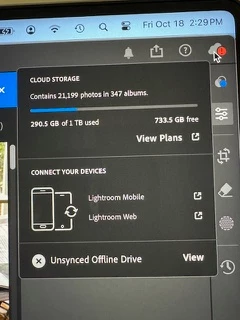
 

Under Connect Your Devices, when I click on the Lightroom Mobile, it tells me that it is included with my Adobe plan and suggests I download it. But it's already downloaded on both iOS devices.  Don't know why I'm getting that message, and maybe it has nothing to do with my problem. Alternatively, if I click on Lightroom Web it takes me to a screen just like I see with my iOS devices. That is, one with only 5,600 photos.

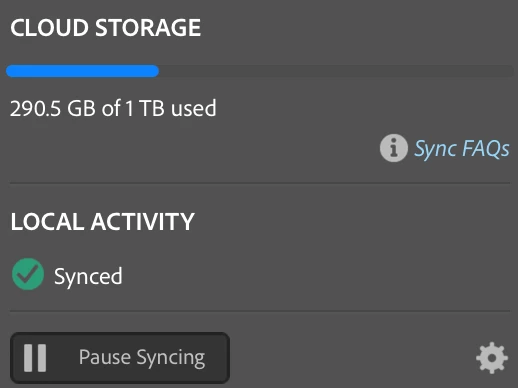
Note: Within LrClassic, the Cloud icon shows this:
This is Lightroom info from my macbook:
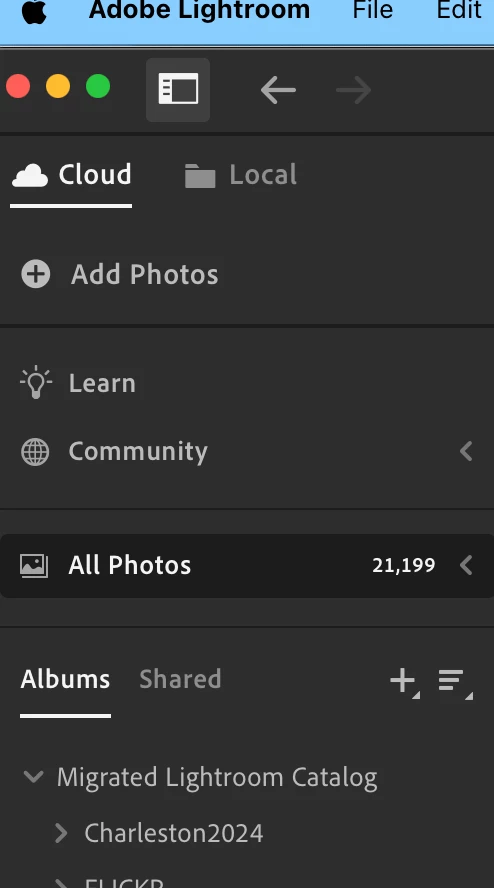
 

Would really appreciate knowing how get my iOS devices to match the 21,000 photos I see when I use Lightroom on my macbook. Thanks for your help, Rob


This topic has been closed for replies.

2 replies

selondon
Community Expert
Community Expert
October 23, 2024

@Robert222352864k1y 
The issue is related to the incomplete sync from Lightroom Desktop. What is the Unsynced Offline Drive (you should be able to check this is Preferences) and what happens if you connect this drive?


I can't remember much about Migration, but the files have to upload to the Cloud once migrated to the HD, so maybe this hasn't completed?

Inspiring
October 23, 2024

Thanks. See my reply to Sameer. Rob

Inspiring
October 18, 2024

To add to my issue description, here are my Lightroom versions:

iPhone/iPad  = 9.5.1

Macbook = 7.5

(Just noticing, the Macbook version says it's "Adobe Photo Shop Lightroom." For the iOS devices, it just says "Lightroom."  Aside from the version numbers, is the name difference significant?) Rob

Sameer K
Community Manager
Community Manager
October 22, 2024

Hey, @Robert222352864k1y. Thanks for sharing the details and screenshots. It helps. We're sorry for the delay and the trouble you've had. 


Before anything else, please update Lightroom, Lightroom Classic, and Lightroom Mobile to the latest versions via the Creative Cloud and the Appstore. 

On the desktop, please log in to Lightroom Web (https://adobe.ly/4eVsp4A) & check the current status of the synced images. On the left part of the screen, do you see a Sync Issues tab? 


In Lightroom desktop, apart from the images that appear on the Web and Lightroom mobile, try applying flags/ratings to a bunch of images and waiting for at least 3-4 hours for Lightroom to finish syncing. 


Before migration, did you sync all or part of these images from Lightroom Classic via collections?  


Awaiting to hear from you! 

Thanks! 

Sameer K

(Use '@mention' to tag me when you reply)

Inspiring
October 23, 2024

Thanks for your help. As soon as i updated the apps syncing started. Although my versions were nearly up to date--but not quite-- that seems to have solved the problem. That said, the sync is plodding along at a slow pace. After running all afternoon yesterday and all night I'm only about one-third done. At this rate it will probably take until tomorrow night to complete.


In the meantime, I presume I can still use my laptop without further delaying the sync. Is that right?

Also can u help me understand why my desktop Lightroom could see all 21,000 photos in the cloud, but my iOS devices couldnt? Aren't they looking at the same cloud? I seem to be in the process of reloading everything I had already loaded to the cloud. 
thanks, Rob