Participant
February 7, 2020
Question

MAC OS Catalina thinks Lightroom 3 is a virus

  • February 7, 2020
  • 3 replies
  • 1435 views

I get the following message when I try to start Lightroom 3 on my MAC with Catalina installed. 

What should I do?
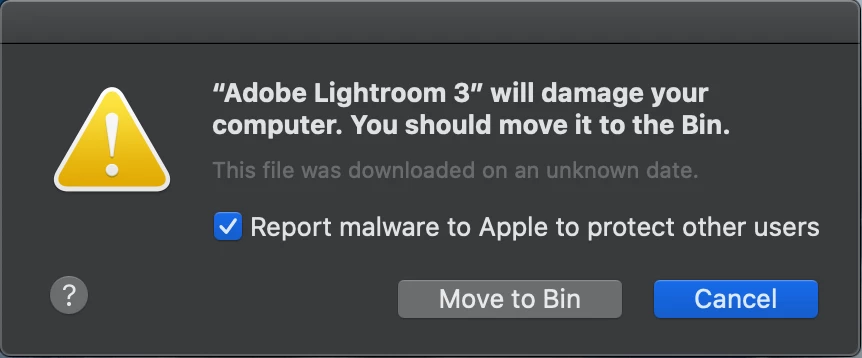
This topic has been closed for replies.

3 replies

Participant
October 18, 2020

Ilán
Participant
November 16, 2021

I still believe that Adobe Lightroom 3.6 is a great tool for processing RAWs and this version has nothing to envy to the current versions, those of us who really know about photography don't need the new unnecessary gadgets. The problem we face here is because as we are OWNERS! (because we have bought it, right?) from previous versions we cannot upgrade because now they want to force us to rent the license and pay an absurd sum of money monthly or annually.


So if I downloaded this App directly from the Adobe server and I have a license that cost 299USD in 2011, how can it be a MALWARE? Adobe is simply ignoring our rights as customers and it is not honest at all.


What we users want is to buy our license and update it when it is really worth it and not to force us to rent it!

So go on tell Catalina to "Override Malware Protecction" just for our Adobe Lightroom ancient version! 🙎

Theresa J
Community Expert
Community Expert
February 9, 2020

I think your only option is to upgrade to Lightroom Classic, or roll back your OS. 

JohanElzenga
Community Expert
Community Expert
February 7, 2020

Looks like this may be a very ancient version of what is now called Adobe Lightroom Classic (and which is version 9). I doubt that Lightroom 3 will run on Catalina.


There is also a new application simply called 'Adobe Lightroom', and this happens to be at version 3.1 right now, but because that application is simply called 'Adobe Lightroom' on your computer, I'm not sure which app it is that is giving you this error message. 


So which Lightroom is this? The very old Lightroom (Classic) 3? Or the new Lightroom? If it is the new Lightroom then you should uninstall and reinstall it.

-- Johan W. Elzenga
G.NygaardAuthor
Participant
February 8, 2020

This is the old Lightroom 3. 

Participant
October 18, 2020

I had the same issue. Here is the fix:

go to Applications folder, right-click on Adobe Lightroom 3, chose "Get Info".

Check the "Override Malware Protection" option. It will probably ask for your admin account+password.

Run Lightroom.
