
Participant
January 25, 2018
Answered

No Option to "Upgrade Photoshop Elements Catalog" in Lightroom CC demo (downloaded today)

  • January 25, 2018
  • 1 reply
  • 413 views

I am looking into converting from Elements Organizer 14 to Lightroom CC (v 1.1) and I thought moving the catalog would be fairly straightforward based on this forum post: How to import photos from Photoshop Elements, other Lightroom Classic CC catalogs, or apps such as iPhoto in Lightroom C…  ​however, when I go under File in LRCC I only have the following options (shown below):
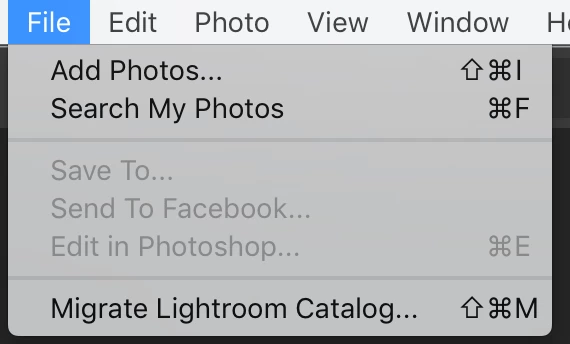
Some information that may be relevant:

1) The Elements Organizer 14 Catalog is stored on an external hard drive.

2) I currently have the Organizer 14 Catalog open on my computer.

3) I have changed the "Storage location for originals" in Lightroom CC to be the same external hard drive where the Elements Organizer 14 catalog is.

Any help would be greatly appreciated!

Thanks!


Kyle

    This topic has been closed for replies.
    Correct answer JP Hess

    It's possible to migrate Photoshop Elements Organizer information using Lightroom Classic CC, but that feature isn't part of Lightroom CC at this time. Lightroom CC is only version 1.1. You will have to wait and see what develops in the future as the program matures.

    1 reply

    JP Hess
    JP HessCorrect answer
    Inspiring
    January 25, 2018

    It's possible to migrate Photoshop Elements Organizer information using Lightroom Classic CC, but that feature isn't part of Lightroom CC at this time. Lightroom CC is only version 1.1. You will have to wait and see what develops in the future as the program matures.

    kkenkelAuthor
    Participant
    January 25, 2018

    Hi Jim,

    Thanks for the response, it is disappointing that feature wasn't included from the beginning. Do you have any recommendations for importing pictures manually from an elements organizer? I would like to start working in lightroom soon. Would it be worthwhile to ditch my keywords and the like in the organizer in favor of lightroom's built-in machine learning tagging features?

    Thanks!

    Kyle

    JP Hess
    Inspiring
    January 25, 2018

    Either that, or add your own keywords in Lightroom CC. It's your choice. Remember, Lightroom CC is a new program in its infancy. I'm just a user like yourself, and I really don't use Lightroom CC that much. I prefer Lightroom Classic CC. I watch Lightroom CC and use it a little bit to see how it develops, but I haven't committed to it and don't plan to.