


Known Participant
September 8, 2022

P: Inaccurate Free Space / Local Storage Space Used/Needed in Preference Dialog

  • September 8, 2022
  • 4 replies
  • 2506 views

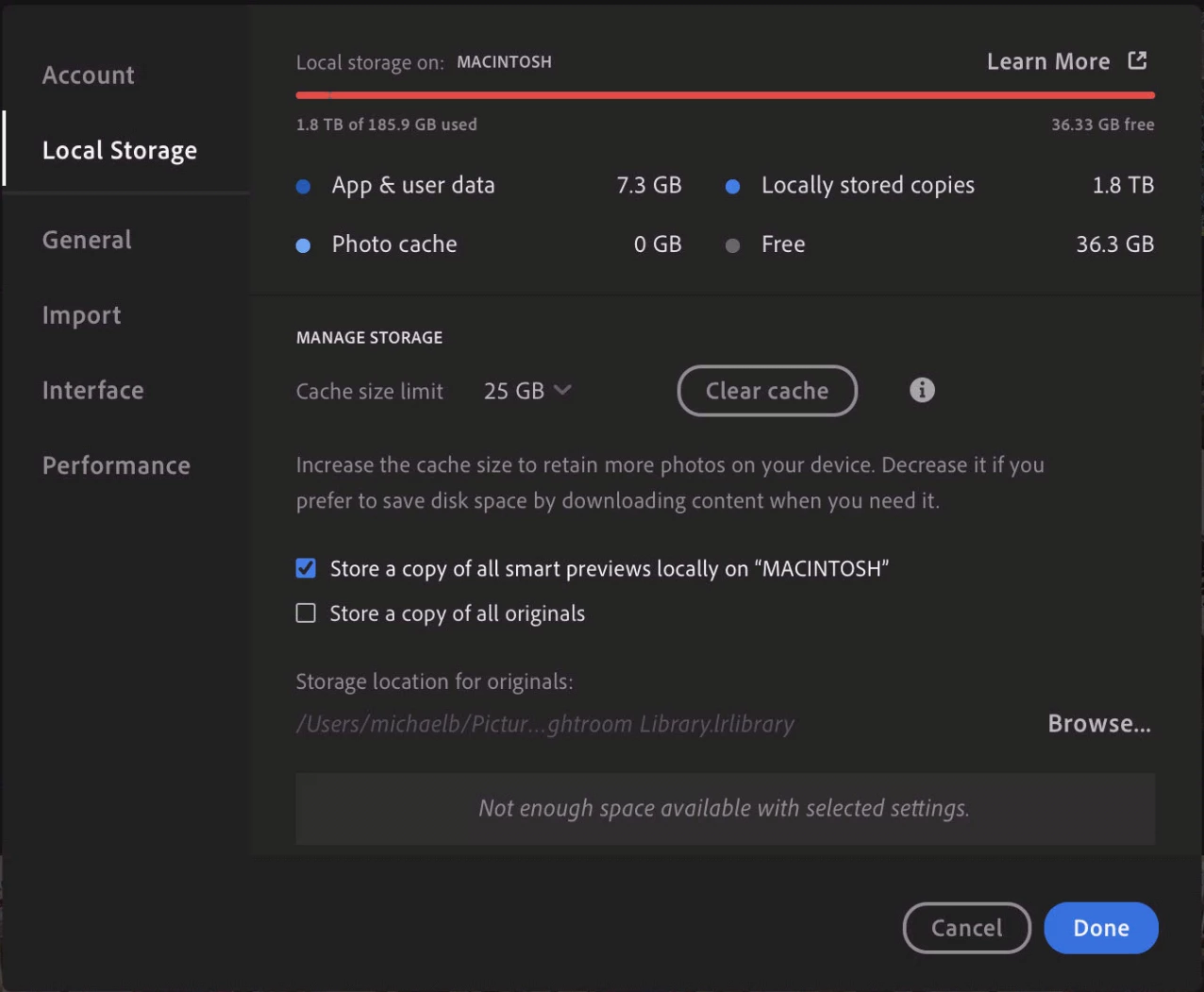
The Local Storage settings window shows I have 1.8 TB of Local Stored Photos on my 512GB M1 MacBook Air. See Screenshot below.

The size of the Library on Adobe Cloud is 696GB with 81050 photos and videos.

The size of the local library file on the machine is 149GB, which is about right for Smart Previews, and consistent with the sizes of the proxies inside the library.

The screenshot shows "free space" as 36.33GB, but the Finder free space on the machine is 131GB.

This whole situation is occurring on two identical macs.

On both macs I have deleted the local library completely and downloaded fresh copies from the Adobe Cloud with the same result. 

Everything seems to be working perfectly so is this just a bug in the Local Storage setttings display?

Advice welcome please!
 

This topic has been closed for replies.

4 replies

Participant
February 17, 2023

Hi! I got Lightroom 6.2 on MacOS Ventura 13.2.1 and the same issure. My library is 46 thousand pics (about 523GB) on the cloud. When I click the option to save smart previews locally it says I do not have enough disk space because that would take 480GB! How a 523GB library generates 480GB smart previews? I thought that was a bug and clicked to do it anyway and monitored the process (in case I was wrong, I did not want my disk to be full, lol) and it took about 70GB. The information is inaccurate and, therefore, the bug is still alive!

Rikk Flohr_Photography
Community Manager
Community Manager
December 13, 2022

Greetings all, 


Updates for Adobe Photography products began rolling out Monday night, December 12th,  The updates contain a fix for this issue. 

If you do not see the update in your Creative Cloud Application, you can refresh it by hitting [Ctrl/Cmd]+[Alt/Opt]+[ R ].

Note: It may take up to 24 hours for your update to be available in your Creative Cloud app.


Thank you for your patience. 

Rikk Flohr: Adobe Photography Org
Rikk Flohr_Photography
Community Manager
Community Manager
September 9, 2022

Adding bug number and updating status

Rikk Flohr: Adobe Photography Org
Rikk Flohr_Photography
Community Manager
Community Manager
September 8, 2022

I checked with one of the developers and this is the story:

You've requested to store 1.8 TB of locally stored copies. You do not have the free space to do so - hence the warning message "Not enough space available withe selected settings" 

The locally stored copies could be the Smart Previews you've checked in this dialog to store plus any Albums where you've marked them to store locally. 

Rikk Flohr: Adobe Photography Org
Known Participant
September 8, 2022

SOLVED!

Thanks very much Rikk, but that wasn't the issue. Note that even if I had requested the entire 696GB Library to have SPs and Originals stored locally it would not require 1.8TB of local storage.


The answer emerged on a two hour Support Chat with Adobe, during which he asked me to install older versions of Lightroom. Doing this revealed that it was a bug that came in on version 5.4. 


Here is the screenshot of the same library with version 5.3 installed: