NoverandiNov
Participant
November 21, 2022
Answered

P: Lightroom (8.0.1) Export options may appear different for individuals

  • November 21, 2022
  • 11 replies
  • 10614 views

Hi, please help me. i want to export photo as DNG but now that option is not in my lightroom. Does this only happen to me?

This topic has been closed for replies.
Correct answer Rikk Flohr_Photography

Greetings all,


Update (Nov 28)
The test mentioned earlier in this thread has been completed. If you are still seeing issues, close your Lightroom App and reopen it and it should be returned to normal. 


Again, we are sorry for any problems this may have caused you. Thank you for your patience.


Former text is no longer applicable: 

Apologies for the confusion.  From time to time, Adobe will conduct tests on changes to UI. No functionality should have been removed from the mobile app experience but the path to arrive at certain functions may have changed.  If functionality has been reduced, we will address that. 


This affects iOS and Android devices. 


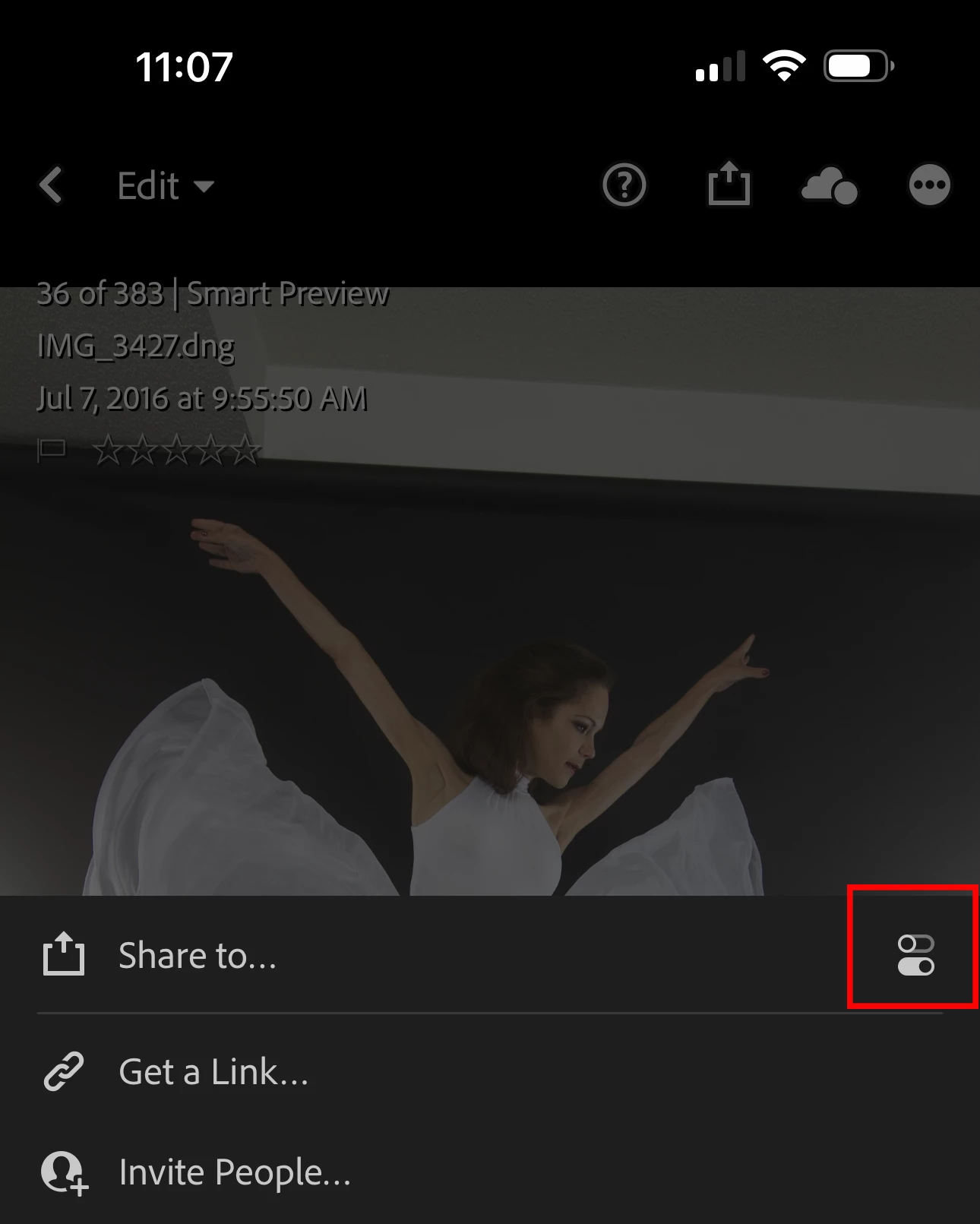
On iOS there is a settings button to the right of the Share to… menu that accesses your relocated settings


Android users who are in this situation should see an update shortly.


Update 1:00 PM Central (11/23/2022): If you are using an Android device and still seeing this issue. Make sure you have internet access and restart your Lightroom Application. Allow time for the change to take place (a few minutes) and then restart Lightroom again. Is your Export experience restored?

We are sorry for any confusion.


Thank you for your patience. 

 

11 replies

Participant
November 27, 2022

Please add export settings again to the lightroom. I don't know why those settings are removed because of the export settings i was using lightroom mobile and may be i quit using it if the export settings are permanently removed.

Participant
November 27, 2022

Why was the export setting removed from the Lightroom app?

Participant
November 25, 2022

I lost some export features after an update and now I can't export with my watermark. 

Participating Frequently
November 27, 2022

Please tap the icons to the right of "save" and "share" buttons to get the export options. After selecting the appropriate option, tap on the "save" or "share" button to the left as required.

Participant
November 23, 2022

 on android can't click add option in share I'm very upset because can't export DNG file🥲

Participant
November 22, 2022

Same for me here. Export As option is not available anymore (Android User), and when we go to the settings of "Export on the Device", I can't choose any format. 

Participating Frequently
November 27, 2022

You have to tap on the icons to the right of the "Enregisterer" and "Partager" buttons to get the export options. I hope that helps.

Participating Frequently
November 22, 2022

Impossible to export photos on Android since this morning.

Was the testing made on prod ?


Rikk Flohr_Photography
Community Manager
November 22, 2022

Greetings all,


Update (Nov 28)
The test mentioned earlier in this thread has been completed. If you are still seeing issues, close your Lightroom App and reopen it and it should be returned to normal. 


Again, we are sorry for any problems this may have caused you. Thank you for your patience.


Former text is no longer applicable: 

Apologies for the confusion.  From time to time, Adobe will conduct tests on changes to UI. No functionality should have been removed from the mobile app experience but the path to arrive at certain functions may have changed.  If functionality has been reduced, we will address that. 


This affects iOS and Android devices. 


On iOS there is a settings button to the right of the Share to… menu that accesses your relocated settings


Android users who are in this situation should see an update shortly.


Update 1:00 PM Central (11/23/2022): If you are using an Android device and still seeing this issue. Make sure you have internet access and restart your Lightroom Application. Allow time for the change to take place (a few minutes) and then restart Lightroom again. Is your Export experience restored?

We are sorry for any confusion.


Thank you for your patience. 

 

Rikk Flohr: Adobe Photography Org
Participant
November 21, 2022

Heya, first time here. I've been using Lightroom mobile Android for a while and now I noticed is missing a button when I go to export settings, I can't change the size of my photos anymore cuz there's no resize option... Can somebody help me plz? 

Ranjisha Sengupta
Legend
November 24, 2022

Hi there,


Thanks for reaching out.

Which version of Lightroom mobile and Android are you using?

There's an option called' Export As' where you get all the options.


Check this to know details: https://helpx.adobe.com/lightroom-cc/using/save-share-export-mobile-android.html


Let us know if it helps.

Thanks,

Ranjisha

KathinkaAurora1989
Participant
November 22, 2022

Lightroom changed the android app. And now I cannot choose in what size I export my photo's. Ive searched everywhere but cannot find it. I only can "save to phone" in small size. 

Participant
November 22, 2022

Hi. I've the same problem. I'm using android app LR.  I upload a photo as .cr2 but when ı edit it ı can't save to my phone as.cr2 it only save as .jpg.

Did you find a solution?

KathinkaAurora1989
Participant
November 22, 2022

Nothing yet. Also have no idea how this here works. Really hope they figure it out soon. This is not ok. 

Participant
November 22, 2022

Export as' option is missing in my Lightroom mobile. How to get it back??

Sean McCormack
Community Expert
Community Expert
November 22, 2022

It should be there at the bottom of the Share icon menu.. Working here on iPhone 14 Pro. Lr 8.01

Sean McCormack. Author of 'Essential Development 3'. Magazine Writer. Former Official Fuji X-Photographer.
Krister Hagman
Participant
November 22, 2022

It is not part of the Share menu anymore for me on 8.0.1, iPhone 14 Pro Max (iOS 16.1.1).

Currently there is no way with the LR app to export photos with Watermarks. Disappeared in this latest LR update.

Participant
November 22, 2022

Hello,


in cant export in DNG or PNG and Change the File size?! 

Why is it removed?

 i can only safe on device.

using Google Pixel 5


pls help!!

selondon
Community Expert
Community Expert
November 22, 2022

Try clicking on this for export settings, then file type::


NoverandiNov
Participant
November 22, 2022

I have do it, but there's no option to export as dng 

Participating Frequently
November 22, 2022

When I click the small icon to the right of the share menu, I have the same options than NoverandiWhich do not include image size, file type...etc