Participant
July 16, 2024
Question

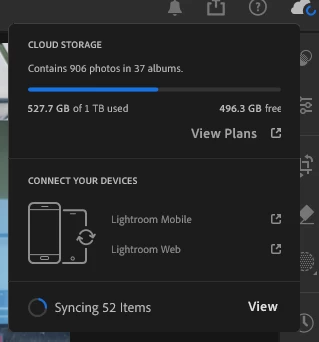
Photos not available on laptop although cloud has 500GB of files?

  • July 16, 2024
  • 2 replies
  • 349 views

Hello


For several years I was using Lightroom only on my laptop with nothing stored in the cloud. I recently swithced to the cloud based system and copied all my files to the cloud. 


Now the cloud shows I have 527 GB of data stored there, but only 906 photos. I have not found a way to get to all my photos although they seem to be in the cloud (527GB should be way more than 906 photos:) . I would appreciate any help on how to get to all my images, thank you!


I was previously using a Macbook and now have switched to a Windows computer plus iPad (both show only those 906 photos). 


This topic has been closed for replies.

2 replies

Jim Wilde
Community Expert
Community Expert
July 17, 2024

Have you checked your cloud contents by using the browser-based LrWeb app (login into lightroom.adobe.com using your Adobe ID)? That should show show exactly what you have stored in the cloud. If, as you think, there are way more that those 906 photos, then that means trying to figure out why the Lightroom apps aren't seeing them (though that screenshot indicates that syncing IS happening, so it maybe just a matter of time).

Sar0Author
Participant
July 31, 2024

Thanks again for the response!


Took me a while to check the LrWeb. I still find only 906 photos, so somehow I must have only stored those photos. 


I have to either try to store my photos / LR library again or switch to another solution. 


Rob_Cullen
Community Expert
Community Expert
July 17, 2024

"copied all my files to the cloud. "-   And exactly how did you do this?

For your images to be in Lightroom they needed to be Imported (Added) to the Lightroom Catalog.


Cloud storage can contain-

--Photos added/imported to Lightroom-Mobile Apps from phones, iPads, Lr-Desktop, etc. Or

--Cloud Documents created in PS and other Adobe Creative Cloud apps

(The Mac Finder {Creative Cloud Folder} that once existed is now obsolete and not available.)


Regards. My System: Windows-11, Lightroom-Classic 15.1.1, Photoshop 27.3.1, ACR 18.1.1, Lightroom 9.0, Lr-iOS 10.4.0, Bridge 16.0.2 .
Sar0Author
Participant
July 17, 2024

Thank you for the reply!


It's about 6 weeks ago when I switched, so I'm not quite sure how I did it back then. I think I tried migrating my catalog from the macbook, but I could be wrong.  


Do you have an idea what I could try now? I would prefer to have all my old edits available i.e. access to my old catalog and all the photos. Maybe I can delete everything in the cloud and try adding my old catalog again?


Thanks again!