SeesTheDay
Inspiring
June 20, 2018
Answered

Presets not showing up in mobile Lightroom cc app

  • June 20, 2018
  • 5 replies
  • 45605 views

i read that presets now so no across devices.  I’ve imported them to lightroom on my desktop, but even though synced, not seeing all my presets (or any of them) on my mobile device.  Thanks for any help. 
This topic has been closed for replies.
Correct answer SeesTheDay

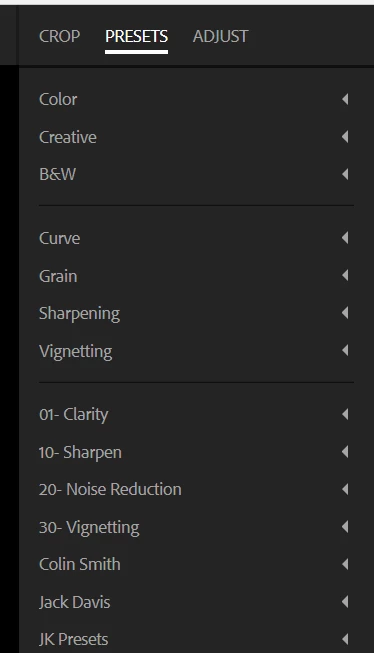
This is what I see on the web app

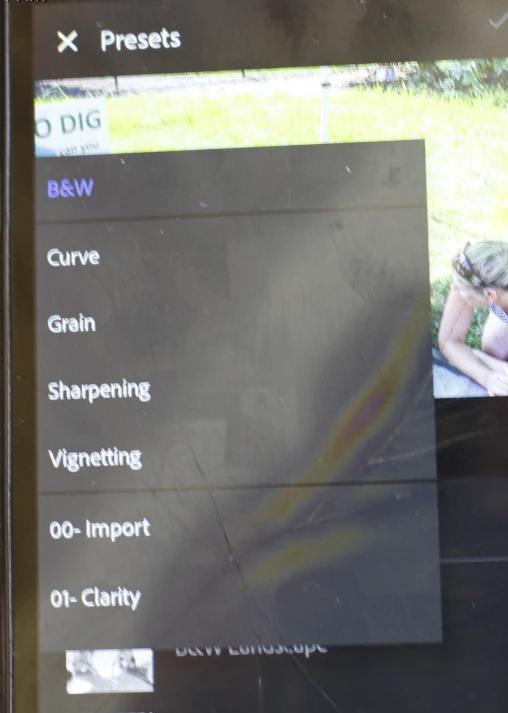
and on my mobile this

I dint know why 00-Import does not appear on the web app it is on every other one.


Thanks everyone for your help.

Apparently, I was simply being impatient. 

I have a HUGE catalog, and it it took days to upload everything, and it seems as though the presets were the LAST things to get synced.

They are all there now.

Again, thank you and sorry for the false alarm.

5 replies

sai krishna73
Participant
June 6, 2022

The simple Answer is just turn on the (show partially Compatible presets) on presets options tools.

aschay
Participant
July 19, 2019

I had the same issue and I resolved uninstalling Lightroom CC on my MacBook and installing again, after that all my presets synced

jamiemiche11e
Participant
February 2, 2019

I’m having this exact same issue. I’ve been waiting days for my presets to all sync to my iPhone app and they aren’t coming through. I paid a lot for my presets and I really need to be able to use them on my phone as I work primarily from my iPhone. They’re in the camera raw folder on my macbook pro and they show up in classic. I don’t know what else I can do to get them over into my app.

can someone please help? Thanks so much

phototocanvaspdx
Known Participant
February 2, 2019

You need to use lightroom cc (not classic) on your desktop to transfer them. Create presets in classic. Then import them into cc. Then they sync to mobile. Not ideal, actually a huge pain in the butt But it finally works.

Participant
June 25, 2019

https://www.youtube.com/watch?v=fNuQm_NBDA8 - leave it to youtube to help out!

Just got all my presets to show.

Jim Wilde
Community Expert
Community Expert
June 21, 2018

And do you see them when you use the LRCC desktop app? If you see them there, then they should be syncing over to mobile and web.

Inspiring
June 21, 2018

Did you import them into lightroom cc from the file system under camera raw

selondon
Community Expert
Community Expert
December 7, 2018

I'm experiencing the same issue (Lightroom CC presets not appearing on mobile CC).

I've already tried the following with no success:

1.) Updated to the latest versions of the desktop and mobile apps (logged into same account on both)
2.) Re-installed the .xmp files through the Cameral Raw folder

3.) Checking lightroom.adobe.com for same presets (not appearing there either)

Please help!  This has been quite frustrating.


Have you tried importing them via the Import Dialog within the Lightroom CC Desktop application itself?

Jim Wilde
Community Expert
Community Expert
June 20, 2018

SeesTheDay  wrote

I’ve imported them to lightroom on my desktop,

Which version of Lightroom on your desktop? LR Classic, or LRCC?

Presets do not sync from Classic to the cloud, but they should sync from LRCC on the desktop across to all other LRCC apps.

SeesTheDay
Inspiring
June 21, 2018

I knew that classic wouldn’t allow it so I migrated over to Lightroom cc

when i am in the develop mode, I click the preset icon (two circles) but there are only the default ones.