
Participating Frequently
July 20, 2023
Question

Samsung Galaxy S23 plus, lightroom crashes

  • July 20, 2023
  • 2 replies
  • 917 views

Samsung Galaxy S23 plus 8GB Ram 256GB storage. When loading RAW image from gallery and editing in lightroom there are numerous crashes using all features eg crop, presets etc.

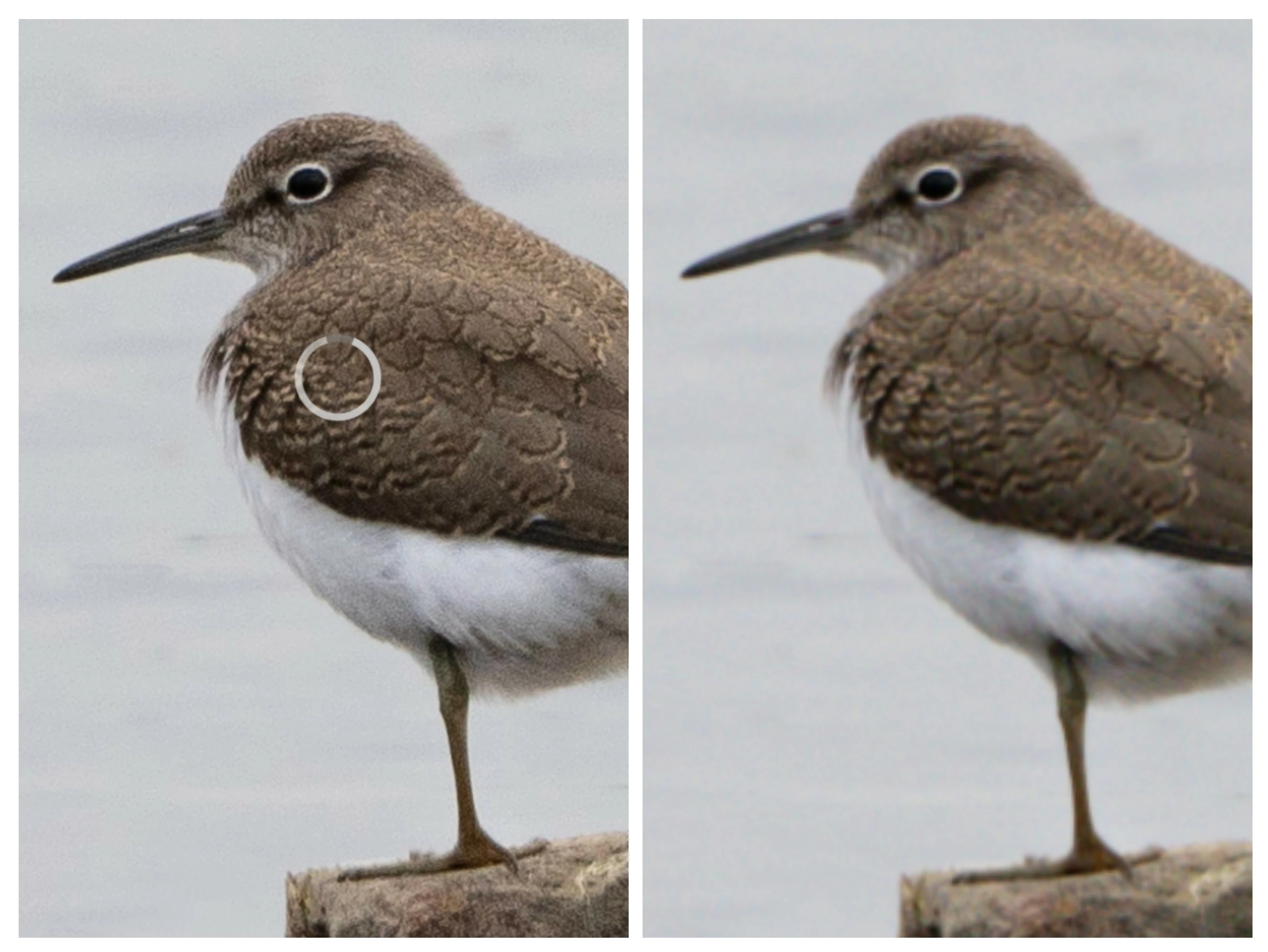
Also when saving an image, there is a buffering circle showing on the image, the image is sharp. When the circle stops buffering the saved image is blurred.

Attached photo of sharp image and final  blurred image.

Hope you can help.

Thanks.
This topic has been closed for replies.

2 replies

Participant
March 10, 2024

Hi, guys. 

I have same issue- LR crashing when try to edit Raw . 

S23ULTRA,  LR v.9.2.0


Suggestion to go in to Fly mode to do editing doesn't satisfy my, its 2024, not early 2000s dude! 


Please solution!  

Sameer K
Community Manager
Community Manager
July 20, 2023

Hey, @Sharon eco. Welcome to the Lightroom Community. I'll help you figure this out. What version of Android & Lightroom are you working on? Do you work with RAW or JPEG images?


Try keeping the device in Flight Mode & without internet when you launch Lightroom.


Log on to Lightroom Web (https://lightroom.adobe.com) & check for all the images that have synced & uploaded to the cloud. Once you're sure everything is backed up to the cloud, try reinstalling Lightroom & let me know how it goes.


Thanks!
Sameer K

Participating Frequently
July 20, 2023

Hi Sameer, I'm using lightroom version 8.4.2 on Android 13. The same problem happens on my Samsung Galaxy S22 running Android 12 and Lightroom 8.4.2.

The camera is a Sony A7RV.

All photos are imported in RAW to lightroom, then saved as a jpeg.

Thanks.

Participating Frequently
July 20, 2023
quote

Hi Sameer, I'm using lightroom version 8.4.2 on Android 13. The same problem happens on my Samsung Galaxy S22 running Android 12 and Lightroom 8.4.2.

The camera is a Sony A7RV.

All photos are imported in RAW to lightroom, then saved as a jpeg.

Thanks.


By @Sharon eco

Hi Sameer, I have backed images up to the cloud, uninstalled lightroom, re installed lightroom turned on flight mode and photo opens sharp then goes blurred in lightroom.