Exit
  • Global community
    • Language:
      • Deutsch
      • English
      • EspaƱol
      • FranƧais
      • PortuguĆŖs
  • ę—„ęœ¬čŖžć‚³ćƒŸćƒ„ćƒ‹ćƒ†ć‚£
  • ķ•œźµ­ ģ»¤ė®¤ė‹ˆķ‹°
0

Sharing from the web site

Community Beginner ,
Mar 24, 2021 Mar 24, 2021

It seems that if I share a photo or collection from the Lightroom web site or mobile app the person receiving the share needs an Adobe account? Is there a way around this? Thanks 

249
Translate
Report
Community guidelines
Be kind and respectful, give credit to the original source of content, and search for duplicates before posting. Learn more
community guidelines

correct answers 1 Correct answer

Community Expert , Mar 24, 2021 Mar 24, 2021

If it is just for viewing or allowing downloads of jpg files with family & friends, etc, try setting Link Access to- [Anyone can View]

ScreenShot052.jpg

Then the person receiving the share need only use the link to open the photos in a web browser. No Adobe Account is needed.

Downloads can be permitted under [Settings]
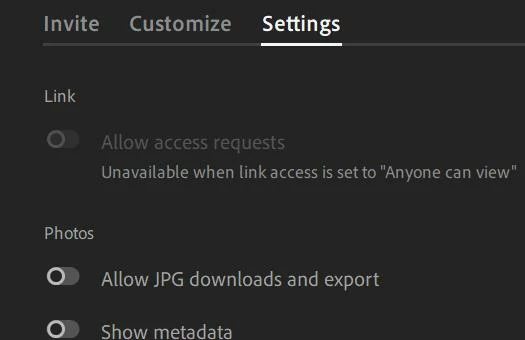
ScreenShot051.jpg


Translate
Community Expert ,
Mar 24, 2021 Mar 24, 2021

If it is just for viewing or allowing downloads of jpg files with family & friends, etc, try setting Link Access to- [Anyone can View]

ScreenShot052.jpg

Then the person receiving the share need only use the link to open the photos in a web browser. No Adobe Account is needed.

Downloads can be permitted under [Settings]

ScreenShot051.jpg


Regards. My System: Windows-11, Lightroom-Classic 15.1, Photoshop 27.2, ACR 18.1.1, Lightroom 9.1, Lr-iOS 10.4.0, Bridge 16.0.1 .
Translate
Report
Community guidelines
Be kind and respectful, give credit to the original source of content, and search for duplicates before posting. Learn more
community guidelines
Community Beginner ,
Mar 25, 2021 Mar 25, 2021
LATEST

thanks

Translate
Report
Community guidelines
Be kind and respectful, give credit to the original source of content, and search for duplicates before posting. Learn more
community guidelines