Participant
January 7, 2021
Answered

Shortcuts in new Lightroom (not Classic)

  • January 7, 2021
  • 2 replies
  • 844 views

I can´t find a documentation for the keyboard shortcuts, can somebody help? They seem to be much different from the classic version.


Thanks.

This topic has been closed for replies.
Correct answer Rob_Cullen

They are very limited!

Lightroom v4 for Desktop is a 'ported' mobile version where 'Finger pointing' by touch is the 'norm'!

Best I could find was-

https://helpx.adobe.com/au/lightroom-cc/using/keyboard-shortcuts-lightroom-mobile.html

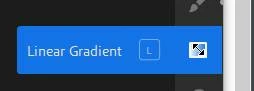
Hover the cursor over icons will often reveal a Keyboard shortcut.
 

2 replies

Gleeful_view5C96
Participant
April 10, 2021

I would also like documentation for these exact shortcuts. Hopefully this post gets noticed since a lot of people are seeking this information

Rob_Cullen
Community Expert
Community Expert
April 10, 2021

Adobe Employee Sahil suggested this link in another forum thread-

https://lightroomguy.com/wp-content/uploads/2019/01/2019-Lightroom-CC-Cloud-Keyboard-Shortcuts.pdf


Regards. My System: Windows-11, Lightroom-Classic 15.1.1, Photoshop 27.3.1, ACR 18.1.1, Lightroom 9.0, Lr-iOS 10.4.0, Bridge 16.0.2 .
Rob_Cullen
Community Expert
Rob_CullenCommunity ExpertCorrect answer
Community Expert
January 7, 2021

They are very limited!

Lightroom v4 for Desktop is a 'ported' mobile version where 'Finger pointing' by touch is the 'norm'!

Best I could find was-

https://helpx.adobe.com/au/lightroom-cc/using/keyboard-shortcuts-lightroom-mobile.html

Hover the cursor over icons will often reveal a Keyboard shortcut.


Regards. My System: Windows-11, Lightroom-Classic 15.1.1, Photoshop 27.3.1, ACR 18.1.1, Lightroom 9.0, Lr-iOS 10.4.0, Bridge 16.0.2 .