Hi there,
Thanks for reaching out. I'd love to help you figure this out. We are here to help.
Could you please confirm the version of macOS you are working on right now? Is the new MacBook Pro based on Apple silicon (M1 Series) or intel-based? Have you recently imported a large batch of images? Does this happen with any specific file type or range of images, or is it just random?
Please follow these steps to launch Adobe Lightroom from the Terminal.
- Quit Adobe Lightroom.
- Go to Finder > Applications > Adobe Lightroom
- CTRL-click or right-click on the launcher of Adobe Lightroom and choose 'Show Package Contents.'
- In the following window, go to Contents > macOS folder > Adobe Lightroom (with the terminal logo)
- Open Lightroom once and check if the previews are generated.
If this does not work, it could be related to Sync issues.
You can also log on to Lightroom Web (https://lightroom.adobe.com) to check current Sync issues on the left part of the screen.
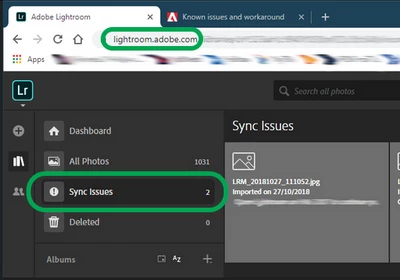
If there are any sync issues, click on them to know more, find the original for those images, and back them up safely before you empty the Sync issues from Lightroom Web.
We hope to hear from you soon.
Thanks!
Sameer K

 AdChoices