
Participant
June 18, 2023
Question

storage is full but is not true Lightroom cloud

  • June 18, 2023
  • 2 replies
  • 601 views

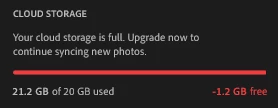
Hi everyone today I have a problem with Lightroom Cloud... I am trying to upload some photos (it's around 700 photos equal to 400 MB but my Lightroom shows me out of storage. full storage over 20GB. Do you know what is happening?  Thank you 
 

This topic has been closed for replies.

2 replies

Rob_Cullen
Community Expert
Community Expert
June 19, 2023

"Cloud Storage" can be two things-

1)  FILE storage  (eg. uploading in File Explorer {Creative Cloud Folder}

and

2) PHOTO storage (eg. all photos added/imported to Lightroom-Mobile Apps from phones, iPads, Lr-Desktop, etc.)

The (20GB) limit is the sum or these two.

So how many photos do you already have in Lightroom.adobe.com  ?


Regards. My System: Windows-11, Lightroom-Classic 15.1.1, Photoshop 27.3.1, ACR 18.1.1, Lightroom 9.0, Lr-iOS 10.4.0, Bridge 16.0.2 .
Jim Wilde
Community Expert
Community Expert
June 19, 2023

There's a third element as well, Rob....Cloud Documents created in PS and other Adobe Creative Cloud apps, which sync to the cloud so that they can be accessed from other apps and computers.

Ian Lyons
Community Expert
Community Expert
June 18, 2023

According to the screenshot you have already used 21.2GB of cloud storage space but your account only includes 20GB. Therefore, you'll need to create some space for the new photos by either deleting some already stored in the cloud or upgrading your storage to the next level.


Participant
June 18, 2023

Yes, I know, but my folder with photos has approximately 400MB. And Cloud is empty ... after uploaded my photos. My storage is over 20GB. I have never encountered this. I use this for 4 years without any problems.


Participant
June 18, 2023

I have the same problem