
Question
Sync stuck and not working. iOS app stuck too
Hi, my Lightroom CC app stopped being able to sync photo edits after I applied ratings to about 40 photos. Mousing over the cloud icon, I obtain this popup:
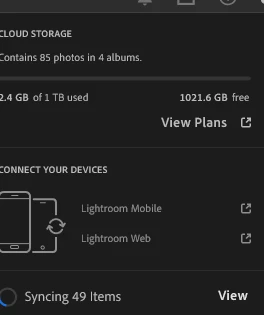
The "Syncing 49 items" never vanishes. Here are a list of things I have tried:
- Run Lightroom with reset preferences
- Uninstall and reinstall Lightroom
- Uninstall and reinstall Creative Cloud (and Lightroom)
- Sign out and sign in
- Restart computer
- Update Windows to latest version
None of the above have worked.
I have deleted the iOS app in case it was causing some sync deadlock. I then proceeded to reinstall the iOS app and the loading is stuck as well (at "Loading library info from cloud"). It feels like I am making no forward progress on any front and it has been frustrating.
What else can I do to fix my issue? Thanks!
Lightroom version: 8.5.1 x64 [ 20250821-1548-c6398d5 ] (Aug 21 2025)
Operating system: Windows 11
 AdChoices