
Participant
May 13, 2020
Question

Unable to delete lightroom catalog

  • May 13, 2020
  • 3 replies
  • 1152 views

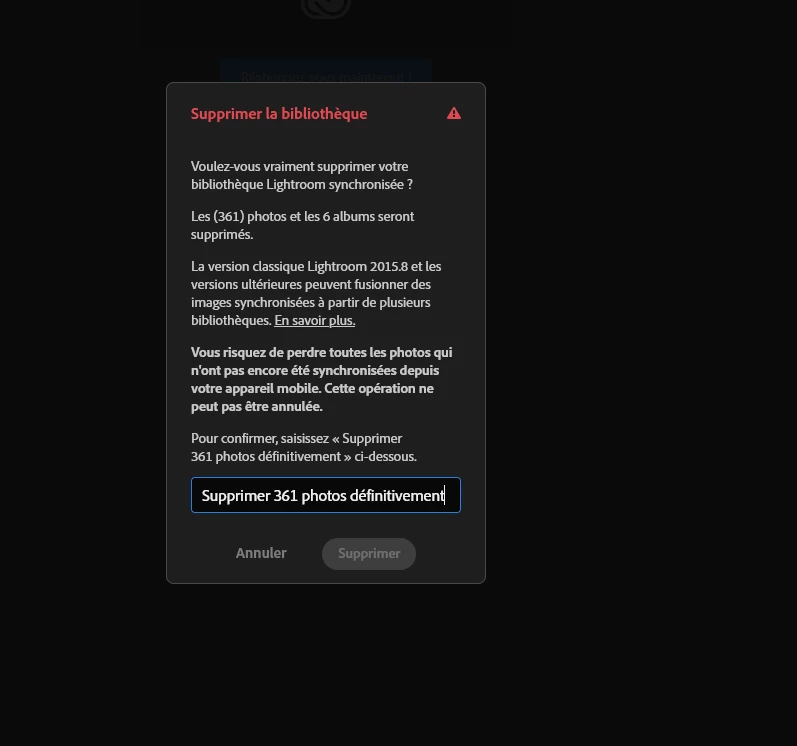
When I try to delete my library, the button is not responsive even if I entered the correct answer.. 

Tried it on different browser and on my mobile, but it doesn't work... I'm not sure this feature has been tested. 
This topic has been closed for replies.

3 replies

Participant
January 12, 2022

Hello,


I've exactly the same issue (France also). Did you manage to delete it?

The provided answer (delete pictures) doesn't suits to me as I really need to delete the entire catalog.

Thanks for your support!

Participant
January 12, 2022

I found the workaround.

it's a specific translation issue to French language I guess.

Move settings of LR web to English upfront, it will ask you to type the confirmation sentence in English. And it will work. 

Theresa J
Community Expert
Community Expert
May 13, 2020

Are you working from the Lightroom application, or the website lightroom.adobe.com?

EtheonAuthor
Participant
May 13, 2020

Trying to do it from the website yep, lightroom.adobe.com/libraries

Theresa J
Community Expert
Community Expert
May 13, 2020

Try deleting photos using the Lightroom app instead then. You can use your phone with Lightroom installed on it.

Theresa J
Community Expert
Community Expert
May 13, 2020

I moved your post to Lightroom, from the Lightroom Classic.

I can't read the error message, so I am not exactly sure what it says. You should be able to delete photos from Lightroom, but you can't actually delete the catalog. The catalog is part of your Creative Cloud subscription. It can be empty of photos, but Lightroom will still be there as long as your account is active.

EtheonAuthor
Participant
May 13, 2020

Well it's not an error message it's just a confirmation modal panel that tells me to write a specific message to be able to click on "Delete". 
But even if I type the exact message, the delete button is not available and therefore I can't delete my photos.