
Participant
June 19, 2022
Question

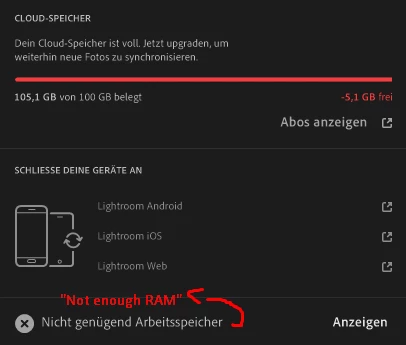
Unable to upload Lightroom pictures to the cloud | "Not enough RAM"

  • June 19, 2022
  • 1 reply
  • 350 views

Hello community,
I'm currently having a problem with my Adobe Cloud in connection with Lightroom (CC). I recently got a faster internet connection, which now allows me to save my pictures directly in the cloud via Lightroom (CC). Previously, I only stored them in Lightroom (CC) without synchronization. Maybe this was already a bad idea, but maybe you still want to help me. My problem now is that I've recently been told by the program that 105/100 gb of cloud storage is occupied. When I use the Lightroom Downloader, however, only a few gb are actually detected. I don't save other files in the cloud and there are currently 1278 images (RAW format) stored in Lightroom (CC). In addition, Lightroom shows me an error when uploading the photos: "Not enough RAM". Is this a known bug or does anyone know how I can fix the problem?

I would also definitely consider to use Lightroom classic in the future.


Thanks in advance for your help! If you need more info, I'll try to answer it as soon as possible!


App version: 5.4

Windows 10
 

This topic has been closed for replies.

1 reply

Community Expert
June 19, 2022

The error message means you don't have enough working space in the cloud. It's not about your RAM. You can't solve this except for getting more cloud space from Adobe (Abos anzeigen). Your images simply take more than 100GB to store in the cloud and your library of images can't be stored there if you don't upgrade. If you do not want to rely on cloud space, you shoulod use Lightroom Classic instead of Lightroom cloudy. 

UNIKATAuthor
Participant
June 19, 2022

Thanks for your answer! It may be a little confusingly translated into German.


Does Lightroom not even try to upload the images in this case? I tried to find out how many images are in the cloud with the Lightroom Downloader. In fact, only just under 3 GB were stored there.


I have a prepaid plan and unfortunately I can't find an option to expand the cloud storage. Do you know one?

Community Expert
June 19, 2022

For plans. Click on the cloud icon and click on Abos anzeigen. You shouold get a web page where you can click on "manage plan"