

Correct answer Rob_Cullen

'Learn & Discover'  is in Lightroom

The 'Saved' presets will (automatically) appear under [Yours] in [Saved from Discover] when you edit one of your own photos-
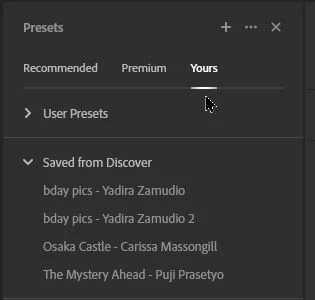
I did learn that if you 'save' a Preset while in the Lr-Web browser interface, the preset will not appear in the Lr-Desktop interface until the Browser version is closed and Lr-Desktop re-opened.

So it's learn & discover for me!


Edit: And if you want the saved preset in Lightroom-CLASSIC, I presume you must Export the preset from Lr and Import it to LrC.


1 reply

Rob_Cullen
Community Expert
Rob_CullenCommunity ExpertCorrect answer
Community Expert
January 8, 2023

'Learn & Discover'  is in Lightroom

The 'Saved' presets will (automatically) appear under [Yours] in [Saved from Discover] when you edit one of your own photos-

I did learn that if you 'save' a Preset while in the Lr-Web browser interface, the preset will not appear in the Lr-Desktop interface until the Browser version is closed and Lr-Desktop re-opened.

So it's learn & discover for me!


Edit: And if you want the saved preset in Lightroom-CLASSIC, I presume you must Export the preset from Lr and Import it to LrC.


Regards. My System: Windows-11, Lightroom-Classic 15.1.1, Photoshop 27.3.1, ACR 18.1.1, Lightroom 9.0, Lr-iOS 10.4.0, Bridge 16.0.2 .
Participant
January 8, 2025

And what if I use it only on mobile and after clicking 'save preset' and it says its saved it's still not in the 'saved from community' presets? I can't save any presets there now

Participating Frequently
June 16, 2025

Where are the ones you save from community?  I'm going on a wild google hunt to even find that ?